Unlock TikTok Secrets: The Ultimate Beginner’s Guide to Going Viral Fast

Ever wonder how some brands seem to effortlessly capture your attention on TikTok while others just… fade away into digital oblivion? It’s not magic—it’s strategy, authenticity, and a sprinkle of human touch. TikTok isn’t just the playground for viral dances and quirky memes anymore; it’s become a powerhouse platform where brands can genuinely connect, influence purchase choices, and build relationships that feel anything but robotic. But here’s the catch: creating content that truly resonates takes more than just showing up. You’ve got to know the ins and outs—from setting up your account to mastering video creation that hooks your audience and drives real results. Lucky for you, I’ve broken down the entire process to help you jump in, speak your brand’s truth, and start turning those fleeting views into lasting impact. Ready to dive in and claim your spot on TikTok’s vibrant stage? LEARN MORE.
TikTok transforms how brands engage with their audiences. The platform drives purchase decisions, supports product research and builds authentic relationships between businesses and consumers.
Brands creating genuine, human content on TikTok see stronger audience engagement and measurable business impact.
Here’s everything you need to know about making TikTok videos that elevate your brand presence and drive results.
How to make a TikTok account
Creating a TikTok account takes less than five minutes and requires only an email address or phone number. Download the TikTok app, tap “Profile” and choose your signup method to get started immediately.
Here’s how to create a TikTok account for your brand:
Step 1: Go to the App Store or Google Play and download the TikTok app.
Step 2: Open the app on your phone and tap on the “Profile” button. You’ll find this button in the right-hand corner at the bottom of your screen.
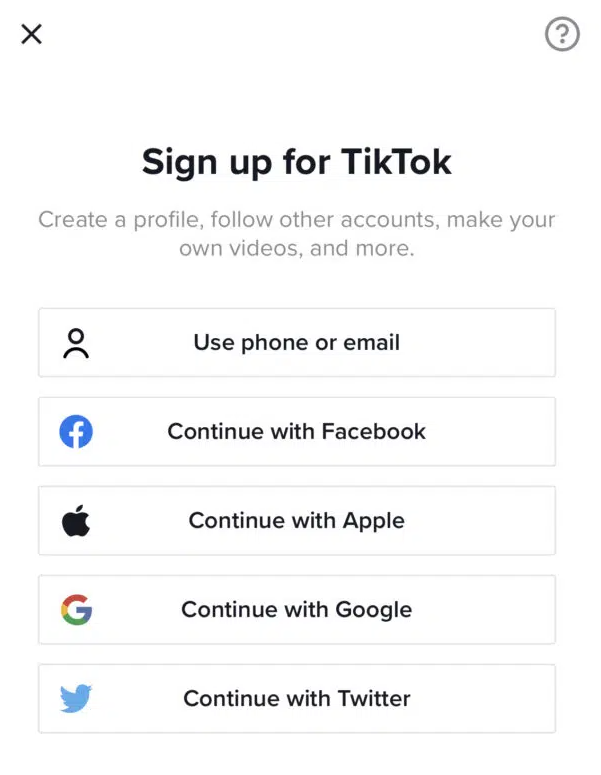
Step 3: Choose your signup method:
- Email: Use your brand’s official email address for easier password recovery
- Phone: Link your business phone number and verify with a 6-digit code
- Social accounts: Connect via Facebook, Google, Apple, Instagram or X (formerly known as Twitter)
For this example, we’ll select the option to sign up using email. Keep in mind that you’ll need to use your brand’s official email address to complete the signup.
Step 4: Next, enter a password to use for your TikTok account. This password should be secure, memorable and closely tied to your brand so it’s easy to remember.
Step 5: You’ll now have to select a username for your account. This step is crucial as this name will show up prominently at the very top of your TikTok profile page.
Ideally, you should be using your official brand name to make it recognizable. This helps your audience recognize your brand on the platform.
After choosing your username, tap on “Sign up”.

Step 6: Since you’re creating a brand account, you’ll want to switch to a business account. Go to your “Profile” page and tap on the “…” button at the top right-hand corner of the screen.
Carefully select the category that best fits what your brand does. This tells TikTok what your account is all about and influences how the TikTok algorithm ranks your content in relevant search results and “For You” pages.
How to record a TikTok video
Now that you have your account set up, it’s time to start creating videos. The process of creating videos on TikTok is similar to that of Instagram Reels.
Both platforms allow you to add videos and pictures from your camera roll or record a new one. Plus, they both offer features like adding effects and audio to customize your video.
So if you’re familiar with Instagram Reels, you should have no trouble getting started with creating a TikTok video. Either way, here’s a guide on how to make a video for TikTok.
How to make a TikTok
Step 1: Tap on the “+” icon at the bottom of your screen. You’ll find this button right in the middle.
This will open up the camera so you can start recording. If this is your first time creating a video, you’ll need to give the app access to your camera, photos and microphone.

Step 2: Select the video length you want from the scrollbar above the record button. By default, you record up to 15 seconds of video.
The app has since updated its recording option to allow up to 60 seconds of video. This will combine four 15-second videos into a longer 60-second video.
Step 3: Use the different tools from the right-hand panel to customize your recording. Set the speed, add effects and filters or even set a timer to self-record.
You can also choose a sound from the TikTok audio library to include in your video. Adding music improves your video visibility on relevant “For You” pages.
When we tested our TikTok marketing strategy, we found that the least popular video lacked music.
On that note, make sure you’re regularly checking your TikTok analytics to see what’s working with your audience. This will support you in fine-tuning your strategy and building a strong presence on the platform.
Step 4: Hit the red record button at the bottom of the screen to start your recording. Also, join multiple clips together so they follow a coherent sequence.

Step 5: Once you have your recording, select the checkmark to preview the video. The preview page will let you customize the video further to create something original and entertaining.
You have the option to add text, sounds, effects, voiceovers, voice effects, stickers and captions.

Step 6: After customizing the video, tap the “Next” button. On the next screen, you can add a video description and change the settings.
Include relevant and trending TikTok hashtags to improve your video visibility. Then hit “Post” to publish your very first TikTok video.

How to make a TikTok using pre-recorded videos
So now you know how to make a video natively within the app, but did you know you can also make TikToks with the awesome content you already have saved on your phone? Here’s how to do it.
Step 1: Tap on the “+” icon at the bottom of your screen and select the “Upload” option next to the record button. This will open up your camera roll, allowing you to choose the pre-recorded video you want to upload.

Step 2: Choose the video/videos you want to upload.
The good thing about this option is that it allows you to upload over 60 seconds of video. In fact, TikTok recently increased its maximum video length from three minutes to 10 minutes.
That’s great news for brands that are all about informative long-form video content. Keep in mind that Duet and Stitch features are currently not available for videos longer than 60 seconds.
Step 3: After uploading the video or videos that you want to use in your TikTok, you’ll have the option to customize it just as you did before. Use the tools from the right-hand panel to add text, stickers, voiceovers, filters, voice effects, captions and effects to the video.
You can also add a sound to the video from the TikTok audio library.

Step 4: Once you’re done editing the video, tap the “Next” button. Then add a description and change the settings before hitting “Post.”
How to add pictures to TikTok
TikTok also lets you create videos using pictures. There are several options for this:
Option 1. Combine multiple pictures (and videos) together using the upload option.

Option 2. Insert a picture in your video from the “Effects” button at the bottom of the screen. Then select “Insert Photo” and choose the picture you want to add to the video.
Also, tweak the position and strategically place it in the video where you want it.
Option 3. Switch from the “Camera” tab to the “Templates” tab. Choose the template you want to use and select the pictures you wish to upload.

How to make a sound on TikTok
When you record a video on TikTok, the recorded sound automatically becomes an original sound. Go to your uploaded video and tap on the audio icon at the bottom of the screen.
Then hit “Use this sound” to use the sound in a new video.
We take our Slack reacji library seriously on TeamSprout. Here are a few of Amanda’s favorites: #slack #saas #techtok #fyp #foryoupage
TikTok video templates and content types
You don’t have to start from scratch every time. TikTok’s built-in templates give you a head start on creating engaging content quickly.
Find them by tapping the Templates tab on the camera screen. Just select a template, upload your photos or video clips and let the app do the heavy lifting.
Consider these proven content formats for your brand:
- Behind-the-scenes content: Show how your products are made or what a day at your company looks like
- Educational tutorials: Teach your audience something valuable related to your industry
- Trend participation: Jump on trending sounds or challenges while maintaining your brand voice
- User-generated content: Feature customer stories and testimonials
TikTok video performance best practices
Creating the video is only half the battle. Driving business impact means optimizing your content for performance.
Here are a few non-negotiables for getting your videos seen:
- Use trending audio. The algorithm prioritizes content using popular sounds. Business Accounts have access to the Commercial Music Library, which is full of pre-cleared tracks.
- Add relevant hashtags. A mix of broad and niche hashtags supports TikTok in categorizing your content and showing it to the right audience.
- Post when your audience is active. Use data to optimize your posting schedule. Sprout Social’s ViralPost technology analyzes your audience engagement patterns and automatically schedules your TikTok videos for maximum impact, eliminating the guesswork from timing decisions.
- Engage with your community. Respond to comments and questions to foster a loyal following. Engagement is a powerful signal to the algorithm.
Track performance with comprehensive analytics:
- Monitor engagement rates: Use Sprout Social’s TikTok analytics to track views, likes, shares and comments
- Measure business impact: Connect TikTok performance to broader social media ROI using unified reporting
- Optimize content strategy: Identify your best-performing content types and replicate success
- Schedule strategically: Use ViralPost to publish when your specific audience is most active
Get creative with TikTok
Start creating TikTok videos that drive real business results. Transform these fundamentals into a strategic advantage by integrating TikTok into your comprehensive social media management approach.
Once you feel comfortable, review our tips for designing TikTok marketing campaigns to learn how to better use TikTok for your brand.
Now that you know how to make a TikTok, be sure to check out Sprout Social’s TikTok integration to learn how to schedule your TikTok videos with optimal send times for maximum engagement.
Frequently asked questions about making TikTok videos
What apps do TikTokers use to make their videos?
TikTok’s native editor handles most brand needs, though some creators use external apps for advanced effects before uploading.
How do I make a video with pictures and music on TikTok?
Select multiple photos from the upload screen, and TikTok automatically creates a slideshow where you add music and effects.
Can I schedule TikTok videos in advance?
Yes, platforms like Sprout Social offer advanced TikTok scheduling with ViralPost technology for optimal timing.
How long should my TikTok videos be for best performance?
Aim for 15-60 seconds for maximum engagement and algorithm preference.
Do I need a business account to make TikTok videos?
Personal accounts work, but Business Accounts provide essential analytics and the Commercial Music Library for brands.








![[DAY 1] Marketing 2030: Preparing for the Next Generation of Growth](https://onlinecashshop.com/wp-content/uploads/2026/10/day-1-marketing-2030-preparing-for-the-next-generation-of-growth-300x225.jpg)