Unlock the Future: The Must-Know Facebook Ad Sizes and Specs That Will Dominate 2026
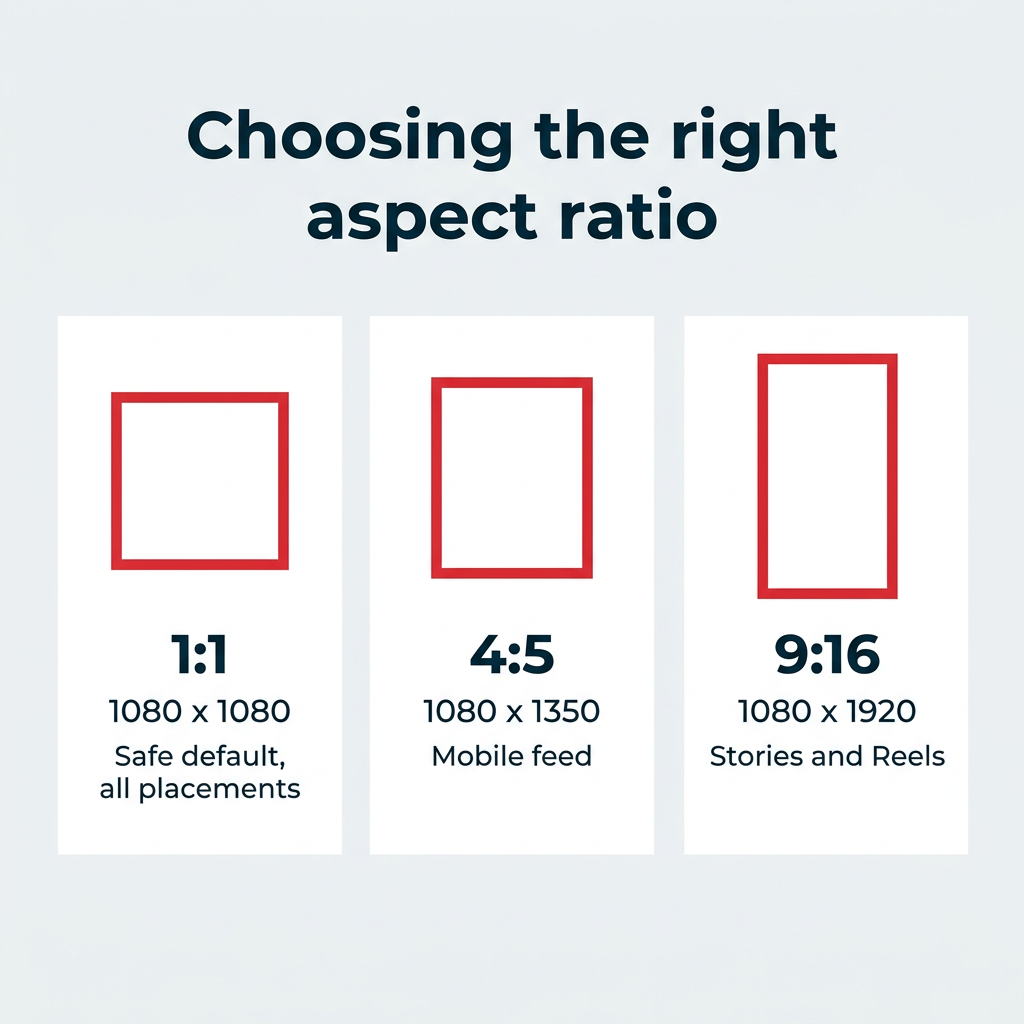
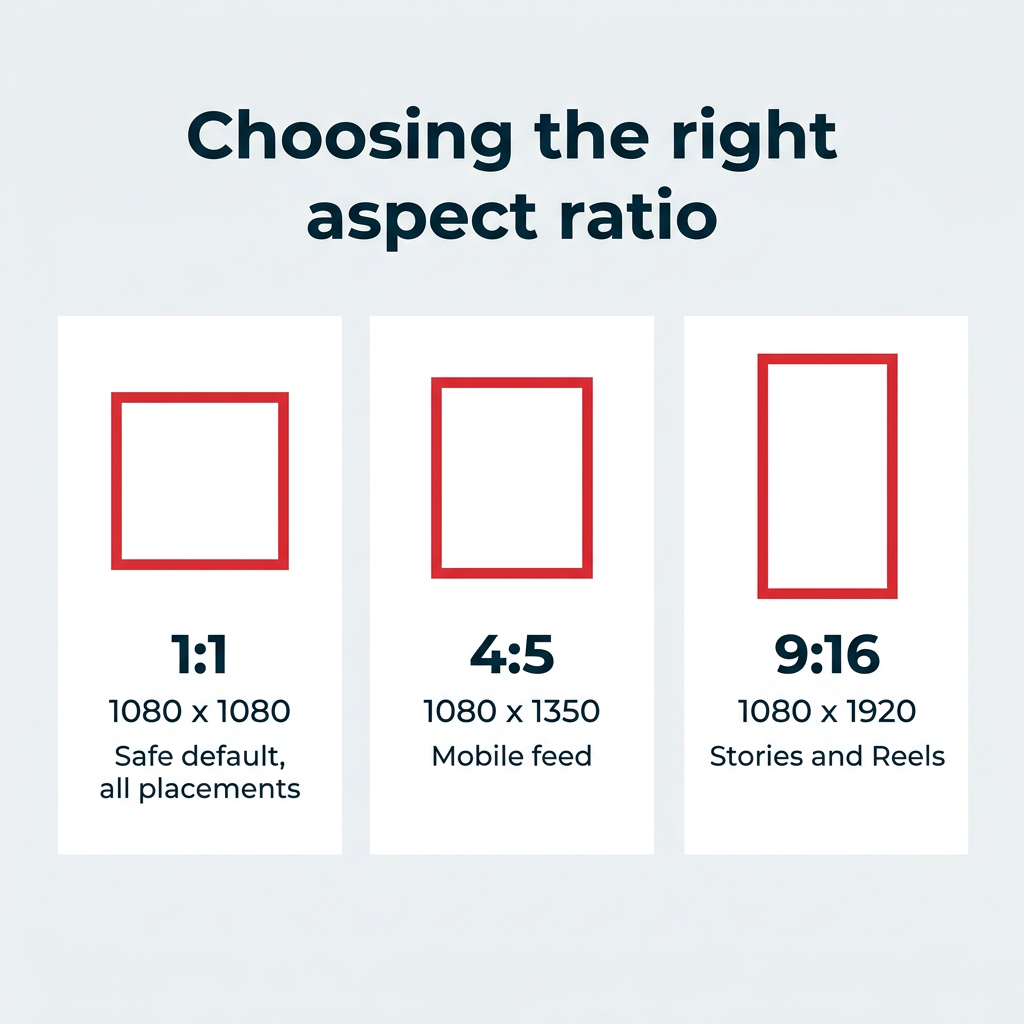
Ever wondered why some Facebook ads just seem to pop everywhere, fitting perfectly whether you spot them in your feed, Stories, or even the Marketplace? Well, spoiler alert: it’s not magic — it’s all about mastering the right ad sizes and formats. Navigating the labyrinth of Facebook’s ad specs can feel like juggling flaming torches blindfolded, but here’s the kicker: a one-size-fits-most approach actually exists. That’s right, the trusty 1080 x 1080 pixels square ad—your secret weapon across multiple placements. But hold on — if you’re eyeing those full-screen Stories or Reels, think vertical with 1080 x 1920 pixels to truly own the mobile screen real estate. And for mobile Feed ads, stretching out with 4:5 aspect ratio can steal more eyeballs as users scroll faster than you can say “click”! With all specs freshly updated for 2026 straight from Meta’s official Ads Guide, this guide walks you through every twist and turn, saving you from pixelated disasters and wasted budgets. Ready to tweak your ads for maximum impact? Let’s dive in. LEARN MORE.
Table of Contents
Key takeaways
- The most versatile Facebook ad size is 1080 x 1080 pixels (1:1), which works across Feed, Marketplace, carousel, and search results placements.
- For Stories and Reels, use 1080 x 1920 pixels (9:16) to fill the full screen on mobile.
- When running Feed ads on mobile, 4:5 aspect ratio (1080 x 1350) gives you more screen real estate than 1:1.
- All specs below are current as of 2026 and sourced from Meta’s official Ads Guide.
Facebook ad sizes at a glance
We cover each ad format in more detail below, but here is a quick overview of all popular facebook ad sizes and specs at a glance.
Placement | Recommended size (px) | Aspect ratio | File types | Max file size |
|---|---|---|---|---|
Feed (image) | 1440 x 1440 or 1440 x 1800 | 1:1 or 4:5 | PNG, JPG | 30MB |
Feed (video) | 1440 x 1440 or 1440 x 1800 | 1:1 or 4:5 | MP4, MOV, GIF | 4GB |
Carousel | 1080 x 1080 or larger | 1:1 (or 4:5 for Advantage+ catalog only) | PNG, JPG, MP4, MOV, GIF | 30MB (image), 4GB (video) |
Stories | 1440 x 2560 | 9:16 | PNG, JPG, MP4, MOV, GIF | 30MB (image), 4GB (video) |
Reels (image overlay) | 1080 x 1080 or larger | 1.91:1 to 1:1 | PNG, JPG | 30MB |
Reels (video) | 1440 x 2560 | 9:16 | MP4, MOV, GIF | 4GB |
In-stream video | 1080 x 1080 or larger | 16:9 or 1:1 | MP4, MOV, GIF | 4GB |
Marketplace | 1080 x 1080 or larger | 1:1 | PNG, JPG | 30MB |
Right column | 1080 x 1080 or larger | 1:1 | PNG, JPG | 30MB |
Search results | 1080 x 1080 or larger | 1:1 | PNG, JPG, MP4, MOV, GIF | 30MB (image), 4GB (video) |
Business Explore | 1080 x 1080 or larger | 1.91:1 to 1:1 | PNG, JPG, MP4, MOV, GIF | 30MB (image), 4GB (video) |
Collection | 1080 x 1080 or larger | 1:1 or 9:16 | PNG, JPG, MP4, MOV, GIF | 30MB (image), 4GB (video) |
Audience Network banner | 320 x 50 | Banner | PNG, JPG | 30MB |
Audience Network interstitial | 320 x 480 or 480 x 320 | 9:16 or 16:9 | PNG, JPG, MP4, MOV | 30MB (image), 4GB (video) |
Facebook advertising guidelines
Before you dive into placement-specific sizes, it helps to know the rules that apply to almost every Facebook ad you’ll run. A few quick notes first: “facebook ad sizes” and “meta ad sizes” refer to the exact same specs, since Facebook is one product inside Meta’s family of apps. For a detailed overview of the different formats, check out this guide on Facebook ad tools.
Here are the universal guidelines to keep in mind:
- Default to 1080 x 1080 pixels. If you can only make one asset, the 1:1 square is the safest choice because it displays cleanly across the most placements.
- Use 4:5 for mobile Feed. A 4:5 aspect ratio (1080 x 1350) takes up more vertical space in the mobile feed, so your ad occupies more of the screen as people scroll.
- Go 9:16 for full-screen placements. Stories and Reels are vertical, so use 1080 x 1920 pixels to fill the whole screen.
- Keep text on images light. Meta no longer enforces the old 20% text rule, but ads with less text on the image still tend to get broader delivery and better results, so put your key message in the ad caption instead.
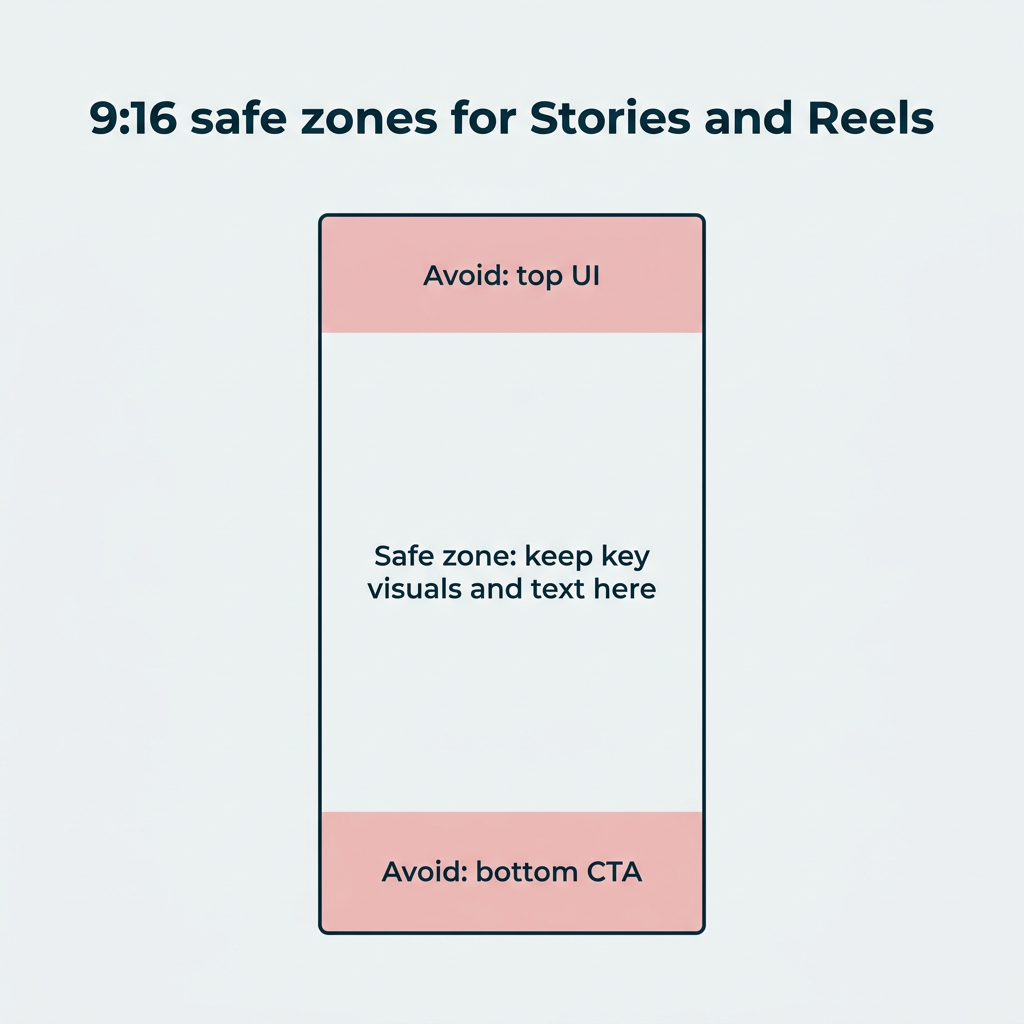
- Respect safe zones. On vertical formats, UI elements and CTA buttons cover the top and bottom of the frame. Keep your key visuals and copy in the center of the canvas.
- Give Advantage+ room to work. When you use Advantage+ placements through your ads manager, Meta automatically adjusts and crops your creative to fit each placement, so upload the highest-resolution assets you can.
Bonus: Get the Facebook advertising cheat sheet for 2022. The free resource includes key audience insights, recommended ad types, and tips for success.
Facebook feed ad sizes
The Facebook news feed is probably what you think of most when it comes to Facebook ad sizes. It’s the endlessly scrollable place to find all your friends’ status updates, photo posts, videos, and more, plus content from brands and Facebook Pages you follow.
Facebook feed ads come in many styles, from carousel ads to single image or video ads, and choosing the right format is a key part of your ad campaign strategy. The second item in a user’s feed is an ad, with more mixed between organic content as a user continues scrolling.
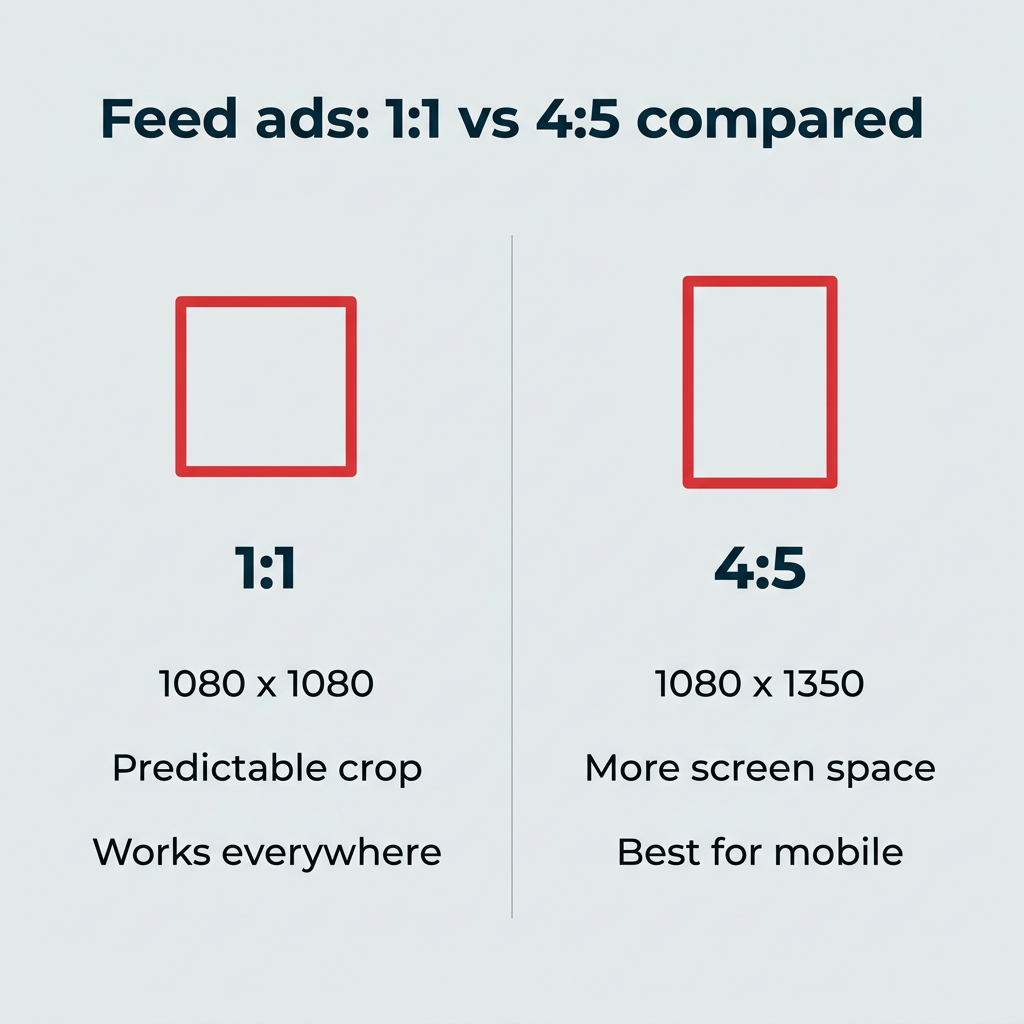
For the mobile feed, 4:5 aspect ratio is usually the better choice because it takes up more screen space and pushes competing content out of view, a difference you can confirm in your paid ad analytics, especially since 81.8% of Facebook users access it only via mobile.
If your ad will run across multiple placements, 1:1 is the safer default since it crops predictably everywhere. The same feed specs apply if you’re advertising in the dedicated video feed (the video tab you reach from the desktop app or the mobile menu), where video ads appear with a “sponsored” label alongside organic clips.
Facebook feed image ad sizes
- Display size: 1440 x 1440 pixels (1:1 ratio) or 1440 x 1800 pixels (4:5 ratio)
- Minimum image ad width: 600 pixels
- Minimum image ad height: 600 pixels (1:1 ratio) or 750 pixels (4:5 ratio)
- Aspect ratio: 1:1 or 4:5
- File type: PNG or JPG
- Maximum file size: 30MB
Facebook feed video ad sizes
- Display size: 1440 x 1440 pixels (1:1 ratio) or 1440 x 1800 pixels (4:5 ratio)
- Minimum video ad width: 120 pixels
- Minimum video ad height: 120 pixels
- Aspect ratio: 1:1 for desktop or mobile, or 4:5 for mobile only
- File type: MP4, MOV, GIF
- Recommended video settings: H.264 compression, square pixels, fixed frame rate, progressive scan and stereo AAC audio compression at 128kbps+
- Maximum file size: 4GB
- Maximum video length: 241 minutes
Facebook carousel ad sizes
Facebook carousel ad types allow you to showcase between two and 10 images, videos, or a mix of both and link each one to a separate URL or landing page. These are one of the most popular Facebook ad formats thanks to their versatility and having so many placement options across Facebook on desktop and mobile.
Carousel isn’t limited to the feed either. You can run carousel ads in Stories, Reels, and in-stream placements too, and the specs stay the same at 1:1. One of the most effective carousel formats is collection carousel ads, which pull images and links from your connected product catalog to automatically generate relevant, conversion-focused ads for e-commerce retailers.

Source: Hazel & Bo
Facebook carousel image ad sizes
- Display size: 1080 x 1080 pixels or larger
- Aspect ratio: 1:1 (4:5 is supported only for Advantage+ catalog carousel ads)
- File type: PNG or JPG
- Maximum file size: 30MB
Facebook carousel video ad sizes
- Display size: 1080 x 1080 pixels or larger
- Aspect ratio: 1:1 (4:5 is supported only for Advantage+ catalog carousel ads)
- File type: MP4, MOV, GIF
- Maximum file size: 4GB
- Maximum video length: 240 minutes
Facebook Stories ad sizes
Facebook Stories ads appear between organic Stories as users scroll through their friends’ Stories.
You can place either an image or video Stories ad and link it to a website. Video Story ads play 10 seconds at a time. Image Story ads show for five seconds, unless someone swipes away sooner. These same specs also apply to Messenger Stories placements, so you don’t need separate assets. Because this is a 9:16 format, keep your CTA buttons and key visuals within the center 1080 x 1420 area so UI elements at the top and bottom don’t cover them.
Facebook Stories image ad sizes
- Display size: 1440 x 2560 pixels
- Minimum width: 500 pixels
- Aspect ratio: 9:16
- File type: PNG or JPG
- Maximum file size: 30MB
Facebook Stories video ad sizes
- Display size: 1440 x 2560 pixels
- Minimum video ad width: 250 pixels
- Aspect ratio: 9:16
- File type: MP4, MOV, GIF
- Recommended video settings: H.264 compression, square pixels, fixed frame rate, progressive scan and stereo AAC audio compression at 128kbps+
- Maximum file size: 4GB
- Maximum video length: 2 minutes, though Facebook will only fully show video ads that are 10 seconds or less. Video ads longer than 10 seconds will be broken up into multiple Stories cards—up to three. After three Stories cards, users will be prompted to Play Full to see the rest of the video.
Facebook Reels ad sizes
Promote an existing Reel or create an ad-specific one to be inserted between organic Reels as users scroll the Reels section on desktop or mobile. The only difference between a regular Reel and an ad is that on Reels ads, you can include a call to action button with a link.
Image ads can also be used as an overlay ad that appears at the bottom of an organic Reel as users watch. It’s a small image with ad copy next to it, so make sure to choose an image that stands out. As with Stories, watch your safe zones: UI overlays cover roughly the top and bottom 250px of a 9:16 Reel, so keep important text and visuals centered.

Source: monday.com
Facebook Reels image ad sizes
- Display size: 1080 x 1080 pixels or larger
- Minimum width: 600 pixels
- Aspect ratio: 1.91:1 to 1:1
- File type: PNG or JPG
- Maximum file size: 30MB
Facebook Reels video ad sizes
- Display size: 1440 x 2560 pixels
- Aspect ratio: 9:16
- File type: MP4, MOV, GIF
- Recommended video settings: H.264 compression, square pixels, fixed frame rate, progressive scan and stereo AAC audio compression at 128kbps+
- Maximum file size: 4GB
- Maximum video length: No maximum limit
Facebook in-stream video ad sizes
In-stream video ads “pop in” during organic video content and play at the start, during, or after another video, including in live streams. You can have a shorter, non-skippable ad, or choose to have a longer, skippable one, where the user can tap to close it after the first five seconds.

Source: Self
Facebook in-stream video ad sizes
- Display size: 1080 x 1080 pixels or larger
- Aspect ratio: 16:9 or 1:1
- File type: MP4, MOV, GIF
- Recommended video settings: H.264 compression, square pixels, fixed frame rate, progressive scan and stereo AAC audio compression at 128kbps+
- Maximum video file size: 4GB
- Maximum video length (desktop): Between 5 and 15 seconds
- Maximum video length (mobile): Between 5 seconds and 10 minutes
Facebook collection ad sizes
Facebook Collection ads look like carousel ads (because they are) but they’re a bit different as they’re automatically generated from your e-commerce product catalog, which you can add and manage in Commerce Manager.
You can also manually choose products from your connected catalog to put together specifically-targeted collection ads. Collection ads use product images or videos in a square (1:1) aspect ratio. You can upload other sizes, but they’ll be cropped to 1:1.
When someone taps a product in your collection ad on a mobile device, they see a full-screen view of your products, called an Instant Experience. It’s like a mini storefront.

Source: ohora.usa
On desktop, collection ads function as carousel ads, linking you over to that product’s page on your website (or other URL you’ve specified). You may recognize many of these details from the carousel ad specs.
Facebook feed collection ad sizes
- Display size: 1080 x 1080 pixels or larger
- Aspect ratio: 1:1
- File type: PNG or JPG (image), MP4, MOV, GIF (video)
- Maximum file size: 30MB (image), 4GB (video)
Facebook Reels and video collection ad sizes
These feature up to four products at the bottom of a Facebook Reel or video ad. For this video format, you’ll need a 9:16 video, like any other Facebook Reel you’d upload, plus an Advantage+ product catalog, which is automatically synced from Shopify, WooCommerce, Big Commerce, or several other partners.

Source: Meta Business
- Display size (image): 1080 x 1080 pixels or larger, 1:1 aspect ratio, PNG or JPG, 30MB max
- Display size (video): 1080 x 1920 pixels or larger, 9:16 aspect ratio, MP4, MOV, GIF, 4GB max
Facebook Marketplace ad sizes
Facebook Marketplace ads are an image-only format across desktop and mobile and, of course, are shown in the Marketplace tab. However, they also show up in the feed and across Facebook since they use Facebook’s automatic Advantage+ placement algorithm to match your ad with people who are most likely to buy.
Their primary purpose is to sell products and convert those in your target audience who are already looking to buy something. Marketplace ads always have a “sponsored” label alongside them.

Source: Keap
Facebook Marketplace image ad sizes
- Display size: 1080 x 1080 pixels or larger
- Aspect ratio: 1:1
- File type: PNG or JPG
- Maximum file size: 30MB
Additional Facebook ad placements
These placements are more niche, but they’re worth knowing if you want full coverage across Meta’s network. Here are the specs for the smaller, secondary placements.
Facebook right-column ad sizes
Right column ads are a desktop-only Facebook ad format best for driving traffic or raising brand awareness. These are image-only ads, paired with a headline and link. Because it’s such a small ad visual, Facebook recommends against using any text or copy on your image file.

Source: Hooks & Needles and Hydroflask
- Display size: 1080 x 1080 pixels or larger
- Minimum width: 254 pixels
- Minimum height: 133 pixels
- Aspect ratio: 1:1
- File type: PNG or JPG
- Maximum file size: 30MB
Facebook search results ad sizes
Search results ads appear on, predictably, the search results page. These can perform very well if your targeting aligns with a user’s intent.
For example, my search for “planner” yields an ad from a planner company. Because I’m already searching for something related, it increases the chances of me clicking on this ad to learn more about the company and its products. Facebook search results are a great way to promote products, events, services, and more.

Source: laurel denise
- Display size: 1080 x 1080 pixels or larger
- Minimum image ad dimensions: 600 x 600 pixels
- Minimum video ad dimensions: 120 x 120 pixels
- Aspect ratio: 1:1
- File type: PNG or JPG (image), MP4, MOV, GIF (video)
- Maximum file size: 30MB (image), 4GB (video)
- Maximum video length: 241 minutes
Facebook Business Explore ad sizes
Business Explore shows up when someone taps an organic post from a business on a mobile device only. Scrolling down, they may see a heading to Explore more (the category the business they’re viewing is in). This shows a mix of organic and paid content from similar businesses.

Source: Meta Business
- Display size: 1080 x 1080 pixels or larger
- Minimum width: 600 pixels (image), 120 x 120 pixels (video)
- Aspect ratio: 1.91:1 to 1:1 (image), 1:1 or 4:5 (video)
- File type: PNG or JPG (image), MP4, MOV, GIF (video)
- Maximum file size: 30MB (image), 4GB (video)
- Maximum video length: 241 minutes
Audience Network ad sizes
Meta’s Audience Network extends your ads to apps and sites outside of Facebook and Instagram. It supports a few distinct formats, so match your creative to the placement type.
- Banner: 320 x 50 pixels, PNG or JPG, 30MB max
- Interstitial: 320 x 480 pixels (vertical) or 480 x 320 pixels (horizontal), PNG or JPG for images (30MB max) or MP4/MOV for video (4GB max)
- Native: flexible sizing that adapts to the host app’s layout; supply a 1080 x 1080 pixels or larger asset (1:1) so it renders cleanly, PNG or JPG (30MB) or video (4GB)
FAQ: Facebook ad sizes
What’s the best size for a Facebook ad?
The best all-purpose Facebook ad size is 1080 x 1080 pixels (1:1 aspect ratio), which works across Feed, Marketplace, carousel, search results, and right-column placements. It crops predictably everywhere, so it’s the safest choice if you can only make one asset.
What size are Facebook ads in 2026?
Facebook ad sizes in 2026 remain consistent with recent years: 1080 x 1080 pixels for square placements, 1080 x 1350 for 4:5 Feed ads, and 1080 x 1920 pixels for vertical Stories and Reels.
What size is a 9:16 Facebook ad?
A 9:16 Facebook ad is 1080 x 1920 pixels, used for full-screen vertical placements like Stories and Reels. Keep key visuals centered so UI overlays don’t cover them.
Is 1:1 or 4:5 better for Meta ads?
For mobile Feed ads, 4:5 aspect ratio (1080 x 1350 pixels) is better because it occupies more screen space, but 1:1 (1080 x 1080 pixels) is the safer choice when your ad runs across multiple placements.
What are the Facebook ad formats?
Facebook supports image, video, carousel, collection, and Instant Experience ad formats, each available across multiple placements like Feed, Stories, Reels, Marketplace, and in-stream video.
What is the maximum Facebook ad image file size?
The maximum file size for a Facebook image ad is 30MB across all placements.
What is the maximum Facebook ad video file size?
The maximum file size for a Facebook video ad is 4GB across all placements.
What’s the difference between Facebook and Meta ad sizes?
There is no difference. “Facebook ad sizes” and “meta ad sizes” refer to the same specs, since Facebook is a product within Meta’s family of apps.
What aspect ratio should I use for Facebook carousel ads?
The recommended aspect ratio for Facebook carousel ads is 1:1 (square), with a minimum resolution of 1080 x 1080 pixels per card. A 4:5 ratio is also supported but currently only for Advantage+ catalog carousel ads.
Do Facebook ads need to follow a text limit on images?
Meta no longer enforces the 20% text rule, but ads with less text on the image still tend to perform better and receive broader delivery.
Save time managing your social media marketing strategy with Hootsuite. Publish and schedule posts, find relevant conversions, measure results, and more â all from one dashboard. Try it free today.