I Tested the Top 9 Customer Data Platforms in 2026: Which Ones Deliver?
I’ve identified Salesforce Data 360 (formerly Data Cloud), Insider One, Customer.io, Bloomreach, Tealium, Dotdigital, Klaviyo, Adobe Real-Time CDP, and Planhat as the top customer data platforms (CDPs).
Why might your customer marketing be falling short? The key reason often lies in “data.” Data results from every marketing effort, but problems arise when you ignore customer feedback and continue untargeted campaigns, which can harm your brand, increase bounce rates, and waste resources.
Automated marketing without understanding customer responses via a CDP misses vital opportunities. You may not know what customers want, their origins, or triggers.
Successful marketing incorporates emotion and relies on a robust CDP to segment, categorize, and analyze data to build customer personas.
Here are 9 leading customer data platforms that unify data into actionable profiles for personalized experiences:
Top 9 Customer Data Platforms to Accelerate Growth in 2026
Salesforce Data 360 (formerly Data Cloud): Ideal for Salesforce-focused enterprises, offering unified profiles across Salesforce workflows starting at $240/profile.
Insider One: Best for omnichannel personalization across web, app, email, SMS, WhatsApp, and push. Pricing on request.
Customer.io: Perfect for event-driven messaging with behavior-triggered emails and notifications at $100/month for 5,000 profiles.
Bloomreach: Excels in commerce personalization with AI-driven search and marketing automation; pricing on request.
Tealium: Vendor-neutral data activation with extensive control; pricing on request.
Dotdigital: Accessible marketing automation for email, SMS, and lifecycle campaigns; pricing on request.
Klaviyo: Tailored for Shopify-based retention with data-driven flows starting at $20/month for 5,000 emails.
Adobe Real-Time CDP: Suits Adobe-centric enterprises focusing on governance and real-time activation; pricing on request.
Planhat: Focused on B2B SaaS retention, managing customer health and renewals; pricing on request.
(Data from G2 Summer Grid Reports; monthly pricing included for comparison.)
My Personal Top 9 Customer Data Platforms
The gap between marketers’ perception of data and its real nature is vast. A CDP serves as a technical tool enabling data attribution, SQL-based data distribution, and sentiment
I identified Salesforce Data 360 (formerly Data Cloud), Insider One, Customer.io, Bloomreach, Tealium, Dotdigital, Klaviyo, Adobe Real-Time CDP, and Planhat as the best customer data platforms.
What is the possible reason that your customer marketing isn’t yielding any significant wins? I want to tell you that it’s “data.”Data is an outcome of every marketing sprint or outreach you spend so much time on. But the problem occurs when you are tone-deaf to customer reciprocation and keep shooting in the dark. Untargeted marketing campaigns lead to brand damage, high bounce rates, and wasted sales and marketing resources.
Running marketing campaigns on autopilot without understanding the value of the response or feedback via a customer data platform is just another lost opportunity. You don’t know what your customers want, where they come from, or their actual triggers or pain points.
In marketing campaigns, emotions have to be involved, along with a dedicated customer data platform to segment, categorize, and analyze raw data to assign a persona to your customer.
In this article, I have listed the top 9 customer data platforms that consolidate data into a single, actionable profile to deliver personalized experiences. Let’s get into it.
9 best customer data platforms to boost growth in 2026
- Salesforce Data 360 (formerly Data Cloud): Best for Salesforce-centric enterprises
Unified customer profiles for real-time activation across Salesforce workflows. (Starts at $240 for profile-based pricing) - Insider One: Best for omnichannel personalization
Cross-channel journeys personalized across web, app, email, SMS, WhatsApp, and push. (Pricing available on request from the vendor) - Customer.io: Best for event-driven messaging
Behavior-triggered email, SMS, push, and in-app messaging. ($100/month for 5K profiles ) - Bloomreach: Best for commerce personalization
AI-powered search, recommendations, and marketing automation for commerce brands. (Pricing available on request from the vendor) - Tealium: Best for governed data activation
Vendor-neutral customer data collection, governance, and activation. (Pricing available on request from the vendor) - Dotdigital: Best for accessible marketing automation
Easy-to-manage email, SMS, and lifecycle campaign automation. (Pricing available on request from the vendor) - Klaviyo: Best for Shopify-powered retention
Commerce data-driven email and SMS flows for customer retention. ($20/month for 5K emails) - Adobe Real-Time CDP: Best for Adobe-centric enterprises
Real-time profiles, governance, and audience activation across Adobe Experience Cloud. (Pricing available on request from the vendor) - Planhat: Best for B2B SaaS retention
Customer health, renewal, and expansion management for SaaS teams. (Pricing available on request from the vendor)
*According to G2 Summer Grid Reports, these customer data platforms are top-rated in their category. I’ve also included their monthly pricing to make comparisons easier for you.
9 best customer data platforms: My personal picks
It is a long gap to bridge between how marketers view data and what the nature of data actually is. On the one hand, a customer data platform is a technical tool that creates data attribution, distributes downstream data with SQL queries, and stores customer-specific databases that help in sentiment analysis and segmentation.
My experience with customer data platforms opened new ways of marketing attribution, diversifying lead sources, analyzing demographics, and sorting big data into a manageable persona to improve the success of marketing campaigns.
How did I find and evaluate these best customer data platforms?
I started with G2’s Grid® Report to build a shortlist of the top customer data platforms based on G2 Score, user satisfaction, and overall market presence.
Next, I analyzed G2 reviews at scale with AI to identify the patterns that matter most to teams evaluating customer data platforms: how effectively each tool unifies customer data, where implementation or integration challenges arise, and which capabilities help teams turn fragmented information into actionable customer insights.
My evaluation also focused on data integration, identity resolution, audience segmentation, real-time activation, analytics, usability, scalability, and data governance. I looked closely at how well each platform connects with existing technology stacks and helps marketing, sales, and customer success teams use customer data across channels.
The screenshots in this article come from G2 vendor profiles and publicly available product documentation.
What makes customer data platform software worth it: My opinion
According to me, there are some key differentiators that have proven to be effective features of customer data platforms. They are as follows:
- Real-time data integration and activation: I made a point to shortlist tools that offer real-time data integration and activation. That is because it is crucial to check real-time customer responses, content distribution, or content shares, and big data metrics across various channels that give me an idea of what consumers are leaning towards and what doesn’t sail their boat. Real-time data integration with data entry platforms or data storage platforms also simplifies data exchanges and optimizes the work of a software developer to manage data.
- Unified customer profiles with identity resolution: Unlike standard data entry software, I paid attention to a customer data platform that generates customer profiles to authenticate identities and eliminate identity theft. This feature ensures that your content reaches the right audience and verifies and encrypts customer data, like an inquiry or registration, to reaffirm the identity and prevent the scope of data risk. I always ensure that the CDPs that I am considering have robust algorithms that automatically combine anonymous and known identities across devices, platforms, and browsers to generate unified profiles.
- Flexible and no-code audience segmentation: I needed tools to segment audiences easily without always depending on IT or data teams. While IT teams can sort, group, or categorize data with structured query language (SQL), these tasks have to be standardized for sales and marketing teams to sort, segment, and align customer profiles for improved marketing. I prioritized platforms that offered no-code audience segmentation to categorize profiles based on demographic factors without delving into code too much.
- AI-powered predictive analytics and recommendations: I also prioritized CDP tools offering AI-powered predictive analytics and recommendations. With robust AI/ML integrations, these tools can spot data patterns and give you personalized recommendations or predictions to take versatile steps and improve your marketing campaigns. These features predict consumer behavior, build on existing data, and correlate data to predict future market strategies for you to improve your outreach efforts.
- Robust privacy and compliance capabilities: It’s a universal fact that customer data needs to be protected. Investing in a tool that offers advanced encryption and data security is crucial to prevent unforeseen circumstances. I kept that in mind and only listed tools that adhere to government policies and compliance regulations while offering the best in industry data privacy and protection.
- Seamless integration ecosystem: Through my evaluation, I discovered that integration capability makes or breaks CDP value. Every CDP should seamlessly connect with my existing tech stack — CRM, marketing automation, tools, data analytics platforms, and other platforms or tech infrastructure — to fit it into the organization’s network and distribute network bandwidth evenly. I also feel that a seamless integration system ensures smooth data flow and eliminates costly integration hassles and additional investment.
- Advanced cross-channel campaign orchestration: I also specifically looked for CDPs that offered cross-channel campaign orchestration to run simultaneous campaigns across various channels, like email, SMS, push notifications, and so on, without giving any kind of error or incompatibility issues. Having a centralized CDP to view, monitor, and manage campaign metrics across diverse lead generation sources gives you the potential to improve your strategy, pivot your messaging, and connect with consumers in a more relatable way.
- Real-time campaign performance analytics and attribution: Another essential feature that I prioritized was the presence of campaign performance analytics and marketing attribution. Apart from sorting and segmenting customer data, it also needs to offer a dedicated campaign dashboard to let you know about the outcome of active campaigns and the attribution of marketing channels. Real-time campaign performance analytics and attribution improve your lead acquisition strategy and help you double down on the campaign that is working best.
Out of the 20+ tools I initially started with, I shortlisted 9 customer data platforms that checked all the boxes and proved suitable contenders for data management and analysis.
The list below contains genuine reviews from the Customer Data Platforms category page on G2. To be included in this category, software must,
- Provide a 360-degree view of the customer.
- Gather data from multiple sources into one platform, including first-party, second-party, and third-party data from online and offline sources.
- Unify customer profiles across systems.
- Connect with other systems to allow marketers to execute campaigns.
- Improve targeting for marketing campaigns.
*This data was pulled from G2 in 2026. Some reviews may have been edited for clarity.
1. Salesforce Data 360 (formerly Data Cloud): Best for Salesforce-centric enterprises
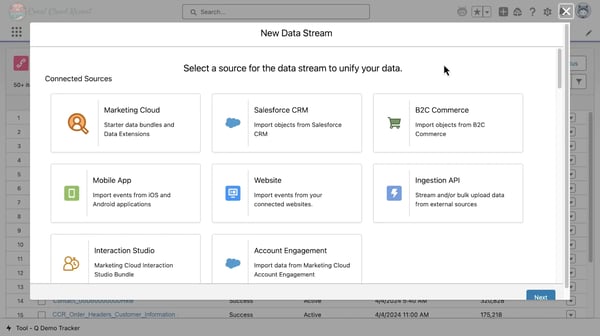
Salesforce Data 360 brings customer data from CRM systems, marketing platforms, warehouses, data lakes, and other sources into unified profiles. If your teams already work across Salesforce, it gives you a way to use that data across marketing, sales, service, analytics, and AI without rebuilding your entire data stack.
Identity resolution is one of the capabilities G2 users mention most often. It helps you combine duplicated or disconnected records into a more complete customer profile, which is especially useful when CRM data alone does not capture the full customer journey.
I also like that segmentation is not limited to technical teams. Reviewers often highlight the drag-and-drop experience, which allows marketers to build and refresh audiences without relying on SQL for every request. Its 93% G2 rating for expandability also suggests that teams are using segmentation across a broad range of campaigns and journeys.
Zero-copy data access is another reason the platform stands out. You can connect data from systems such as Snowflake, Databricks, Amazon, and Google without duplicating it inside Salesforce. G2 users say this helps them control storage costs while keeping existing governance and warehouse investments intact.
Calculated Insights makes the unified data more useful in day-to-day workflows. Teams can create engagement scores, product preferences, and behavioral indicators directly in the platform, and its 92% G2 feature rating supports the positive feedback around this capability. That means less back-and-forth with data teams when marketers or service teams need new customer signals.
Real-time activation is particularly valuable when timing matters. Reviewers describe using behavioral updates to adjust campaigns and customer journeys as activity happens, rather than waiting for the next data refresh. This also gives Agentforce and other AI workflows more current customer context to work with.
The platform also goes beyond structured customer records. G2 users mention bringing in emails, PDFs, and other unstructured content to support knowledge retrieval and generative AI workflows. For teams building service or support use cases, that can help AI responses stay more grounded in relevant customer information.
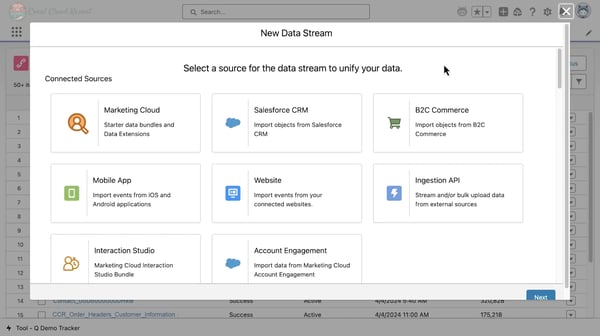
The trade-off is that implementation can be demanding. Reviewers often mention a learning curve around data streams, identity rules, object mapping, and Salesforce terminology, so you may need experienced admins or architecture support at the beginning. Once the foundation is in place, however, users generally find the platform easier to manage and more reliable at scale.
Pricing also requires close attention. Some G2 users find the consumption-based credit model difficult to forecast as data volumes and use cases grow. With clear governance and a defined activation plan, though, teams are better placed to control usage and connect the investment to measurable outcomes.
I would choose Salesforce Data 360 if your organization already relies heavily on Salesforce and needs one customer data layer to support several teams at once. It makes the most sense for companies with complex data environments, strong technical resources, and plans to use unified data well beyond marketing alone.
What I like about Salesforce Data 360 (formerly Data Cloud):
- I like that marketers can build and refresh audience segments without depending on SQL or submitting every request to a data team.
- The zero-copy architecture stands out to me because it lets you activate warehouse data without giving up your existing governance model or duplicating large datasets.
What do G2 users like about Salesforce Data 360 (formerly Data Cloud):
“I really like the segmentation feature in Salesforce Data 360. Once the Data Model Objects (DMOs) are mapped cleanly, building and refreshing our six customer segments is fast and reliable. The identity resolution feature is another highlight as it helped us create a unified customer view from scattered CRM data, which was our main goal. I appreciate the Calculated Insights too, even with its quirks. It allows me to derive insights like preferred product categories directly in the platform, saving me from a lot of back-and-forth. The ability for segments like VIPs, sleeping customers, and category-specific buyers to stay live without manual list-pulling for every campaign saves significant time and improves targeting. We can act on actual purchase behavior rather than guesswork, making re-engagement easier.”
– Salesforce Data 360 (formerly Data Cloud) review, Hemanth Kumar P.
What I dislike about Salesforce Data 360 (formerly Data Cloud):
- G2 users often mention that configuring data streams, identity rules, and object mappings can take time, especially for teams without experienced Salesforce administrators. Bringing in the right technical support early can make the platform much easier to manage once it is fully set up.
- Some reviewers find the consumption-based pricing model difficult to predict as usage expands. Teams with clear governance and defined activation priorities, however, are in a stronger position to control costs and tie the investment back to business value.
What do G2 users dislike about Salesforce Data 360 (formerly Data Cloud):
“The additional license cost for a company of our size feels very restrictive to getting the most out of all systems, plus there’s still a reliance on fixing the data in the long term, which will delay the execution of the system”
– Salesforce Data 360 (formerly Data Cloud) review, Alex J.
Related: Starting your role as a digital marketer, but stuck in endless database streams? See how market segmentation is the most useful way to categorize consumers.
2. Insider One: Best for omnichannel personalization
Insider One combines customer data, journey orchestration, behavioral segmentation, and real-time personalization in one platform. I see it fitting marketing teams that want to coordinate web, app, email, SMS, WhatsApp, and push campaigns without relying on engineering for routine execution. Its 4.8 G2 rating also reflects strong user satisfaction.
The Architect journey builder is the capability reviewers mention most consistently. You can visually create multi-step campaigns across several channels from one canvas, with no coding required. G2 users describe this as a practical way to move from campaign planning to launch without waiting for technical teams to configure every workflow.
Behavioral segmentation gives those journeys more relevant audiences. Instead of targeting customers only by broad demographic traits, you can combine browsing activity, transactions, app events, and profile data. I find this especially useful for brands that need messaging to respond to what a customer is doing now, not just what the business already knows about them.
Smart Recommender brings that same level of personalization to product discovery. Retail and e-commerce reviewers use it to surface products based on browsing intent and past behavior, which can help customers navigate large or complex catalogs. Its 96% G2 rating supports the positive feedback around recommendations that feel more relevant than standard product carousels.
Sirius AI also appears to make campaign creation faster. G2 users mention generating audience segments, content, and journey ideas from prompts rather than starting every campaign from scratch. For a busy marketing team, that can reduce the time spent on routine setup while leaving more room to refine the strategy and customer experience.
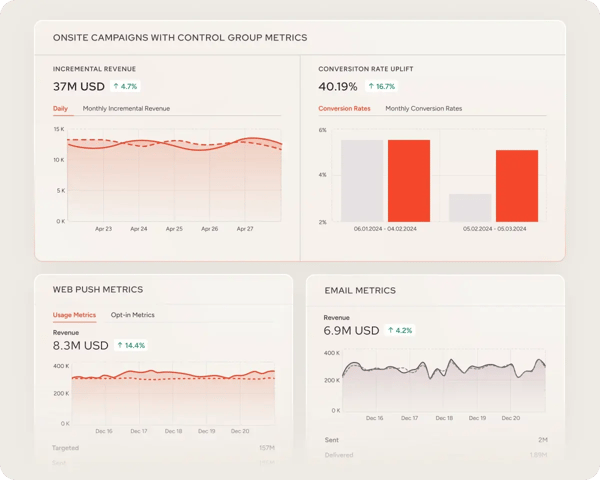
Customer support is another area where Insider One separates itself. The platform has a 98% Quality of Support score compared with a 93% category average, and reviewers frequently describe the customer success team as proactive rather than reactive. I noticed users value the help with onboarding, use-case planning, and campaign prioritization just as much as technical troubleshooting.
The experimentation tools give growth teams room to keep improving once campaigns are live. Reviewers describe using A/B tests across website elements, messages, and journey paths without involving IT in every test cycle. Automated winner selection also makes it easier to apply what works without adding another manual reporting step.
With so many capabilities in one place, the initial learning curve can feel steep. G2 users sometimes describe the range of journeys, messaging tools, templates, AI features, and personalization options as overwhelming at first. Structured onboarding and hands-on support, however, appear to help teams get comfortable quickly and make day-to-day campaign management much more intuitive.
Reporting may require a little more support from your analytics stack. Some reviewers would like deeper native options for cohort analysis, lifetime value, incremental lift, and exact revenue attribution. The built-in dashboards still cover everyday campaign monitoring, while integrations with external BI tools give data-focused teams a path to more advanced analysis.
Insider One makes the strongest case for retail, e-commerce, and financial services teams that need to coordinate personalization across several customer touchpoints. Compared with simpler CDPs, it is better suited to organizations that want to turn customer data into connected, high-volume campaigns rather than stop at profile unification.
What I like about Insider One:
- What stands out to me most is how Architect brings web, email, SMS, push, and app journeys into one visual workflow, giving marketers more freedom to launch without waiting on engineering.
- Beyond the product itself, the support experience appears unusually hands-on. Reviewers frequently mention proactive guidance with onboarding, use-case selection, and campaign planning.
What do G2 users like about Insider One:
“The usability of the platform is nice, but the differentiator of Insider is the team that serves us with excellence and high understanding, engagement. They know our business, act in a detailed and profound manner.”
– Insider One review, Fabi S.
What I dislike about Insider One:
- The range of journeys, templates, AI tools, and personalization options can make the platform feel dense during the initial ramp-up. Insider’s structured onboarding and customer success support, however, help teams turn that breadth into a more manageable day-to-day workflow.
- Advanced analysis may still extend beyond the native dashboards, particularly for cohort reporting, lifetime value, and precise revenue attribution. For teams already using an external BI platform, the available integrations provide a practical way to fill those gaps.
What do G2 users dislike about Insider One:
“Some irregularities (reports out of standard, features only available in architect, non-existent push API) in-app do not scale impressions, receive with low customization. Product improvements are needed involving more AI, such as AI deciding which type of product is better to show to the user. creative assembly for each type of segmentation, automatic AI copy for PDP abandonment (e.g., Meli), and so on.”
– Insider One review, Rebeca C.
3. Customer.io: Best for event-driven messaging
Customer.io is less about sending campaigns to static lists and more about responding to what users actually do. It uses behavioral events and customer attributes to trigger email, SMS, push, and in-app messages, making it particularly relevant for product-led teams with reliable user data.
The event-based data model is where I see the biggest difference. You can create segments that update as soon as someone completes a purchase, abandons a workflow, or reaches a product milestone. G2 reviewers describe using this precision to send messages around specific behaviors instead of relying on broad schedules or manually refreshed lists.
Liquid templating takes that behavioral context into the message itself. Rather than creating a separate template for every customer state, you can adapt the content based on account balances, transaction history, product activity, or other stored attributes. Reviewers say this helps them deliver more relevant messages while keeping the number of campaigns and templates manageable.
I also found the visual workflow builder worth highlighting, although its value here is different from Insider One’s broader omnichannel orchestration. Customer.io users focus more on how clearly they can map event triggers, delays, conditions, and branching paths. Even complex onboarding or re-engagement flows remain readable enough for teams to review, adjust, and hand over.
The AI Agent gives users another way to reduce routine campaign work. G2 reviewers mention asking questions in plain language to locate data, summarize performance, generate drafts, or work through configuration tasks. If you regularly move between documentation, analytics, and campaign setup, having that assistance inside the platform can save a fair amount of back-and-forth.
Customer profiles also continue to evolve as user behavior changes. Reviewers describe transforming incoming data, updating attributes, and moving customers between cohorts without repeatedly exporting and reimporting lists. I see this as useful for lifecycle teams that need audience logic to stay accurate without creating a separate data-cleaning workflow.
Integration flexibility rounds out the platform’s appeal for technical teams. G2 users mention connecting Customer.io with Segment, Twilio, data warehouses, and internal systems, while developers often praise the API for being predictable and adaptable. That makes it easier to fit the platform around an existing product stack instead of reshaping every workflow around the messaging tool.
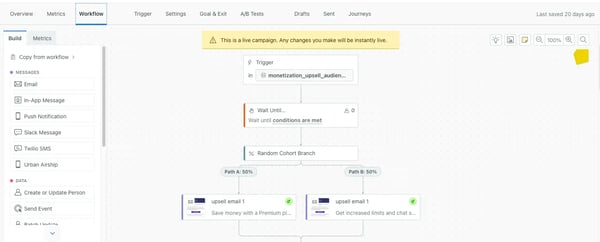
The event-first approach does require a different way of thinking. Teams moving from traditional broadcast email platforms may need time to become comfortable with triggers, attributes, and event taxonomies. Reviewers say the difficulty is concentrated early, and resources such as Customer.io Academy help the platform feel much more intuitive once the underlying logic clicks.
Reporting is the other trade-off I noticed in G2 feedback. Delivery and engagement metrics are available, but teams looking for cohort analysis, customer lifetime value, detailed attribution, or executive dashboards may need to send the data to a BI tool. For organizations that already have an analytics layer, that setup adds flexibility rather than becoming a major obstacle.
For me, Customer.io earns its place on this list for SaaS, fintech, and product-led teams that want messaging to follow individual user behavior closely. You will get more from it than from a conventional email platform when your event data is well structured, and your campaigns depend on precision rather than volume alone.
What I like about Customer.io:
- What wins me over is the event-driven model. It lets teams respond to specific user actions as they happen instead of forcing every campaign into a static list or fixed schedule.
- I also see real value in Liquid templating because one workflow can adapt its content across several customer states without creating and maintaining dozens of separate templates.
What do G2 users like about Customer.io:
“Fast-paced updates and consistent advancements. New dashboards are also looking good. Different workspaces and communication channels are easy to implement. Also, the system is working properly most of the time”
– Customer.io review, Erce E.
What I dislike about Customer.io:
- The same event-first design that gives Customer.io its precision can take time to understand if your team is used to traditional email tools. Once users establish a clear event taxonomy and work through the available training resources, reviewers generally find the platform much easier to operate.
- Analytics is the other trade-off, since advanced cohort, lifetime value, and attribution views often sit outside the native dashboards. Teams with an existing BI setup can still access that depth while using Customer.io for everyday campaign monitoring.
What do G2 users dislike about Customer.io:
“To be completely honest, the learning curve is quite aggressive right at the start, and the platform feels completely overwhelming if you don’t have a background in data-driven marketing tools. The initial onboarding phase was honestly a bit intense. It took us about three weeks to fully dial in.”
– Customer.io review, Bob V.
4. Bloomreach: Best for commerce personalization
Bloomreach makes the most sense when product discovery and lifecycle marketing need to work from the same customer data. It combines a CDP, AI-powered search and merchandising, behavioral segmentation, and omnichannel automation, which gives retail and e-commerce teams one place to shape both campaigns and on-site experiences.
Loomi AI is the capability that first caught my attention. G2 reviewers describe its search engine as better at interpreting shopper intent than tools that rely mainly on exact keywords. If customers use vague or incomplete search terms, Bloomreach can still guide them toward relevant products, which makes this more than a behind-the-scenes data feature.
That same intelligence also supports product recommendations. Retail users mention using behavioral and purchase data to surface items that match what a shopper is currently exploring, rather than filling every page with generic bestsellers. Bloomreach’s 89% Expandability rating reflects how teams are applying this intelligence across search, recommendations, and campaign personalization.
Segmentation gives marketers detailed control over who enters each experience. You can combine purchase history, browsing patterns, location, order value, and custom attributes to create audiences that change as customer behavior changes. Reviewers describe using these segments for retention, churn prevention, and lifetime-value campaigns without rebuilding the same logic in separate channel tools.
The Scenarios canvas is where those audiences turn into automated journeys. I noticed users value how its node-based structure handles triggers, conditions, delays, and localized paths without making large workflows impossible to follow. For teams running campaigns across several countries or product lines, that flexibility can reduce the need to maintain separate versions of nearly identical journeys.
Weblayers take personalization beyond email, SMS, and push notifications. G2 reviewers mention launching banners, countdowns, overlays, pop-ups, and social-proof messages for specific customer groups without depending heavily on developers. Because these experiences draw from the same profiles used in campaigns, the website and outbound messaging can stay aligned.
Analytics is another area where Bloomreach feels more self-contained than many engagement platforms. Reviewers, including users in BI roles, praise the ability to build custom tables, charts, and campaign reports directly inside the platform. Its 88% Data Enrichment and 87% Multiple Devices ratings also support the positive feedback around keeping profiles useful across touchpoints.
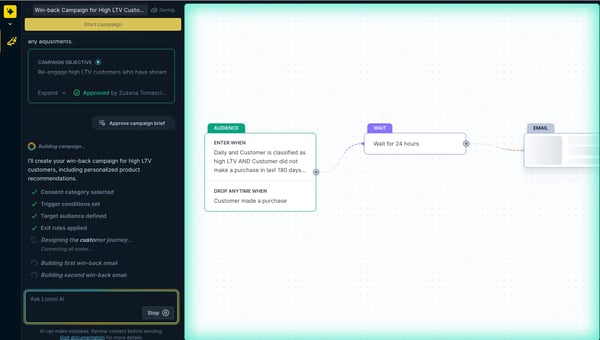
That depth does create a steeper starting point. Users coming from simpler email or CRM tools may need time to understand Bloomreach’s data model, Jinja templating, and campaign structure before they can work independently. Bloomreach Academy, structured onboarding, and hands-on customer success support give teams a clearer path through that initial complexity.
Reporting is powerful, but it is not always immediately accessible. Some G2 users say building custom views or pulling quick campaign statistics for colleagues takes more configuration than expected. Teams with analyst support can make full use of the reporting flexibility, while others may need to invest in reusable dashboards before the experience feels truly self-service.
Bloomreach is best suited to retail and e-commerce teams that see search, merchandising, website personalization, and lifecycle marketing as connected parts of the customer journey. It has a stronger case than a traditional CDP when your priority is improving how shoppers discover and engage with products, not simply consolidating their data.
What I like about Bloomreach:
- Loomi AI stands out to me because it applies the same behavioral understanding to search and product recommendations, helping brands improve product discovery rather than limiting personalization to outbound campaigns.
- The Scenarios canvas gives teams room to build detailed, localized journeys while keeping the logic visible enough to review and adjust without creating a separate workflow for every market.
What do G2 users like about Bloomreach:
“Bloomreach makes it easy to deliver personalized customer experiences. I particularly like its powerful segmentation, product recommendations, and automation capabilities, which help improve customer engagement and conversion rates. The platform provides valuable insights into customer behavior and integrates well with other marketing and ecommerce tools, making campaigns more effective and efficient”
– Bloomreach review, Megan L.
What I dislike about Bloomreach:
- Getting comfortable with the data model, Jinja templating, and broader feature set can take time, particularly for teams moving from simpler marketing tools. Reviewers consistently point to Bloomreach Academy and customer success support as useful resources for making that transition smoother.
- Report creation can feel more technical than the underlying analytics capabilities suggest, especially when someone needs a quick stakeholder-ready view. Once teams build reusable dashboards and establish a reporting structure, however, the platform offers considerable room for deeper analysis.
What do G2 users dislike about Bloomreach:
“The reporting and dashboard part could be better. It could be more intuitive and flexible, and allow you to build more out-of-the-box use cases.”
– Bloomreach review, Verified User
5. Tealium: Best for governed data activation
Tealium starts lower in the technology stack than most platforms on this list. It collects, unifies, and routes customer data across web, mobile, CRM, offline, advertising, and analytics systems in real time. Across 450+ G2 reviews, the recurring theme is control: you can connect customer data across vendors without making one marketing ecosystem the center of everything.
EventStream gives teams a consistent way to collect and distribute behavioral data as it arrives. G2 users describe sending clean event data to warehouses, analytics platforms, and customer-facing tools without building a separate pipeline for every destination. If your organization has several teams using the same customer signals, that central routing layer can reduce conflicting definitions and disconnected integrations.
AudienceStream turns those live events into profiles and audiences that teams can activate elsewhere. You can enrich profiles using customer behavior, build rules around those changes, and send qualifying audiences to advertising, CRM, email, and analytics tools. Its 88% Expandability rating supports what reviewers say about applying the same audience logic across a broad activation stack.
The connector ecosystem is another reason Tealium works well in complex environments. Reviewers mention connecting platforms such as Snowflake, Databricks, paid media tools, and marketing systems without creating custom APIs for every use case. I find the vendor-neutral approach valuable because Tealium strengthens the tools you already use instead of pushing you toward a single proprietary suite.
Visitor stitching helps bring anonymous, authenticated, mobile, and cross-device behavior into the same customer profile. G2 users describe using that context to understand what happened before a customer logged in, submitted a form, or became a known CRM contact. TRACE also makes this process less opaque by showing how events and profile attributes are being processed, which can make identity issues easier to investigate.
Privacy and governance controls are built into how data moves through the platform. Reviewers in regulated industries highlight the ability to manage collection, processing, and activation according to consent status. That gives you more control over where customer data goes without forcing marketing and compliance teams into entirely separate workflows.
MomentsAPI brings Tealium’s real-time data into customer-facing experiences. G2 users mention triggering relevant website or app interactions as soon as a qualifying event occurs rather than waiting for a scheduled batch update. Its 85% Data Enrichment rating also reflects how customer profiles continue to change as new behavior comes in.
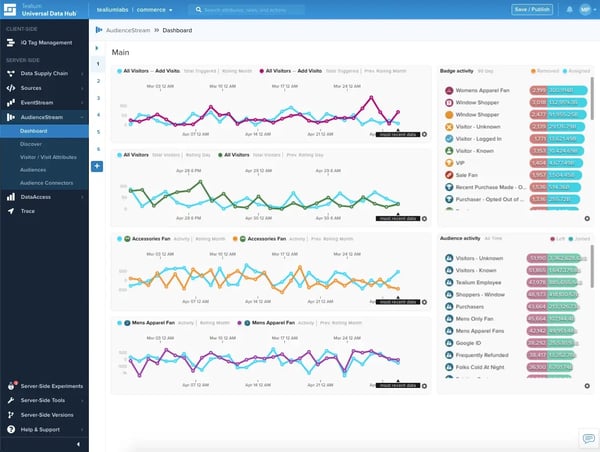
Getting all of this configured takes meaningful technical work. Reviewers frequently mention the time required to understand Tealium iQ, EventStream, AudienceStream, event schemas, and enrichment rules. Teams that establish a clean data layer and use Tealium University early, however, tend to build a more reliable foundation that supports new use cases without repeated rework.
The interface may also feel dense for marketers who expect immediate self-service. Nested menus, version management, and complex enrichment workflows can take time to navigate, particularly when several Tealium products are involved. With structured permissions, reusable templates, and guidance from experienced users, the platform becomes much more manageable for day-to-day work.
Tealium fits enterprises that care as much about how customer data is governed and transported as how it is used in campaigns. It has the clearest advantage for regulated or multi-vendor organizations that want a neutral data foundation while retaining control over the warehouses, analytics tools, and activation platforms surrounding it.
What I like about Tealium:
- What appeals to me most is its neutrality. Tealium can connect warehouses, analytics systems, advertising platforms, and marketing tools without forcing the business to rebuild its stack around one vendor.
- Visitor stitching feels more trustworthy when TRACE lets teams inspect how identities and attributes are being assembled instead of asking them to rely on a black-box profile.
What do G2 users like about Tealium:
“It effectively unifies scattered customer data from apps, websites, and our business systems into a single profile, which helps activate customer data across all channels and applications.”
– Tealium review, Rajasekhar V.
What I dislike about Tealium:
- The main compromise is the amount of technical planning needed to configure event schemas, data layers, enrichments, and audience rules correctly. Reviewers indicate that teams that invest in this architecture early end up with a more stable platform that is easier to expand.
- For non-technical users, the interface can require more orientation than the underlying functionality might suggest. Reusable workflows, clear ownership, and Tealium’s training resources can make the experience far more approachable once the operating model is established.
What do G2 users dislike about Tealium:
“I wish they had sandbox and cheatsheet of features for partners to demo internally. More integrations to leverage on Snowflake Marketplace for out-of-the-box composability”
– Tealium review, Emily M.
6. Dotdigital: Best for accessible marketing automation
Dotdigital is built for marketing teams that want sophisticated automation without making every campaign a technical project. It brings email, SMS, customer data, segmentation, and journey orchestration into one interface.
The drag-and-drop email builder is one of the clearest strengths. G2 reviewers describe creating polished campaigns quickly, while dynamic content blocks let a single email change according to customer behavior, purchase history, or segment membership. I like that teams can personalize at scale without maintaining a separate template for every audience.
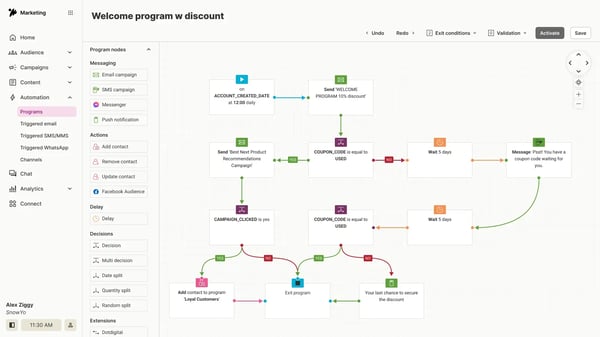
Programs gives lifecycle marketers a visual way to build welcome, abandonment, win-back, and post-purchase journeys. Triggers, delays, and conditional paths are laid out as tiles, which makes complex logic easier to follow and update. Reviewers frequently mention being able to manage these workflows without waiting for developer support.
Segmentation is designed around speed rather than technical complexity. You can group customers using purchase activity, engagement history, clicks, and custom fields, then use those audiences across campaigns and automated programs. G2 users often highlight how quickly they can move from identifying an audience to launching relevant messaging.
Connections with platforms such as Shopify, Magento, and Zoho help keep those audiences current. Reviewers describe syncing customer and commerce data without relying on repeated exports or manual list updates. Unlike Tealium’s infrastructure-focused integrations, the value here is more immediate: marketers can use connected data directly inside their everyday campaigns.
WinstonAI feels more practical than many built-in marketing assistants. Users mention relying on it for subject lines, content suggestions, and answers to platform questions. Its step-by-step guidance can be particularly useful when a team does not have a dedicated marketing operations specialist available for every configuration task.
The support experience adds another layer of reassurance. G2 reviewers regularly mention responsive live chat, knowledgeable account managers, and proactive guidance on new campaign ideas. Dotdigital Academy also gives users a way to build confidence independently, which can reduce how often routine questions need to become support tickets.
SMS is available, but it does not yet feel as refined as the email experience. Some reviewers find the interface and workflow integration less mature than dedicated SMS platforms or Dotdigital’s own email tools. It still works well as a supporting channel, particularly for teams whose lifecycle strategy remains primarily email-led.
Reporting covers campaign performance clearly, but deeper analysis may take extra work. Reviewers looking for revenue attribution, journey-level trends, or granular customer exports sometimes need external tools or manual data preparation. For teams focused on everyday monitoring, however, the native dashboards remain straightforward and easy to interpret.
Dotdigital suits mid-market teams that want the whole marketing department to manage automation, not just a technical specialist. It stands apart through its balance of usability, campaign depth, and hands-on support, making it a strong fit when consistent execution matters more than having the most complex data architecture.
What I like about Dotdigital:
- For me, the combination of dynamic content and Programs is the biggest advantage. Teams can personalize multi-step journeys without multiplying templates or depending on developers for routine changes.
- Another detail I appreciate is how WinstonAI supports the actual workflow, giving users useful platform guidance alongside content and campaign assistance.
What do G2 users like about Dotdigital:
“I find Dotdigital much simpler to use than our previous provider. The team is very hands-on, which I really appreciate. I also like the brand voice feature and the automation programs they offer. The initial setup was super easy, and the platform pricing is awesome compared to what we were paying before. My favorite part of Dotdigital is the support options—they do it best by far.”
– Dotdigital review, Verified User in Leisure Travel & Tourism
What I dislike about Dotdigital:
- The SMS side is where Dotdigital feels less polished, according to some G2 reviewers, particularly when compared with its email experience. Teams using SMS as a complementary channel should still find enough functionality for their core campaigns.
- Reporting gives me more pause for teams that need advanced attribution or highly customized stakeholder views. The standard dashboards handle regular campaign monitoring well, and external analytics tools can provide the additional depth when required.
What do G2 users dislike about Dotdigital:
“I’m not overly keen on the e-commerce blocks. While the idea behind them is great. The styling leaves a lot to be desired, and I tend not to use them as a result. The entry points for automated triggered campaigns could also have more options for how frequently they run / entry requirements.”
– Dotdigital review, Mike H.
7. Klaviyo: Best for Shopify-powered retention
Klaviyo approaches customer data through the lens of e-commerce. Its profiles, automation templates, analytics, and predictive tools are built around how shoppers browse, buy, and return. That makes it especially relevant for DTC and retail teams that want customer data to feed directly into retention campaigns.
The Shopify integration goes well beyond syncing contact details. Klaviyo brings in product views, cart activity, order history, catalog data, and purchase timelines, then makes those events available inside flows and segments. G2 reviewers describe using this data without first relying on custom pipelines or extensive developer work.
Flows turn that commerce data into automated customer journeys. You can launch welcome, abandoned-cart, post-purchase, replenishment, and win-back sequences using pre-built templates, then add conditional paths based on products, order history, or engagement. What I find useful is how quickly teams can move from connecting a store to running revenue-focused automation.
Segmentation gets equally specific. Rather than grouping customers only by broad engagement levels, you can target people who viewed a particular category, purchased above a certain value, or stopped buying within a defined period. Its 88% Marketing Metrics rating supports the positive feedback around connecting audience behavior with campaign performance.
Predictive analytics gives retention teams signals they would otherwise need to model separately. G2 users mention working with predicted customer lifetime value, churn risk, and expected next order date to decide who to contact and when. These insights make it easier to act before a customer lapses instead of analyzing the loss afterward.
Email and SMS also share the same customer profiles and workflow logic. Teams can send a text when an email goes unopened, reserve SMS for urgent promotions, or coordinate both channels within one sequence. Reviewers value not having to reconcile separate suppression lists or rebuild the same audiences across multiple tools.
Getting started appears relatively quick for the audience Klaviyo serves. Its 90% Ease of Setup score is the highest among the platforms in this roundup, while 93% of users say they are likely to recommend it. G2 feedback frequently connects that ease with pre-built flows, familiar commerce terminology, and minimal dependency on IT.
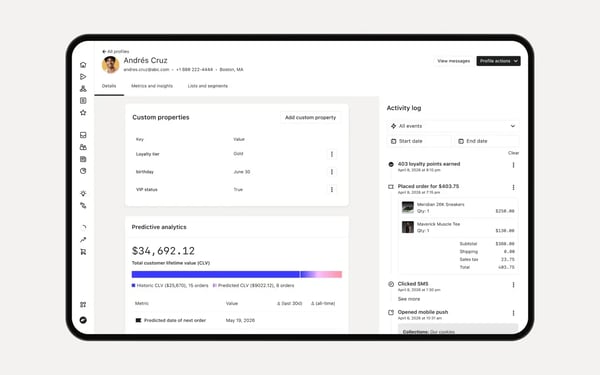
The pricing model deserves closer attention as a contact database grows. Klaviyo charges according to active profiles rather than how frequently each person receives a message, so large groups of lapsed or lightly engaged customers can increase costs. Brands that routinely clean and suppress inactive profiles are better positioned to keep pricing aligned with the value they receive.
Revenue reporting can also require some interpretation. Reviewers sometimes see differences between Klaviyo’s attributed revenue and figures in Shopify or GA4 because each platform applies its own attribution rules. Adjusting the attribution window and validating performance against a primary analytics source gives teams a more dependable basis for budget decisions.
For Shopify-led DTC and retail brands, Klaviyo offers one of the shortest paths from store activity to personalized retention campaigns. Its advantage is not simply that it integrates with an online store, but that its workflows and predictions are designed around the purchase lifecycle from the beginning.
What I like about Klaviyo:
- The depth of the Shopify connection stands out to me. Browse activity, cart events, orders, and catalog data can feed directly into campaigns without requiring teams to construct a separate data workflow first.
- Predictive lifetime value, churn risk, and expected purchase timing add a useful forward-looking layer, helping retention teams decide when an intervention is more likely to matter.
What do G2 users like about Klaviyo:
“What I like most about Klaviyo is how easy it makes it to build targeted email campaigns and automate customer communication. I also find the reporting helpful for seeing what’s working, identifying what isn’t, and making adjustments to improve overall campaign performance.”
– Klaviyo review, Mohd Danish K.
What I dislike about Klaviyo:
- Profile-based billing can become expensive when a store retains a large number of inactive or lapsed customers. Regular list maintenance and thoughtful suppression rules can help brands keep costs closer to the audience they actively engage.
- Klaviyo’s revenue figures may not always match Shopify or GA4 because the platforms use different attribution windows and methods. Teams that refine those settings and compare results with their primary analytics source can still use the reporting effectively.
What do G2 users dislike about Klaviyo:
“There are not enough professionally designed email templates suitable for financial industry scenarios. It cannot achieve stable one-click data linkage with our in-house client management system, so we have to spend extra time on manual data supplementation. It is not convenient to set up pre-release content review rules for financial marketing content. Meanwhile, its local statistical analysis reports cannot fully match the data sorting standards used in German financial institutions, requiring extra rearrangement before submitting audit documents.”
– Klaviyo review, Joseph G.
Related: If you are deciding between ecommerce-focused automation and a more general email marketing platform, this Klaviyo vs Mailchimp comparison breaks down the key differences.
8. Adobe Real-Time CDP: Best for Adobe-centric enterprises
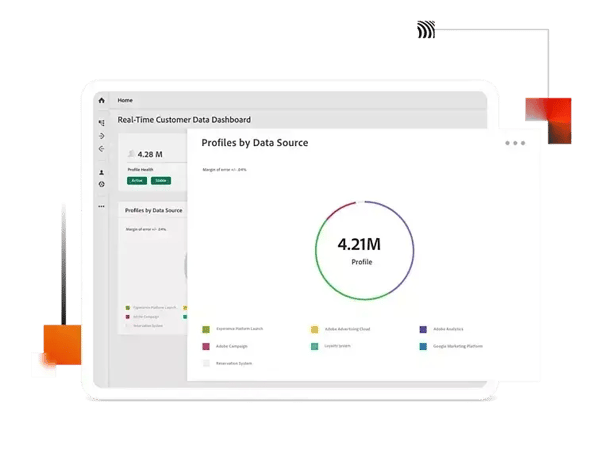
Adobe Real-Time CDP asks more of your data foundation than the other platforms on this list. You need a sound XDM schema, a clear identity strategy, and technical ownership from the outset. In return, it gives large organizations a real-time data layer for personalization, governance, analytics, and activation across Adobe Experience Cloud.
The clearest payoff is edge segmentation. Instead of waiting for a scheduled refresh, the platform can reassess audience membership as soon as a customer purchases, cancels, or reaches a behavioral threshold. G2 reviewers value this speed because it helps teams respond to customer behavior before the next interaction, while its 86% Data Enrichment and Marketing Metrics ratings support the positive feedback around data accuracy and activation.
Identity stitching connects CRM records, email addresses, device IDs, and anonymous and authenticated behavior into unified profiles. That gives you context from before and after a customer identifies themselves, even when they move between devices. Its 86% Multiple Devices rating reinforces what reviewers say about maintaining useful profiles across complex customer journeys.
Governance is handled as part of the data architecture rather than as a separate checklist. Adobe’s Data Usage Labeling and Enforcement framework lets teams attach policies to data and restrict where sensitive information can be activated. Reviewers in regulated environments describe this as a practical way to reduce the risk of data reaching an unauthorized destination.
Adobe Sensei adds predictive signals to those profiles. Customer AI, propensity scoring, and lookalike modeling can help teams identify customers who are likely to convert or churn before an obvious event occurs. I see the value here in moving from reactive messaging to earlier interventions based on patterns already present in the data.
The platform becomes easier to justify when Adobe Experience Cloud is already part of your stack. Audiences can move into Adobe Journey Optimizer, Adobe Target, Customer Journey Analytics, and Adobe Analytics without teams maintaining a separate connector for every workflow. G2 users mention this native flow as a major advantage when speed and consistency matter across several Adobe products.
Federated Audience Composition also gives enterprise data teams more control over where information lives. You can build audiences using data stored in warehouses such as Snowflake without first copying everything into Adobe. For organizations managing regional residency requirements or large volumes of sensitive data, that can reduce duplication while preserving existing warehouse investments.
The XDM schema is where implementation becomes demanding. Reviewers warn that weak modeling decisions can affect identity resolution, segmentation, and every activation built on top of them, while correcting those decisions after ingestion may require substantial rework. Teams that involve experienced Adobe engineers or certified partners at the design stage are much more likely to build a stable foundation they can expand confidently.
Licensing and integration costs also need to be mapped carefully. G2 users mention add-on expenses for certain connectors and note that activating data outside Adobe can require more configuration than using native Experience Cloud tools. The economics are strongest when a company already relies on Adobe and has enough high-value use cases to make the wider ecosystem work together.
Adobe Real-Time CDP earns its place for financial services, media, and global commerce enterprises that already use Adobe and need personalization to operate with strict governance and minimal activation delay. It is a heavier commitment than the other platforms here, but that commitment makes sense when schema-level control and edge-speed decision-making are non-negotiable.
What I like about Adobe Real-Time CDP:
- The capability that stays with me is edge segmentation. Reassessing audiences in milliseconds can prevent outdated or inappropriate messages from reaching customers after their circumstances have already changed.
- For regulated teams, DULE may matter even more than the personalization features because it embeds data-use restrictions into the architecture instead of relying entirely on people to enforce policies manually.
What do G2 users like about Adobe Real-Time CDP:
“Getting all the messy data streams—from mobile apps, websites, CRM systems, and cash registers—to play nice is a super complicated, technical job. The whole point is just to smash all that info into one clean, unified customer profile.”
– Adobe Real-Time CDP review, Philip H.
What I dislike about Adobe Real-Time CDP:
- Where I would be most cautious is the XDM foundation, since G2 reviewers make it clear that early modeling mistakes can be expensive to correct. Bringing Adobe architecture expertise into the planning stage helps teams avoid that rework and build a more dependable platform.
- The commercial model also deserves a full cost review, especially when your stack includes several non-Adobe tools or requires paid connectors. Organizations already invested in Experience Cloud are better positioned to capture the efficiency that makes the expense worthwhile.
What do G2 users dislike about Adobe Real-Time CDP:
“What I dislike about Adobe Real-Time CDP is that, while it is powerful, it can feel heavy and complicated to actually run well. A lot of the value depends on having clean data, a solid identity strategy, and people who really understand the Adobe ecosystem, so the platform can be hard for smaller or less mature teams to get full value from quickly. It can also be expensive, and simple use cases sometimes end up feeling overengineered because the product is built for enterprise scale. In practice, that means Adobe Real-Time CDP often shines most once a company already has the budget, technical support, and internal discipline to handle that level of complexity.”
– Adobe Real-Time CDP review, Verified User in Construction
9. Planhat: Best for B2B SaaS retention
Most platforms in this roundup help you acquire, understand, or activate customers. Planhat focuses on what happens after the sale. It gives customer success teams a central workspace for managing account health, onboarding, renewals, expansion opportunities, and ongoing customer relationships.
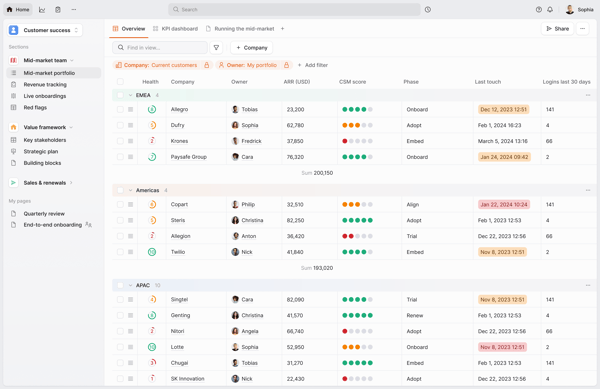
Health scoring is the first capability I would look at. You can combine product adoption, support activity, engagement, NPS, commercial data, and custom signals, then weight them according to what predicts risk in your business. G2 reviewers say the color-coded scores help them scan an entire portfolio and identify accounts that need attention.
Those scores become more useful when they trigger Planhat’s playbooks. Teams can automatically launch onboarding tasks, risk follow-ups, QBR preparation, or renewal workflows when an account reaches a particular milestone or health threshold. Reviewers frequently mention that this reduces administrative work and gives CSMs more time for strategic customer conversations.
The AI capabilities help teams interpret the account data they already have. G2 users describe generating account summaries, identifying changes in sentiment, and surfacing adoption patterns that may indicate churn or expansion. I can see this being especially valuable before a customer call, when you need months of context without reading every note and activity log.
Data Explorer gives CS leaders more freedom to investigate portfolio trends without relying on SQL. You can build views around churn risk, onboarding progress, expansion potential, or product adoption and filter them by segment, owner, or customer type. Reviewers managing large books of business value the level of detail they can reach through custom fields and dashboards.
Customer portals add a collaborative layer that many customer success platforms leave out. Your customers can view success plans, onboarding milestones, shared goals, and progress in one place. G2 feedback suggests this reduces routine status updates while giving both sides a clearer understanding of what has been completed and what still needs attention.
The partnership experience also carries real weight. Planhat has a 95% Ease of Doing Business With score and a 94% Quality of Support rating, and reviewers often describe their CSMs and technical account managers as proactive advisers. That guidance matters when you are adapting health models and workflows to your own customer success methodology.
The platform asks more from teams that want to use its full configuration depth. Complex formulas, cross-object reports, and detailed automation logic can require a knowledgeable CS operations owner or technical administrator. Organizations that assign clear platform ownership and involve Planhat’s support team early tend to reach a more scalable setup faster.
Connector coverage may also need reviewing before implementation. Some G2 users mention that less common SaaS, telephony, or analytics tools require API work because a native integration is not available. Planhat’s API is generally described as flexible and well documented, giving technical teams a dependable route for filling those gaps.
Planhat earns its place when retention and expansion are central to how your B2B SaaS company grows. Unlike the marketing-led platforms on this list, it is organized around the CSM’s daily responsibilities, making it the more natural fit for companies that need customer success to operate as a measurable revenue function.
What I like about Planhat:
- The health model is the part I find most convincing because it lets teams combine product usage, engagement, support, and commercial signals instead of reducing customer risk to one lagging metric.
- I’m equally drawn to the customer success partnership behind the product. Reviewers describe Planhat’s CSMs and technical account managers as active participants in improving workflows, not simply contacts for resolving support issues.
What do G2 users like about Planhat:
“What I’ve really loved about Planhat is the customizability of the tool, particularly around leveraging its AI capabilities. The research and analysis I’m doing feels unique to our business, not cookie cutter. I’ve been able to build prompts that surface adoption patterns tied to sentiment shifts, so I can spot risk earlier than a static health score would tell me. That kind of analysis would normally take a data team weeks to scope. Here, I can just build it.”
–Planhat review, Adrian D.
What I dislike about Planhat:
- My main reservation is the amount of platform knowledge needed for advanced formulas, automation, and cross-object reporting. Teams that appoint a dedicated CS operations owner and use Planhat’s implementation support are better equipped to turn that complexity into a tailored, scalable system.
- Connector availability deserves an early audit if your technology stack includes niche or less common tools. Although some connections may require API work, reviewers generally find the API capable and well documented once technical resources are involved.
What do G2 users dislike about Planhat:
“The interface isn’t as intuitive as I would like. I find myself clicking around a lot to figure out where I need to be and how to make it work.”
– Planhat review, Traci C.
Best Customer Data Platforms: Frequently Asked Questions (FAQs)
Got more questions? We have the answers.
Q1. What is a customer data platform?
A customer data platform collects information from websites, apps, CRM systems, warehouses, and marketing tools, then combines it into unified customer profiles. I see its main value in helping teams segment audiences, personalize experiences, coordinate campaigns, and make customer data easier to use across marketing, sales, service, analytics, and customer success workflows.
Q2. What’s the best customer data platform out there?
I don’t think there is one best customer data platform for every business. Salesforce Data 360 suits Salesforce-centric enterprises, Insider One supports omnichannel personalization, Customer.io fits event-driven messaging, Bloomreach works well for commerce personalization, Tealium supports governed activation, Klaviyo serves Shopify-led brands, Adobe fits Adobe-centric enterprises, and Planhat focuses on customer success.
Q3. How do I choose a B2B customer data platform?
I would start by defining the primary use case: acquisition, marketing activation, or post-sale customer management. Salesforce Data 360, Tealium, and Adobe Real-Time CDP fit complex enterprise environments. Customer.io supports product-led messaging, while Planhat is the better choice for B2B SaaS teams focused on health scores, renewals, retention, and expansion.
Q4. What’s the best customer data platform for small businesses?
For a small e-commerce business, I would consider Klaviyo because its commerce integrations and pre-built flows reduce setup effort. Customer.io can work well for a product-led company with clean behavioral data and some technical support. Dotdigital is another option for a growing team that wants accessible automation without adopting a complex enterprise platform.
Q5. What are the best customer data platforms (CDPs) for digital marketing teams managing data centralization?
I would shortlist Salesforce Data 360 and Tealium when data centralization is the main goal. Salesforce unifies data across its ecosystem and connected enterprise systems, while Tealium provides a vendor-neutral layer for collecting, stitching, governing, and routing customer data. Insider One and Bloomreach are stronger when activation and personalization matter equally.
Q6. Which customer data platform (CDP) has the best user interface for adoption?
Dotdigital and Klaviyo appear to offer the most approachable interfaces in this roundup. Dotdigital scored 91% for both Ease of Use and Ease of Admin, while Klaviyo earned a 90% Ease of Setup score. Insider One also provides a user-friendly visual journey builder, although its broader feature set may require more onboarding.
Q7. Which customer data platform (CDP) platforms can deliver ROI within the first quarter for mid-market companies?
I would look first at Klaviyo, Dotdigital, and Customer.io because their focused workflows can help mid-market teams launch campaigns faster. Klaviyo is especially strong for e-commerce retention, while Dotdigital supports accessible lifecycle automation. Customer.io works well for product-led businesses. First-quarter ROI still depends on data quality, implementation scope, and clear use cases.
Q8. Which customer data platform (CDP) offers an easy initial setup without extensive training?
Klaviyo and Dotdigital are the strongest options for a relatively easy initial setup. Klaviyo offers pre-built commerce flows and a 90% Ease of Setup score, while Dotdigital combines an accessible interface with 91% scores for Ease of Use and Ease of Admin. Customer.io is also manageable for teams comfortable with event-driven workflows.
Q9. What is the highest-rated customer data platform (CDP) for teams with 51–200 employees focused on rapid deployment?
Insider One has the highest overall G2 rating in this roundup at 4.8, but rapid deployment depends on the team’s needs. For a 51–200-person company, I would lean toward Klaviyo for e-commerce or Dotdigital for broader marketing automation because both offer faster setup than enterprise-heavy platforms such as Adobe, Tealium, or Salesforce.
Q10. What are the most reliable customer data platforms (CDPs) based on reviews from digital marketing managers at growing companies?
Based on the review themes, I would consider Dotdigital, Customer.io, Klaviyo, and Insider One the most reliable options for growing marketing teams. Dotdigital stands out for usability and support, Customer.io for flexible event-based messaging, Klaviyo for dependable commerce automation, and Insider One for coordinated cross-channel journeys. The right choice depends on the team’s workflow.
Q11. What is the most trusted customer data platform (CDP) among digital marketing managers based on user reviews?
Insider One stands out for trust because of its 4.8 G2 rating and 98% Quality of Support score. Dotdigital also earns strong feedback for account management, live support, and ease of administration. Customer.io builds trust through reliability and a 94% Ease of Doing Business With score. I would compare them by workflow and support needs.
Q12. What are the top customer data platforms (CDPs) for companies with 51–200 employees that need an easy initial setup?
For companies with 51–200 employees, I would prioritize Dotdigital, Klaviyo, and Customer.io. Dotdigital suits general mid-market automation, Klaviyo is the clearest fit for Shopify-led e-commerce, and Customer.io works well for product-led teams with structured event data. These options are typically easier to adopt than Adobe, Tealium, or Salesforce Data 360.
Q13. Which customer data platform (CDP) integrates with digital marketing manager-friendly workflows and dashboards?
Dotdigital, Insider One, and Bloomreach offer some of the most marketing-friendly workflows and dashboards in this roundup. Dotdigital supports accessible campaign building, Insider One brings several channels into one visual journey canvas, and Bloomreach connects commerce data with campaigns, search, and personalization. Customer.io also offers clear workflows, but deeper reporting may require external BI tools.
Q14. Which customer data platform (CDP) avoids lengthy implementations and steep learning curves?
Klaviyo and Dotdigital are the safest choices when avoiding long implementations and steep learning curves is the priority. Their pre-built workflows, approachable interfaces, and strong ease-of-use scores make them accessible to teams without large technical departments. Customer.io can also work well for technically comfortable teams, while Adobe, Tealium, and Salesforce generally require more specialized setup.
Know your customers inside out
Without delving into the right data, you cannot create and launch customer-oriented campaigns, as you have not factored in their preferences or recommendations.
Learning this was a major takeaway after analyzing each customer data platform to its full potential. Seeking customer insights, cleansing and segmenting inbound leads, and personalizing campaigns are some of the main features of customer data platforms that can benefit sales and marketing teams the most. However, depending on your needs and budget, the final decision on what tool fits your operational workflow rests with your team.
Build new-age marketing strategies with the 7 best marketing analytics software analyzed by my peer, and easily fine-tune your targeting and engagement outreach.













Post Comment