9 Top Customer Success Software Solutions I Choose to Prevent Churn

Ever seen a promising customer quietly disappear? I have, and it’s frustrating, especially knowing it might have been prevented. Customer churn usually creeps up — decreasing usage, ignored emails, and subtle dissatisfaction. Detecting these warning signs early is tough without top customer success software.
Although I’m not a customer success professional, I analyze tools aiding SaaS growth. Whether creating apps, scaling SaaS, or serving enterprise clients, customer success software consistently proves a vital investment.
The most effective tools combine robust features with visibility, automation, and scalability. Platforms like Salesforce Service Cloud, Gainsight, ChurnZero, Planhat, HubSpot Service Hub, Vitally, Totango, Custify, and Staircase AI frequently emerge as favorites for managing customer health, automating engagement, and boosting retention.
After consulting CS leaders and evaluating reviews, it’s clear excellent customer success software is essential for retention, expansion, and loyalty.
Summary: Best Customer Success Software in 2026
- Top picks: Salesforce Service Cloud, Gainsight, ChurnZero excel in automation, health scoring, and usability for SaaS and digital service teams.
- Key features: Lifecycle automation, customer segmentation, risk alerts, and deep CRM integration help teams proactively combat churn.
- Common use cases: Ideal for app developers, startups, and service firms to enhance retention, personalize onboarding, and scale relationships efficiently.
With many options available, selecting the right software can be challenging. Below are my top 9 customer success platforms, curated from user feedback, critical features, and effectiveness in managing churn.
The 9 Best Customer Success Software for 2026
Salesforce Service Cloud
Highly rated for tech enterprises, perfect for large teams integrated with Salesforce CRM. Features robust case management and service automation. Pricing: $25/user/month.Gainsight Customer Success
Ideal for data-driven customer success at scale, favored by large B2B firms for health scoring, adoption tracking, and advanced analytics. Pricing upon request.ChurnZero
Focused on reducing churn in SaaS, automates customer journeys, engagement, and renewals. Pricing upon request.Planhat
Customizable platform tailored for software companies managing revenue, health, and workflows. Pricing upon request.HubSpot Service Hub
Combines customer success and support with CRM integration, featuring ticketing, shared inbox, and automated workflows
Ever watched a high-potential customer slip away without warning? I have, and even from the outside looking in, it’s frustrating. What’s worse is knowing it was probably avoidable.
Churn rarely shows up with flashing lights. It’s often a slow fade in the form of a drop in usage, unanswered emails, and quiet complaints. And from everything I’ve learned researching this space, spotting those signs early is nearly impossible without the best customer success software.
I don’t work in customer success (CS), nor do I send quarterly business review (QBR) decks or manage renewals. But I spend my days analyzing the tools that help SaaS companies grow. Whether you’re building mobile apps, scaling a SaaS company, or supporting enterprise clients, customer success software consistently stands out as one of the most valuable investments a team can make.
From what I’ve seen, the most effective customer success software for app developers and digital service companies is not only rich in features but also brings visibility, automation, and scale. Tools like Salesforce Service Cloud, Gainsight, ChurnZero, Planhat, Service Hub, Vitally, Totango, and Custify are a few that consistently come up when teams look for ways to manage customer health, automate engagement, and scale retention efforts.
I’ve spoken to CS leaders, read through countless reviews, and analyzed how teams are using software to turn those “at-risk” moments into retention wins. The more I dig into this space, the clearer it becomes that great customer success software isn’t just a “nice-to-have.” It’s a lifeline for retention, expansion, and long-term customer loyalty.
TL;DR: Best Customer Success Software in 2026
- Top product picks: Salesforce Service Cloud, Gainsight, and ChurnZero lead the pack as top-rated customer success platforms, trusted for their automation, health scoring, and usability across growing SaaS teams and digital service providers.
- Key features: The most effective tools offer lifecycle automation, customer segmentation, predictive risk alerts, and deep CRM integrations, giving CS teams the insights and workflows they need to stay ahead of churn.
- Common use cases: Ideal for app developers, small tech startups, and large service firms, these platforms help teams boost retention, personalize onboarding, and scale customer relationships with less manual effort.
Still, with so many tools claiming to solve the same problems, choosing the right one isn’t easy. That’s why I’ve pulled together the 9 best customer success software worth your attention based on user feedback, key features, and how well they actually help teams stay ahead of churn.
9 best customer success software for 2026: My top picks
- Salesforce Service Cloud: Best-rated client success software for tech enterprises
Ideal for large teams already deep in the Salesforce ecosystem, with robust case management and service automation. ($25/user/month) - Gainsight Customer Success: Best for data-driven CS at scale
Trusted by large B2B companies for customer health scoring, adoption tracking, and advanced analytics. (Pricing available on request) - ChurnZero: Best for churn reduction in SaaS businesses
Automates customer journeys, engagement, and renewal workflows to proactively reduce churn. (Pricing available on request) - Planhat: Best platform for customer success management in the software industry
Highly customizable platform with flexible modules for revenue management, customer health, and success workflows. (Pricing available on request) - HubSpot Service Hub: Best for customer success and support unified with CRM
Integrated ticketing, shared inbox, and CRM-powered customer insights help manage support and customer relationships in one place. ($15/user/month) - Vitally: Best for product-led growth teams
Flexible, fast-to-deploy CS platform with health scoring, playbooks, and CRM integrations. (Pricing available on request) - Totango: Best for quick-start CS journeys
Offers prebuilt customer success playbooks and out-of-the-box templates for fast adoption. (Pricing available on request) - Custify: Best for flexible and data-driven customer success
Customizable health scores, automation playbooks, and a comprehensive customer view help proactive management. (Pricing available on request) - Staircase AI by Gainsight: Best for AI-powered customer intelligence
Delivers relationship intelligence and sentiment analysis to identify risks and opportunities early. (Pricing available on request)
*These are the top-rated customer success software in their category, according to G2 Winter 2026 Grid Reports. Pricing for most of these products is available upon request, except for the ones for which I’ve already included the details.
9 best customer success software I recommend
From what I’ve seen, customer success software isn’t just about stopping churn. It’s about delivering a better customer experience, strengthening relationships, and driving long-term retention. And with the market expected to reach $9.17 billion by 2032, it’s clear more companies are doubling down on CS as a growth driver. It helps teams stay proactive, not reactive, and that shift alone can make a huge difference.
I’ve seen how the right platform can give CS teams the visibility they need to scale personalized support, track product adoption, and uncover opportunities to add value. These tools make it much easier to manage a growing list of accounts without missing a beat. You can track usage trends, automate check-ins, and spot red flags before they become real issues.
It’s not just about reacting when things go wrong; it’s about being one step ahead and making sure customers see success every step of the way.
If you’re in the middle of evaluating tools, I know how overwhelming it can be. That’s why I put this list together to spotlight platforms that consistently stand out for their usability, retention-driven features, and real impact on customer success teams.
How did I find and evaluate the best customer success software?
I started with a shortlist of 20 top-rated customer success tools on G2 and dug into each platform’s features, pricing, and usability. I focused on how well they handled key functions like onboarding, customer health scoring, playbooks, automation, account tracking, and collaboration between CS and other teams.
To go deeper, I used AI to analyze G2 reviews and surface recurring themes, whether it was pain points users kept mentioning, features they couldn’t live without, or areas where certain tools consistently outperformed others.
Please note: While some platforms offer free trials, demos, or guided tours, there were a few I wasn’t able to try firsthand. In those cases, I connected with professionals who’ve used the tools directly and compared their insights with verified G2 reviews and my own independent research. The screenshots in this article include a mix of those captured during my research and evaluation, as well as images sourced from the vendors’ G2 profiles.
What makes the best customer success software: My criteria
When I set out to evaluate these tools, I focused on what actually helps CS teams do their jobs better. Here’s what I prioritized:
- Ease of use: Even the best features don’t matter if the platform’s hard to use. I paid attention to how intuitive the UI felt, how smooth onboarding was, and whether users would need heavy training to get started.
- Onboarding and lifecycle automation: I looked for platforms that make it easy to build and automate customer journeys. Triggered emails, task flows, and success milestones matter when scaling.
- Health scoring and risk alerts: I paid close attention to how each tool handled customer health, how flexible the scoring models were, what data they pulled from, and whether alerts actually helped teams act before issues escalated.
- Integrations with CRM and support tools: Customer success doesn’t live in a vacuum. I prioritized tools that play nicely with CRMs like Salesforce or HubSpot and support platforms like Zendesk or Intercom, so teams get a unified view of the customer.
- Playbooks and success planning: I looked for built-in playbooks and templates that help standardize processes like renewals, QBRs, or escalations. Bonus points if the tool lets teams customize and automate them based on account type or lifecycle stage.
- Reporting and visibility for CS leaders: I wanted to see how easily teams could report on churn, net revenue retention (NRR), retention, or segment performance. Executive dashboards and exportable data made a big difference here.
Using these factors, I evaluated over 20 tools and narrowed them down to the 9 best customer success software. While all of them might not check every single box in my checklist, they each excel in key areas that make them worth considering.
I selected these tools not just for SaaS, but also for mobile app businesses, digital service companies, growing software startups, and groups that need flexible, scalable, and reliable customer success software.
The list below contains genuine user reviews from G2’s customer success software category page. To be included in the list, a tool must:
- Monitor and score customer health using native, multi-factor models combining product usage, engagement, support interactions, commercial data, and historical data
- Predict future customer growth and churn risk with built-in dashboards or graphs using data related to account engagement, product usage, satisfaction, payments, and more
- Provide automated playbooks for lifecycle stages (onboarding, adoption, renewal, expansion) triggered by time, behavior, and health changes
- Have revenue tracking metrics built-in (ARR, NRR, GRR, churn, contraction, expansion) and attribute outcomes to customer success activities
- Enable digital customer engagement through in-product messaging, surveys (NPS, CSAT, CES), self-service portals, or success planning tools
*This data was pulled from G2 in 2026. Some reviews may have been edited for clarity.
1. Salesforce Service Cloud: Best for enterprise customer success
Salesforce is one of the most well-known and widely used CRM and customer success platforms out there. According to G2 Data, Salesforce Service Cloud is used by 45% mid-market teams and 39% enterprises.
Reviewers mention that Salesforce is pretty much the gold standard for large enterprises and support-heavy teams that need deep case management, omnichannel service, and cross-functional alignment at scale.
I noted that Salesforce Service Cloud is an incredibly powerful platform for support and customer service workflows. It brings together case management, automation, and customer data in one place, helping teams resolve issues faster, personalize support interactions, and deliver more consistent customer experiences.
For large service providers or tech enterprises already using Salesforce, the Service Cloud can be the most reliable customer success platform to drive multi-channel support and retention.
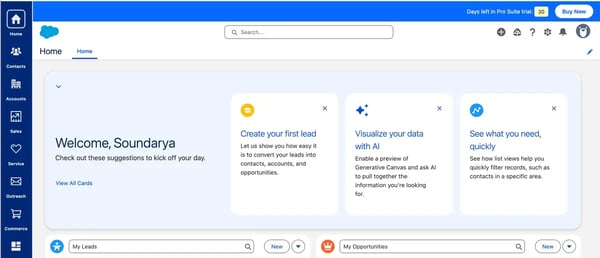
What stood out to me right away was how robust the platform is for case management. Users consistently mention that it handles support at scale like a pro. The omnichannel capabilities, including web, chat, and email case routing, are a huge win for support teams juggling multiple channels.
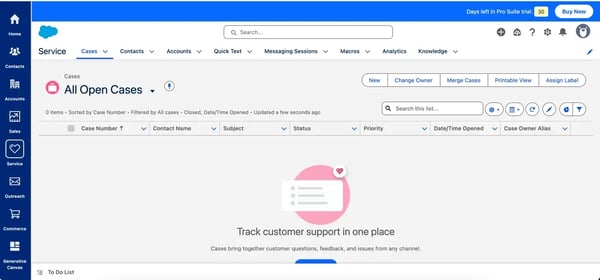
In the screenshots I captured during my trial (before setting up the channels), you can see just how centralized and clean the case view is. You can assign labels, change owners, merge cases, and track everything with customizable filters. Everything, from setting up a new case and updating it to adding knowledge base articles, felt neat once you understood the flow.
Where Salesforce Service Cloud really shines, according to users, is in customizability. You can tailor workflows, automate actions, and build dashboards that actually reflect your customer lifecycle. While evaluating G2 reviews, I saw users mention that it’s a centralized system that makes collaboration easier.
Another thing that jumped out to me was the way AI is subtly integrated throughout the platform. From generating answers to summarizing customer conversations to using Einstein AI for predicting trends, Salesforce seems to be taking a thoughtful approach to automation.
Users often mention pricing as an important factor when evaluating Salesforce Service Cloud, particularly as teams grow and expand their use of the platform. Because it offers a wide range of advanced features and capabilities, organizations may benefit from reviewing the available plans to find the option that best aligns with their needs and scale.
Some users note that while the platform’s customization capabilities are a major strength, making the most of them may require admin or developer support. In my own trial, I found that setting up more advanced workflows and configurations can take a bit of time at first. However, once implemented, it can become a strong foundation for managing customer success, especially for teams already using Salesforce as their CRM.
Overall, based on my evaluation, Salesforce Service Cloud stands out as a comprehensive platform for managing customer relationships, support operations, and long-term engagement from a single ecosystem.
What I like about Salesforce Service Cloud:
- The case management experience is genuinely powerful; it’s easy to track, assign, and organize support requests across multiple channels without things slipping through the cracks.
- I really like how customizable the platform is. Being able to tailor workflows, dashboards, and automation to fit different CS processes is a huge plus.
What G2 users like about Salesforce Service Cloud:
“Salesforce Service Cloud centralizes customer interactions across channels—cases, email, chat, phone, and social—so agents don’t have to jump between systems or risk losing context. The case management and automation are a big plus: routing, macros, flows, and SLAs make it easier to handle high volumes efficiently while still staying compliant and consistent.“
– Salesforce Service Cloud Review, Rachel P.
What I dislike about Salesforce Service Cloud:
- Making the most of the platform’s deep customization and advanced workflow configuration may require admin or developer support, especially for teams new to the Salesforce ecosystem.
- Pricing can become an important consideration for growing teams, as costs may scale with expanded feature usage and larger deployments.
What G2 users dislike about Salesforce Service Cloud:
“Some features of Salesforce Service Cloud have a steep learning curve, especially for new users. Customizations sometimes require technical expertise, and some advanced configurations can be time-consuming. The licensing cost is also on the higher side compared to other tools.”
– Salesforce Service Cloud Review, Mohd shahnawaz A.
2. Gainsight Customer Success: Best for data-driven CS at scale
Gainsight Customer Success is used by 58% mid-market teams, according to G2 Data. It gives customer success teams the insight they need to drive real gains in retention, engagement, and growth.
It’s no surprise that Gainsight frequently ranks among the leading customer success applications for technology firms, especially those with mature CS operations and complex customer lifecycles.
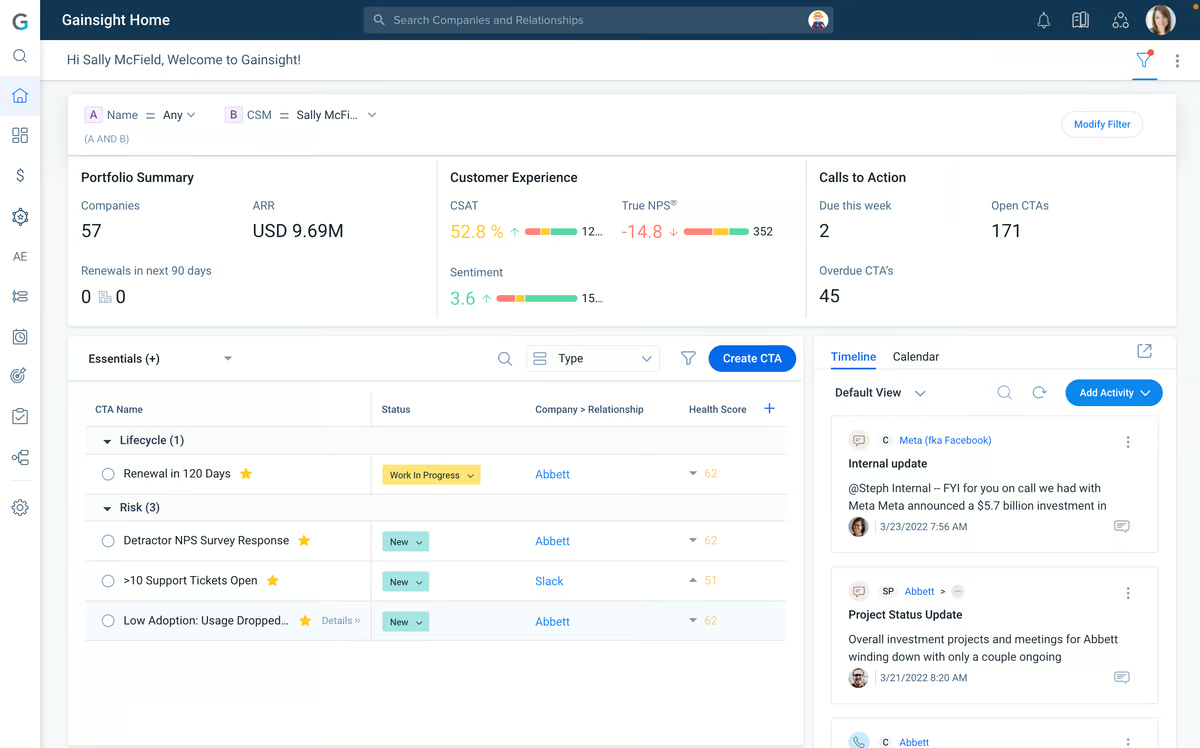
I only had access to a demo of Gainsight, and I can see why so many CS teams swear by it. From what I gathered during my demo and confirmed by dozens of user reviews, it’s clearly built for teams that need full visibility into customer health, relationships, and outcomes.
What stood out to me first is how many users highlight the Timeline and 360-degree views. It sounds like Timeline has become the go-to spot for staying on top of every interaction, touchpoint, and update tied to a customer. A lot of CS professionals described it as their single source of truth, especially when juggling a large book of business. That’s the kind of structure I know a lot of teams wish they had — less hunting across tools, more time actually helping customers.
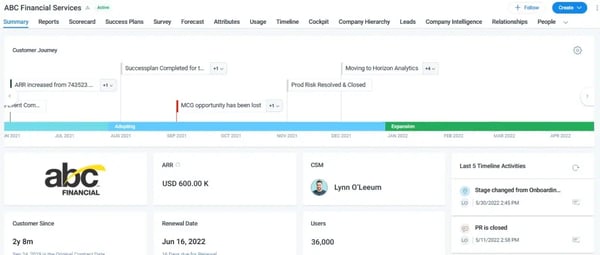
I also saw a lot of praise for Gainsight’s dashboards and automation features. Users mention how easy it is to track account health, set up alerts, and even forecast risk. The ability to customize playbooks and trigger workflows based on behavior or product usage seems like a huge plus, especially for CS teams trying to scale without losing that personal touch.
Users often highlight the platform’s comprehensive functionality, which can involve navigating through multiple steps to access certain features. In fast-paced environments where teams manage a high volume of accounts, some reviewers note that a more streamlined navigation flow could further support efficiency. Adjustments that simplify access to commonly used actions may help teams move through daily tasks even more smoothly.
Another theme that came up frequently was the depth that comes with its feature-rich design. Gainsight offers a wide range of capabilities, and making the most of them may take some time as teams familiarize themselves with the platform. With the right resources and implementation approach, many teams find the platform well-positioned to deliver long-term value.
Overall, based on my evaluation, Gainsight isn’t just another CRM add-on — it’s a purpose-built customer success platform with real depth. Whether it’s surfacing product adoption trends or supporting interdepartmental collaboration, the tool seems to deliver value across the board.
What I like about Gainsight Customer Success:
- I love how Gainsight pulls everything into one place. Having a 360-degree view of accounts, timelines, health scores, and playbooks makes it way easier to stay proactive.
- The dashboards and automation options are impressive. It feels like I can build workflows that actually reflect how the CS team works, not just force us into a preset system.
What G2 users like about Gainsight Customer Success:
“What I appreciate most about Gainsight is how it changes the way customer work is prioritized. Instead of relying on gut feeling or scattered notes, the platform gives a clear sense of which accounts need attention and why. Timelines and automated cues help keep conversions contextual, so customer interactions feel more informed and consistent.”
– Gainsight Customer Success Review, Avyan S.
What I dislike about Gainsight Customer Success:
- Accessing certain features can involve multiple steps, and some users note that more streamlined navigation could further support efficiency when managing a high volume of accounts.
- Gainsight’s extensive feature set may take some time for teams to fully explore and operationalize, particularly during the initial implementation phase.
What G2 users dislike about Gainsight Customer Success:
“I wish I had more access in terms of integrations with our other systems, but that might be more of a permissions issue rather than a Gainsight issue.“
– Gainsight Customer Success Review, Jessica C.
3. ChurnZero: Best for churn reduction in SaaS businesses
According to G2 Data, ChurnZero is used by 63% mid-market teams. It helps teams to keep track of dozens of accounts, health scores, and touchpoints. Users also mention how the tool streamlines customer management and enhances productivity.
What stood out to me immediately, from user feedback, is how well ChurnZero brings everything together. It’s designed to be a true command center for CS teams: account overviews, task tracking, playbooks, health scores, and customer journeys are all in one place.
Many users mentioned how helpful it is to have visibility across the customer lifecycle without jumping between tools, and that definitely came through in the way people described their daily workflows.
Customization also seems to be a big win. Users consistently mentioned how easy it is to tailor dashboards, automate processes, and segment accounts based on whatever metrics matter most to them.
ChurnZero gives teams a lot of flexibility without complexity. There’s also a strong emphasis on proactivity. Things like reminders, alerts, and playbooks seem to help teams take action before problems snowball into churn.
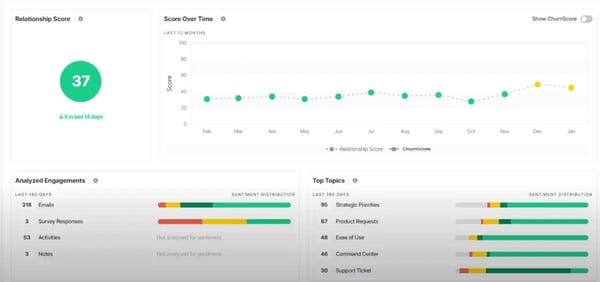
Based on several user reviews, some teams mention that it can take a bit of time to become fully familiar with everything ChurnZero offers. The platform includes a wide range of capabilities, and while that depth is a clear advantage, exploring and configuring all its features may take some initial time as teams settle into the workflow.
A few reviewers also mention that the interface prioritizes functionality, which can involve navigating through multiple steps in certain areas. Many users note that once they become familiar with the system, moving through the platform feels much more intuitive, though there may be a short adjustment period at the start.
For most teams, these are manageable trade-offs. On the whole, ChurnZero is definitely a strong contender in the customer success space.
What I like about ChurnZero:
- Everything’s centralized — tasks, customer data, journeys, and notes all live in one place, which makes staying organized so much easier.
- The automation and customization options stood out. From what I’ve seen, it’s flexible enough to support different CS models without forcing a one-size-fits-all setup.
What G2 users like about ChurnZero:
“The health scoring metrics and flexibility of ChurnZero to integrate usage statistics within our platform into the overall health evaluation of our customers are fantastic and not something I had access to in my old role. This ability has meant aggregating customers is far easier, streamlined, and scalable.”
– ChurnZero Review, Josh P.
What I dislike about ChurnZero:
- ChurnZero’s extensive feature set may take some time for teams to fully explore and configure as they become familiar with the platform.
- Some users note that certain tasks may involve navigating through multiple steps, particularly when first getting familiar with the platform’s interface.
What G2 users dislike about ChurnZero:
“We could use additional customization on certain ChurnZero features. For example, the Success Plan functionality works great for our needs. We use that functionality to power Save Plans, too. Unfortunately, we can’t rename Success Plans to just ‘Plans’. Accordingly, we see the term ‘Success Plan’ when we’re looking at ‘Save Plans’, creating some confusion.”
– ChurnZero Review, Amanda F.
4. Planhat: Best for customer success management in the software industry
From renewals and QBRs to portfolio health and account insights, Planhat is built to give CS orgs the clarity and structure they need to stay on top of their pipeline and customers. It’s especially popular with mid-market and enterprise teams that need visibility into what’s happening across segments without losing speed.
With its emphasis on flexibility and structured visibility, Planhat is often considered among the best-rated client success software for tech enterprises looking to track QBRs, renewals, and growth signals in one place. According to G2 Data, Planhat is used by 33% small businesses and 61% mid-market teams.
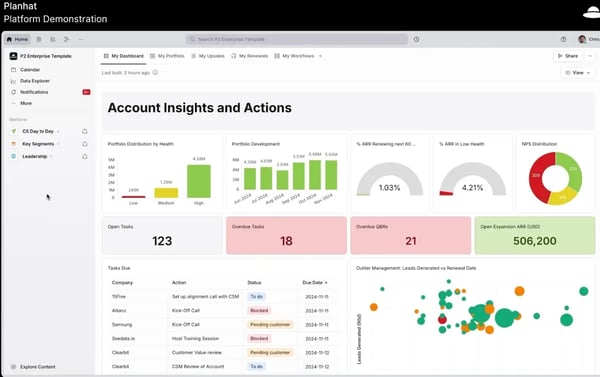
After watching the platform demo and digging into recent G2 reviews, it’s clear that Planhat puts real thought into the CS workflow. The dashboard design is sharp. It’s simple, but packed with context.
You can quickly see account health, task status, renewal risk, and open expansion opportunities all in one view. I found the way it visualizes customer portfolios genuinely helpful. Several reviewers called out the time they save by having everything, from NPS scores to overdue QBRs, in one place.
What stood out the most was the balance of flexibility and structure. Users are not forced into a rigid playbook, but they still have the tools to keep things consistent: playbooks, lifecycle tracking, alerts, and integrations that actually plug into your day-to-day tools.
Some users mention that configuring dashboards and working with advanced workflows may take a bit of time as teams become familiar with the platform. Others note that while the interface is clean and well-designed, exploring the layout and understanding how different features connect can take some initial time during the onboarding phase.
Some reviewers mention that having more extensive integration options could further support teams connecting tools beyond the core ecosystem. Additional flexibility in configuring integrations may help organizations bring a wider range of tools from their existing tech stack into the platform.
But overall, people seem to genuinely enjoy working in Planhat, mostly because it helps them stay organized, align better with internal teams, and prioritize the right customer actions without guessing.
What I like about Planhat:
- I really like how customizable the dashboards are. It’s easy to tailor views around account health, renewals, and customer activity without feeling locked into rigid templates.
- The way Planhat pulls in data from different systems and gives you a full picture of your portfolio makes it feel like a true operational hub for CS teams.
What G2 users like about Planhat:
“Planhat is an extremely powerful tool that leverages a lot of different requirements for me and the CS team. It’s intuitive (once you know what you’re doing), and their support team is always on hand to assist with problems as and when they arise. I use it every single day in my role & although I didn’t implement it originally, we have set up a huge number of automations and integrations with the platform that aid us in our day-to-day work. It’s a really good tool.“
– Planhat Review, Jonathon W.
What I dislike about Planhat:
- Configuring dashboards and advanced workflows may take some time initially as teams familiarize themselves with the platform’s layout and features.
- Some users mention that broader integration options and more flexible configuration could further support connecting tools beyond the core ecosystem.
What G2 users dislike about Planhat:
“We encounter some integration complexities, more so with data platforms, which affects the accuracy of any insights or analysis. Some inconsistencies and inaccuracies are experienced, more so when dealing with big datasets that need processing.”
– Planhat Review, Ifeoma E.
5. HubSpot Service Hub: Best for customer success and support unified with CRM
HubSpot Service Hub, helps teams manage customer support, retention, and engagement from within the broader HubSpot ecosystem. According to G2 Data, it is used by 41% small businesses and and 53% mid-market teams.
One of the most widely appreciated capabilities is the ticketing system. Service Hub allows teams to create, track, and prioritize support requests through structured pipelines and automated workflows. Tickets can be automatically routed to the right team members, ensuring that customer issues move through the resolution process efficiently while maintaining clear ownership.
Another key strength I noted is the platform’s shared inbox and conversation management tools. Emails, live chats, and messaging conversations are consolidated into one collaborative workspace, allowing teams to respond quickly while keeping communication organized.
I also noticed frequent praise for HubSpot’s knowledge hub functionality. Teams can build self-service support centers where customers can access help articles, guides, and documentation. This not only empowers customers to find answers independently but also reduces support workload by deflecting common questions.
HubSpot Service Hub also stands out for its automation. Through workflow automation, teams can automatically assign tickets, trigger follow-ups, escalate issues, or send notifications based on customer activity. These automated processes help standardize support operations while allowing customer success teams to focus on higher-value interactions.
Service Hub also benefits from its deep CRM integration within the HubSpot ecosystem. Because customer service data connects directly with marketing, sales, and customer records, teams gain a complete view of each customer’s journey. This unified data structure helps customer success managers personalize interactions and identify opportunities for retention and growth.
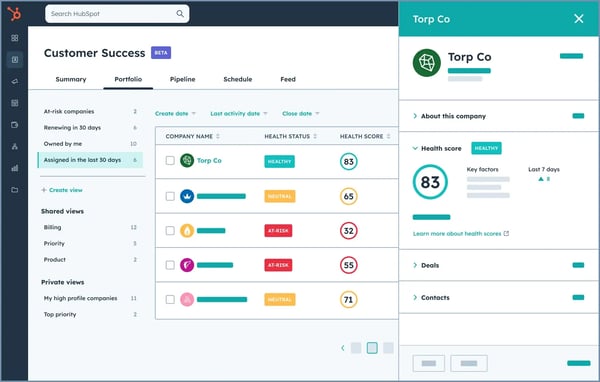
Some users mention that expanded customization flexibility could further support teams looking to tailor dashboards, views, and more advanced workflows to match their specific operational needs. While the platform provides a structured and user-friendly setup, additional configuration depth in certain areas may help teams with more complex service processes refine their workflows further.
Another point that comes up in reviews relates to feature availability across plans. A few users note that some advanced capabilities are included in higher subscription tiers, so organizations may evaluate different plan options as their customer support and success operations scale.
Based on my evaluation, HubSpot Service Hub stands out as a strong choice for organizations that want to unify customer support and success operations with CRM data.
What I like about HubSpot Service Hub:
- The ticketing system in Service Hub allows teams to create, track, and prioritize support requests through structured pipelines and automated workflows.
- Through workflow automation, teams can automatically assign tickets, trigger follow-ups, escalate issues, or send notifications based on customer activity.
What G2 users like about HubSpot Service Hub:
“HubSpot Service Hub makes it incredibly easy to manage customer communication in one place. The ticketing system and automation tools streamline our workflows, and the shared inbox helps our team stay aligned without things slipping through the cracks. I also appreciate how intuitive the interface is, training new team members is quick, and the reporting provides clear visibility into performance and response times.“
– HubSpot Service Hub Review, Tara H.
What I dislike about HubSpot Service Hub:
- Some users mention that additional customization flexibility for dashboards, views, and advanced workflows could further support teams with more complex service processes.
- Some advanced capabilities are available in higher subscription tiers, so teams may evaluate plan options as their service operations scale.
What G2 users dislike about HubSpot Service Hub:
“The free version works well for daily use, but there are some limits. You can only have a certain number of contacts, dashboards, reports, and email templates. Some advanced features and integrations are only available on paid plans. For now, it’s fine, but it could feel limiting as your needs grow.”
– HubSpot Service Hub Review, Tarun K.
6. Vitally: Best for product-led growth teams
From what I saw in the product tour and backed by G2 reviews, Vitally feels like it’s built to give customer success teams their time back. Everything about it seems designed for clarity, speed, and customization, especially for teams that want data front and center without drowning in it.
Vitally is quickly gaining a reputation as one of the best platforms for customer success management in the software industry, especially among product-led and data-driven SaaS teams. According to G2 Data, it is used by 42% small businesses and 54% mid-market teams.
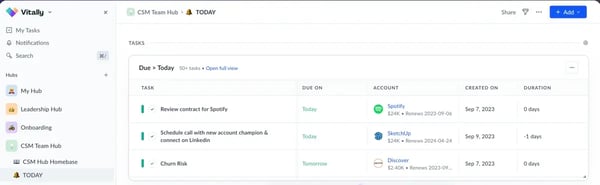
The UI was one of the first things that stood out to me. It looks clean, modern, and actually enjoyable to navigate. Multiple reviewers highlighted that it’s customizable, constantly improving, and gives you control over how you see customer data. You can tell it’s designed with day-to-day usability in mind.
I also liked how clearly tasks and account renewals surfaced. Just from the screenshot alone, it’s easy to imagine a CSM jumping in each morning and knowing exactly what needs attention.
What really impressed me is how Vitally balances being powerful without being overwhelming. It pulls data from multiple tools like CRMs, support systems, product analytics and makes it usable, not just visible. Users seem to love how easy it is to centralize insights and take action.
I also noted reviewers mention that the playbooks and automation workflows look genuinely useful for repetitive tasks like onboarding and lifecycle management. They’re visual, editable, and don’t seem to require a technical background to tweak.
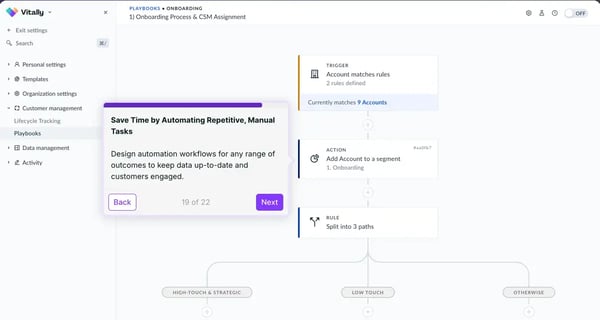
Based on what I saw in user reviews, getting Vitally fully set up and ensuring integrations are configured the way you want can take some initial time. Creating and implementing playbooks also benefits from thoughtful planning, especially when teams are defining the right workflows and triggers for their customer success processes.
A few users also mention that while the interface is clean and modern overall, some areas may take a bit of time to navigate when accessing certain features. As teams become more familiar with the platform, many find that the flexibility and customization options support a wide range of customer success workflows.
Overall, Vitally looks like one of the more modern, CS-first platforms out there. It doesn’t just help you manage customer data; it helps you act on it. If your team wants something powerful but still approachable, this one’s worth a look.
What I like about Vitally:
- I really liked how clean and customizable the UI felt. It’s easy to imagine a CSM starting their day and knowing exactly what to focus on.
- From what I saw and read, the ability to automate playbooks and centralize key data from different tools makes it a super-efficient hub for CS teams.
What G2 users like about Vitally:
“Vitally is highly customizable, which makes it an essential part of how we manage Customer Success at Streamline. I use it daily to build and maintain playbooks, automate QBR workflows, and create dashboards that track renewal timelines, CSAT results, and product adoption across our accounts. It has helped align our CS processes with other departments like Product and Marketing by giving us visibility into account health and activities in one place. We’ve also been able to tailor it to our own team structure, making it flexible enough for both technical and operational work.“
– Vitally Review, Lana K.
What I dislike about Vitally:
- Initial setup, including configuring integrations and building playbooks, may take some planning to align workflows and triggers with team processes.
- Some areas of the interface may take a little time to navigate when accessing certain features, particularly during the initial stages of use.
What G2 users dislike about Vitally:
“The Vitally interface can feel a bit overwhelming at first because there’s so much information on screen. I also wouldn’t say it’s especially intuitive to navigate.“
– Vitally Review, Laura Valentina M.
7. Totango: Best for quick-start CS journeys
Totango is a customer growth and success platform that keeps things simple without stripping away functionality. According to G2 Data, the customer success tool is used by 57% mid-market teams.
From the walkthrough I saw, it feels like it’s built to support CS teams that want visibility, structure, and flexibility, without having to rely on a CS ops expert just to get started.
The thing I noticed most, and that shows up often in G2 reviews, is how helpful Totango’s segmenting and filtering capabilities are. Users really seem to love how they can quickly slice their customer base by key metrics, track lifecycle stages, and monitor behavior with custom views.
It gives you that high-level dashboard feel while still letting you drill down into what matters. The visual dashboards, task organization, and health score visibility stood out as big wins. You get at-a-glance clarity on renewals, risk, and engagement, which makes it easier for teams to stay on top of what needs attention.
A lot of users also mention that it’s pretty easy to learn. For me, that was refreshing to see. The UI is clean and intuitive, and reviewers often mention that the initial setup doesn’t feel overwhelming, especially compared to some heavier CS platforms.
Reviewers appreciate how Totango’s ongoing updates reflect a clear focus on helping CS leaders and their teams streamline workflows, improve visibility into customer health, and drive measurable outcomes across the customer lifecycle. This commitment to continuous improvement helps teams operate more efficiently while staying focused on delivering consistent value to their customers.
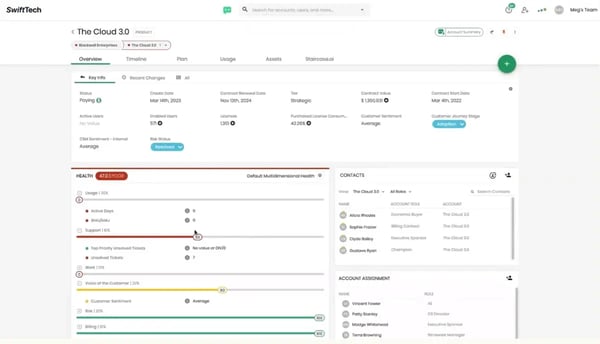
Some users mentioned that certain areas of the platform, such as task creation and management, could benefit from additional flexibility to better support different workflow preferences. Enhancements in this area may help teams tailor task management more closely to their operational needs.
There were also a few mentions around integrations. While the platform supports connections with several tools, some users noted that additional depth or expanded options could further support teams working with a broader tech stack. This may help organizations connect more of their existing tools seamlessly.
Overall, Totango seems like a strong choice for CS teams that want to scale their processes, keep tasks organized, and get a unified view of their customers without drowning in complexity.
What I like about Totango:
- I really liked how easy it seemed to segment customers and track lifecycle stages. The dashboards felt clean and helped surface the right information quickly.
- A lot of users mentioned how approachable the platform is, and I can see why. It looks like something a CS team could get up and running without needing tons of technical setup.
What G2 users like about Totango:
“What I like best about Totango is its clear, actionable customer health insights and the ability to set up automated success plays based on real-time usage and engagement data. It helps prioritize outreach by highlighting accounts at risk or ready for expansion, and its segmentation and task management features make it easy to coordinate follow-ups. The interface is also intuitive, which speeds up adoption across teams.”
– Totango Review, Sagarika S.
What I dislike about Totango:
- Some users mention that task creation and management features could benefit from additional flexibility to better support different workflow preferences.
- I noticed quite a few G2 reviewers mention that expanded integration depth and options could further support teams working with a broader tech stack.
What G2 users dislike about Totango:
“I find Totango sometimes incoherent, as there are fields that appear in certain filters or pages but not in the main account overview. This inconsistency means I have to manually search for and update information like renewal updates or risk updates, which do not appear automatically on the account page. Consequently, I have to remember to manually update these on multiple fronts, which is inefficient.”
– Totango Review, Crow S.
8. Custify: Best for flexible and data-driven customer success
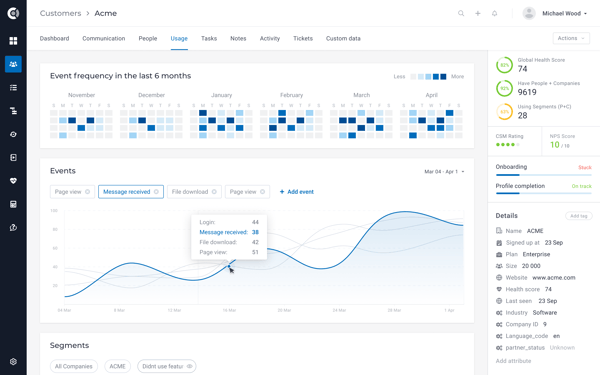
One of the first things that stood out to me was Custify’s ability to provide a customer 360° view. The platform consolidates data from CRM systems, billing tools, support platforms, and product usage tracking into a single customer profile.
This unified perspective makes it easier for CSMs to quickly understand account history, engagement patterns, and recent activity without switching between multiple tools. This works well for teams working with limited tools. According to G2 Data, Custify is used by 63% small businesses.
Another capability I noticed across reviews is the platform’s health scoring system. Custify allows teams to create customizable health scores based on factors like product usage, engagement signals, and support interactions. These scores help CSMs quickly identify accounts that may require attention and prioritize outreach before churn risks escalate.
I also found that automation and playbooks play a major role in how teams use Custify. Customer success managers can design rule-based workflows that automatically trigger tasks, alerts, or communications based on customer behavior or lifecycle milestones. This allows teams to standardize onboarding, adoption, and renewal processes while reducing manual follow-up work.
Another feature I saw frequently mentioned is segmentation. Custify enables teams to group customers based on attributes such as product usage, lifecycle stage, subscription details, or engagement metrics. This makes it easier to personalize communication, launch targeted campaigns, and manage portfolios more strategically as the customer base grows.
The platform also offers strong reporting and analytics capabilities. Teams can build custom dashboards to track metrics such as churn risk, expansion revenue, onboarding progress, and overall portfolio health. These insights help CS leaders measure the impact of their initiatives and identify opportunities to improve retention and customer engagement.
Some users mention that because Custify offers a wide range of customization options and metrics, teams may spend some initial time determining how to structure their workflows, health scores, and automation rules. Once configured, many reviewers note that the platform becomes a central hub for managing customer success operations.
Reviewers mention that expanding email workflow integrations could further support teams that manage customer communication directly from their inbox. While emails sent through Gmail can be logged in Custify, reviewers note that features like a dedicated inbox extension or additional mobile capabilities could help bring customer success activities even closer to their daily workflow.
Based on my evaluation, Custify stands out as a flexible and data-driven customer success platform for SaaS companies looking to centralize customer insights and scale proactive engagement.
What I like about Custify:
- I liked how Custify allows teams to create customizable health scores based on factors like product usage, engagement signals, and support interactions.
- Custify enables teams to segment customers based on attributes such as product usage, lifecycle stage, subscription details, or engagement metrics.
What G2 users like about Custify:
“The most helpful thing about Custify is its automation, along with the integrations with Slack and Outlook. Having everything in sync makes Customer Success much easier.”
– Custify Review, Lisa A.
What I dislike about Custify:
- The platform’s customization options and metrics may require some initial setup time as teams define workflows, health scores, and automation rules.
- Some users mention that deeper email workflow integrations, such as an inbox extension or additional mobile capabilities, could further support managing customer communication within daily workflows.
What G2 users dislike about Custify:
“Custify’s native reporting suite could offer more customization for advanced analytics. While data exports and integrations support our needs, more in-platform reporting flexibility would improve complex visualization and deeper performance analysis.”
– Custify Review, Melissa P.
9. Staircase AI by Gainsight: Best for AI-powered customer intelligence
Staircase AI is used by 65% mid-market teams, according to G2 Data. It helps customer success teams understand engagement and sentiment across accounts, using real-time communication signals.
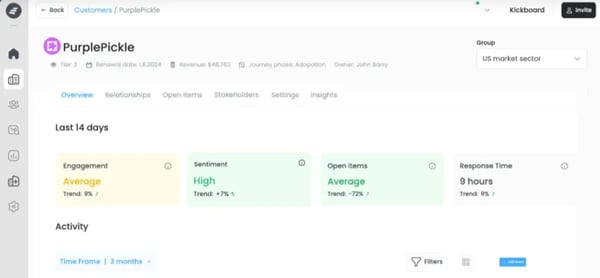
From my evaluation, I can tell it leans heavily on automation and AI to surface insights that might otherwise get lost in the noise, like who’s slipping into risk, which stakeholders are going dark, or where sentiment is trending.
What stood out to me, and clearly to a lot of users, is how easy it is to navigate. Multiple reviewers praised the simplicity of the UI and how intuitive the platform feels day to day. You don’t need a big learning curve to start seeing value. It really helps teams spot early warning signs in customer relationships and flag areas for deeper engagement.
One capability that stands out is Staircase AI’s alerts, which helps teams stay on top of critical customer signals in real time. Notifications can be pushed directly into dedicated Slack channels, allowing key stakeholders to be immediately informed when the platform detects messages with negative sentiment from customers.
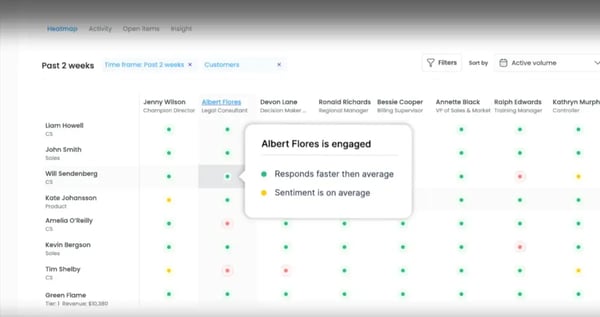
Users also seem to love the clarity Staircase AI brings. Whether it’s surfacing sentiment signals, flagging risks, or showing who’s engaged at what level, the platform gives you a much more complete picture of each account.
A few users mention that the volume of data surfaced by the platform can take some initial time to navigate as teams become familiar with the insights available.
Others also noted that expanded or deeper integrations could further support organizations looking to connect the platform more closely with their existing tools and workflows.
Most users seem genuinely excited about how Staircase AI helps them act earlier, communicate smarter, and manage accounts more holistically. Now that it’s part of Gainsight, I’m curious to see how it evolves, but even on its own, it already seems like a solid tool for teams who want deeper insight without extra busy work.
What I like about Staircase AI by Gainsight:
- I really liked how the platform surfaces relationship signals like engagement, sentiment, and responsiveness without having to dig through calls or emails manually.
- The interface looked clean and easy to navigate, and reviewers seem to agree it’s intuitive enough to start seeing value quickly.
What G2 users like about Staircase AI by Gainsight:
“The AI features are great. They recently launched meeting notes and it has saved me a lot of time post-client calls. The reports are pretty insightful as well and help me quickly see when certain accounts need more attention. I like that we also have a CSM who helps us learn more about the platform.”
– Staircase AI by Gainsight Review, Amanda M.
What I dislike about Staircase AI by Gainsight:
- Some G2 users mentioned that the dashboards and filters could be more flexible. I can see how that might matter if you’re managing a lot of accounts and need sharper views.
- A few G2 reviews also mentioned wanting more integration depth with tools. G2 users noted that strong data sync across platforms is essential for maximizing value.
What G2 users dislike about Staircase AI by Gainsight:
“It’s not a dislike, more of an ask. Staircase has many native integrations, but there’s always room for more. Additional Call Intelligence integrations and SFDC object syncing would be good additions.”
– Staircase AI by Gainsight Review, Stephanie H.
Frequently asked questions (FAQs) on customer success software
1. What are the best-rated client success software for tech enterprises?
Large technology enterprises often consider platforms like Salesforce Service Cloud, Gainsight Customer Success, and Totango, which provide advanced automation, health scoring, and scalable workflows suited for complex customer portfolios.
2. What are the top-rated customer success tools for mobile app businesses?
Mobile app companies frequently explore tools such as ChurnZero, Vitally, and Planhat, which help track product usage, manage onboarding journeys, and automate engagement across growing user bases.
3. What are the leading customer success applications for technology firms?
Technology firms commonly evaluate platforms like Gainsight Customer Success, Totango, Planhat, and Salesforce Service Cloud for managing lifecycle workflows, customer health insights, and expansion opportunities.
4. What’s the most recommended customer success platform for SaaS companies?
SaaS companies often consider tools such as ChurnZero, Gainsight Customer Success, Vitally, and Custify, which are designed to track product adoption, automate success playbooks, and identify churn risks.
5. What are the most effective customer success software for app developers?
App developers frequently look at platforms like Custify, Vitally, and Planhat, which provide product usage insights, segmentation, and automation to help manage onboarding, engagement, and retention.
6. Which customer success software is ideal for large service providers?
Large service organizations often evaluate Salesforce Service Cloud, Gainsight Customer Success, and Totango, as these platforms support enterprise-scale workflows, integrations, and customer lifecycle management.
7. Best customer success software for small tech startups?
Small startups typically consider tools like Custify, HubSpot Service Hub, and Vitally, which provide essential features such as automation, health scoring, and customer tracking without requiring heavy implementation.
8. What are the best customer success platforms for growing software companies?
Growing software companies often evaluate ChurnZero, Planhat, Totango, and Vitally, which support scalable customer engagement, automated workflows, and analytics as teams expand.
9. What is the best platform for customer success management in the software industry?
Across the software industry, commonly used platforms include Gainsight Customer Success, Salesforce Service Cloud, Totango, and ChurnZero, which help centralize customer data, automate playbooks, and improve retention strategies.
10. What’s a reliable customer success tool for digital service companies?
Digital service companies often evaluate solutions like HubSpot Service Hub, Staircase AI by Gainsight, and Planhat, which provide customer insights, communication tracking, and engagement signals to help teams proactively manage client relationships.
Your license to retain
After spending some time exploring different customer success software platforms, one thing became clear to me: the “best” software isn’t just about features. It’s about fit.
What works beautifully for a SaaS company with a high-touch model might feel clunky or excessive for a product-led growth team. I learned that understanding your internal workflows, customer lifecycle stages, and the real pain points your CS team faces is more important than chasing shiny dashboards or the most expensive solution.
Here’s another thing I picked up during this process: pay close attention to how well the platform enables proactive engagement. Tools that offer deep integrations and usage-based triggers (like when a customer hasn’t logged in for 7 days or drops below a certain health score) will help your team move from reactive firefighting to strategic relationship building. That shift is where the real ROI of customer success software starts to show.
Whether you’re running a small tech startup, a mobile app company, or a large digital services firm, investing in a reliable customer success tool tailored to your growth stage and industry can drastically improve your retention outcomes.
If you’re still unsure, don’t just rely on vendor demos. Talk to teams similar to yours and run short pilots when possible. The right tool won’t just help your customers succeed; it’ll also make your CS team feel empowered, efficient, and aligned with growth.
Want to improve customer satisfaction? Learn how to care for unhappy customers with escalation management.