6 AI Customer Support Agent Software Solutions to Consider in 2026
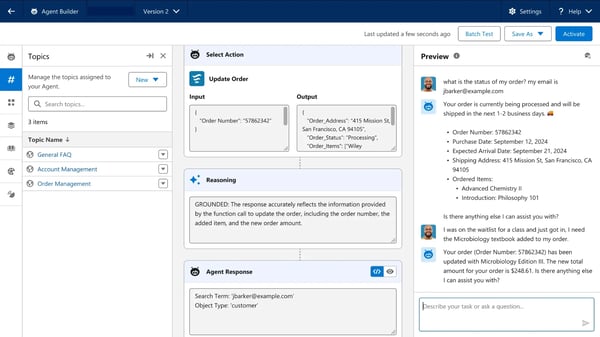
I reviewed the leading AI customer support agent software to find the top platforms for today’s customer service teams. The standout options include Salesforce Agentforce, Fin, HubSpot Service Hub, Jotform AI Agents, Zendesk for Customer Service, and Genesys Cloud CX.
An AI agent that answers every question isn’t always the one that lowers your support costs. Nearly all tools handle common questions, but key differences arise when conversations get complex, customers change channels, or AI must fetch relevant business context and decide whether to solve problems or escalate to humans.
Each platform takes a unique approach to AI-powered support—some prioritize conversational quality, others lean on CRM integration, workflow automation, or omnichannel management. Choosing the best platform depends more on how it matches your support team’s workflow than on sheer feature count.
My analysis combined G2 reviews, vendor documentation, and product data, focusing on conversation quality, escalation, integrations, usability, and blending automation with human interaction. From this, six AI customer support platforms emerged as leaders.
These tools shine not because they reply fastest, but because they help organizations solve more customer issues, reduce agent effort, and provide the seamless support experiences customers expect.
Top 6 AI Customer Support Agent Software for 2026:
- Salesforce Agentforce: Ideal for Salesforce-driven autonomous support, with AI agents accessing CRM data and automating workflows ($500 per 100k credits).
- Fin: Best for conversational AI support that feels natural, using existing content to answer questions ($0.99 per outcome).
- HubSpot Service Hub: Great for unifying customer support and data, combining ticketing, automation, AI, and CRM in one place ($7 per seat/month).
- Jotform AI Agents: Perfect for building AI agents with no coding, enabling automation of conversations and workflows ($34/month).
- Zendesk for Customer Service: Excels at scaling omnichannel support with ticket management, automation, and self-service ($19 per agent/month).
- Genesys Cloud CX: Designed for orchestrating complex customer experiences across channels with routing, workforce management, and AI support ($75 per user/month).
These tools are top-rated in their category, as per the G2 Summer 2026 Grid Report, with listed starting prices for easy comparison.
Why These Platforms are Valuable
AI agents automate interactions, answer frequent questions, route issues, deliver
I evaluated the top AI customer support agent software to identify the best platforms for modern customer support teams. These are Salesforce Agentforce, Fin, HubSpot Service Hub, Jotform AI Agents, Zendesk for Customer Service, and Genesys Cloud CX.
An AI customer support agent that answers every question isn’t necessarily the one that reduces your support costs.
Nearly every tool could resolve common inquiries. The real differences appear when conversations become complex, customers switch channels, or the AI needs to retrieve the right business context and decide whether to resolve the issue itself or hand it to a human agent.
That distinction became clear as I analyzed the best AI customer support platforms. I found that every platform approached AI-powered support from a different angle. Some focused on conversational experiences, others emphasized CRM integration, workflow automation, or omnichannel support. That made the decision less about choosing the platform with the most AI features and more about finding the one that best fits the way a support team operates.
To build this guide, I analyzed G2 reviews alongside vendor documentation and product data. I focused on conversation quality, escalation handling, integrations, usability, and how effectively each platform balanced automation with human support. Based on that analysis, six AI customer support agents software topped my list.
These tools stand out not because they generate the fastest replies, but because they help organizations resolve more customer issues, reduce agent workload, and deliver the kind of support experience customers increasingly expect.
6 best AI customer support agents software for 2026: My top picks
Salesforce Agentforce: Best for Salesforce-powered autonomous customer support
AI agents that can access CRM data, automate support workflows, and take action across the Salesforce ecosystem. ($500/100k credits)
Fin: Best for delivering AI-powered support that feels conversational
Customer service AI built to resolve questions using existing support content while maintaining natural, human-like interactions. ($0.99/outcome)
HubSpot Service Hub: Best for managing customer support and customer data in one place
A unified customer service platform that combines ticketing, automation, AI assistance, and CRM context in a single workspace. ($7/seat/month)
- Jotform AI Agents: Best for building AI customer support agents without technical complexity
No-code AI agents that help teams automate customer conversations, collect information, and support common service workflows. ($34/month) - Zendesk for Customer Service: Best for scaling omnichannel customer support operations
Customer service platform designed to manage conversations, automation, self-service, and support workflows across multiple channels. ($19/agent/month) - Genesys Cloud CX: Best for managing complex customer experiences across channels
Experience orchestration platform that connects customer interactions, routing, automation, workforce management, and AI-driven support. ($75/user/month)
*These AI customer support agent software are top-rated in their category, according to the G2 Summer 2026 Grid Report. I have mentioned the starting price of their paid plans for easy comparison.
Best AI customer support agent software I’ve found most useful
AI customer support agent software helps businesses automate customer interactions, answer common questions, route requests, surface relevant information, and assist support agents during conversations. As I evaluated the tools in this category, I found that the strongest platforms went beyond basic chatbot functionality by helping teams manage workflows, support self-service experiences, and handle routine inquiries more efficiently.
What makes this category particularly interesting to me is that the goal isn’t necessarily to replace support agents. The best platforms I evaluated were the ones that helped teams work more efficiently while still keeping humans involved when needed. In many cases, that meant reducing repetitive work, improving response consistency, and making support operations easier to scale. That’s also why customer service automation has become such a priority for support leaders looking to improve efficiency without sacrificing the customer experience.
The value of that approach is already showing up in real-world results. According to IBM, organizations that have operationalized and optimized AI-powered customer service report 17% higher customer satisfaction than those that haven’t. IBM also found that 70% of customer service managers already use generative AI to analyze customer sentiment, which suggests that AI is becoming a practical part of everyday support operations rather than something teams are simply experimenting with.
As I evaluated the tools on this list, I found that the strongest options weren’t always the ones with the most AI capabilities. They were the ones that fit naturally into existing support workflows and helped teams deliver faster, more consistent customer experiences without creating additional complexity.
How did I find and evaluate the best AI customer support agent software?
I started with G2’s Grid® Report to build a shortlist of the top AI customer support agent software based on G2 Score, user satisfaction, and overall market presence.
Next, I dug into G2 reviews at scale with AI to spot the patterns that keep showing up for teams evaluating AI customer support agent software: what actually helps support teams handle growing ticket volumes, where automation workflows break down, and which capabilities truly reduce repetitive support work without creating additional complexity.
My evaluation also focused on usability, integrations, automation, AI conversation quality, and how effectively each tool helps teams balance customer self-service with human support. I looked closely at knowledge base utilization, escalation handling, and workflow management since these factors can have a direct impact on support efficiency.
Verified G2 reviews played an important role in the evaluation as well. Using AI, I analyzed recurring strengths, limitations, usability, and overall value to understand which platforms consistently deliver positive support experiences and which ones are best suited for different customer service needs.
The screenshots in this article come from G2 vendor profiles and publicly available product documentation.
What makes the best AI customer support agents software: My selection criteria
To narrow down the list, I focused on the capabilities that have the biggest impact on support efficiency and customer experience. While every platform approaches AI-powered support differently, these were the factors I paid the closest attention to during my evaluation:
- Conversation quality and accuracy: The best tools understand customer intent, maintain context, and provide relevant answers without making interactions feel robotic.
- Knowledge base utilization: Strong AI agents can pull from existing support content, FAQs, and documentation to deliver consistent and reliable responses.
- Automation and ticket handling: I prioritized platforms that help reduce repetitive work through ticket routing, workflow automation, and automated issue resolution.
- Human agent collaboration: AI works best when it knows when to involve a person. Effective escalation and agent handoff capabilities were important evaluation factors.
- Integrations and customer context: The strongest platforms connect with CRMs, help desks, and business systems so support teams can work with complete customer information.
- Ease of implementation and usability: Even the most capable AI platform can create friction if it’s difficult to deploy or manage. I looked closely at how easy each platform is to set up, adopt, and use based on reviewer feedback.
- Scalability: Customer support needs change over time, so I favored tools that can support growing ticket volumes, larger teams, and increasingly complex workflows.
One thing worth mentioning is that AI customer support agents aren’t all designed for the same use case. Some focus on conversational AI, while others emphasize workflow automation, customer service operations, or customer experience management. That’s why I focused on practical support outcomes rather than vendor positioning.
The list below contains genuine user reviews from the AI Customer Support Agents software category. To be included in this category, a solution must:
- Integrate deeply with business systems such as CRMs or knowledge bases to enable data-driven, role-specific interactions
- Utilize NLP or speech recognition to provide accurate, context-aware responses
- Offer dashboards or insights reports for agent interaction and performance data
- Enable seamless human-in-the-loop functionality for escalating complex or unresolved tickets
- Support advanced automation for proactive task execution, including ticket resolution and inquiry deflection
- Maintain security, compliance, and data privacy protocols aligned to enterprise standards
- Provide modularity for integrating third-party tools into the agent’s workflow
Support omnichannel communication across email, chat, social media, and other platforms - Execute tasks on behalf of the customer, such as appointment scheduling, subscription renewal, or refunds, via function calling or model context protocol
*This data was pulled from G2 in 2026. Some reviews may have been edited for clarity.
1. Salesforce Agentforce: Best for Salesforce-powered autonomous customer support
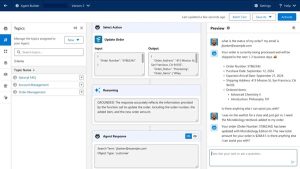
What immediately stood out to me about Salesforce Agentforce is that it doesn’t operate as a separate AI layer sitting outside your support systems. Salesforce positions it as a platform for building autonomous AI agents, and from what I observed in both the product information and G2 reviews, its biggest advantage comes from being deeply embedded within the Salesforce ecosystem.
One capability that consistently stood out in reviews was Agentforce’s ability to bring customer context into every interaction. Instead of treating conversations in isolation, the platform uses information from customer records, cases, and knowledge articles to help agents respond with greater relevance. Several G2 reviewers mentioned that this reduced the time spent searching for information and made support interactions feel more informed.
Action-taking capabilities also appear to be a major differentiator. Many AI support tools focus primarily on generating responses, but G2 users often highlighted Agentforce’s ability to automate repetitive service processes and move work forward within existing workflows. That emphasis on automation is reflected in its 88% customer interaction automation score on G2.
Knowledge management is another area where Agentforce performs particularly well. Knowledge base utilization is one of its highest-rated capabilities at 89%, and reviewers regularly mentioned the platform’s ability to surface relevant information quickly. For teams handling large support volumes, that can help reduce repetitive questions while improving response consistency.
I also noticed that many organizations use Agentforce to extend workflows they already have in place rather than introducing an entirely new support process. G2 reviewers frequently mentioned building AI into existing service operations, allowing teams to automate work while maintaining familiar processes and governance. For organizations looking to expand their support capabilities without disrupting established workflows, that continuity can be a meaningful advantage.
Another advantage is flexibility. Users frequently referenced the ability to tailor agents, workflows, and business processes to their specific requirements. That customization can be especially valuable for organizations with unique support models or more sophisticated service environments that outgrow rigid, one-size-fits-all automation tools.
The platform’s administration experience also received positive feedback. Ease of administration scores 86% on G2, and several reviewers noted that once workflows are configured, managing and refining agents feels relatively straightforward. For teams planning a long-term AI support strategy, that operational control can be just as important as the AI itself.
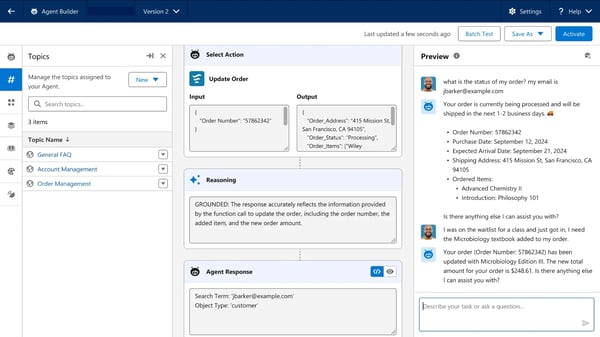
One tradeoff I encountered repeatedly in reviews is that Agentforce often requires more planning during implementation than lighter-weight AI support tools. However, many reviewers framed that additional setup effort as a consequence of the platform’s flexibility. Teams with complex service operations may ultimately benefit from having more control over how agents behave and interact with existing business processes.
Another consideration is how Agentforce approaches customer conversations. Because it’s designed to work closely with predefined workflows, business rules, and organizational data, teams looking for highly open-ended conversational AI may want to evaluate how much flexibility they need. At the same time, many G2 reviewers appeared comfortable with that approach because it helps create more consistent and controlled customer experiences.
What ultimately makes Agentforce stand out is its ability to connect AI with the broader service operation rather than treating it as a standalone support tool. For organizations already invested in Salesforce and looking to automate customer service without losing operational context, it offers a practical path toward more autonomous support.
What I like about Salesforce Agentforce:
- The platform connects AI agents directly to Salesforce data, cases, workflows, and knowledge bases, making customer interactions more context-aware and actionable.
- Strong ratings for knowledge base utilization and customer interaction automation reflect its ability to reduce repetitive support work while helping teams scale service operations.
What G2 users like about Salesforce Agentforce:
“What I like most about Salesforce Agentforce is its ability to create autonomous AI agents that operate directly within the Salesforce ecosystem. It helps automate repetitive tasks, enhance customer interactions, and deliver real-time insights based on CRM data. The low-code setup makes it easier to build, tailor, and refine agents without a heavy development lift, and its integration with Salesforce tools like CRM, Data Cloud, and automation workflows makes it especially efficient for streamlining business processes.”
– Salesforce Agentforce review, Aniket N.
What I dislike about Salesforce Agentforce:
- Setting up agents and workflows may require more planning than some lightweight AI tools, but that flexibility can be valuable for organizations with complex service operations.
- Teams handling highly nuanced or multilingual support scenarios may want more conversational flexibility, though many G2 users still value the platform’s consistency and workflow-driven approach.
What G2 users dislike about Salesforce Agentforce:
“As a new Salesforce user, I find it has a steep learning curve, and there are many things that need to be taken care of while implementing it in the system. In many scenarios, Agentforce solutions feel rigid and stick too closely to the given instructions. As an AI-backed platform, it should improve by learning from user interaction.”
– Salesforce Agentforce review, Snigdh G.
2. Fin: Best for delivering AI-powered support that feels conversational
As I worked through customer reviews for Fin, I kept coming back to the same theme: G2 users weren’t just talking about automation. They were talking about the quality of the conversations themselves. Built by Intercom, Fin is an AI customer service agent that uses existing support content to answer customer questions, but its appeal seems to extend beyond simple ticket deflection.
Natural language interaction is where the platform stands out most. Fin earned a 96% satisfaction score for this capability on G2, making it its highest-rated feature. G2 reviewers frequently described the responses as natural, relevant, and easy to understand, which helps explain why many organizations use it as a customer-facing support channel rather than just an internal automation tool.
Another strength is its ability to maintain context throughout customer conversations. Several users noted that Fin can follow the flow of a discussion and provide answers that feel connected rather than fragmented. For support teams, that can create a smoother experience and reduce the need for customers to repeat information.
What also caught my attention was how often reviewers mentioned confidence and trust. Many G2 users described feeling comfortable letting Fin handle customer inquiries because the responses stayed consistent with the information already published in their help centers and support documentation. That consistency helped teams deliver answers that reflected their existing support processes and brand voice rather than introducing responses that felt disconnected or unpredictable. For organizations that value consistency as much as speed, that can be an important advantage.
The platform also appears to fit naturally into existing support environments. Cross-system integration scores 88% on G2, and users frequently referenced how easily Fin connects with existing customer support operations. Rather than forcing teams to redesign their workflows, it often works alongside processes they already have in place.
Several G2 reviewers also highlighted the practical impact on agent workloads. By handling common inquiries and routine requests, Fin helps support teams spend more time on complex conversations that require human judgment. Many users described it as an extension of their team rather than a replacement for it.
Ease of adoption is another reason the platform earns positive feedback. Ease of use and meeting requirements both score 89% on G2, and reviewers regularly mentioned getting started without lengthy implementation projects. For teams looking to introduce AI into support operations, that shorter path to value can be appealing.
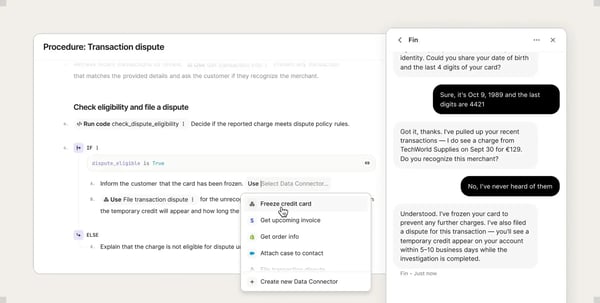
One thing I noticed while reading reviews is that the platform performs best when it’s supported by well-maintained documentation. Since Fin relies on existing knowledge sources to generate responses, organizations with limited or outdated support content may need to spend some time strengthening their knowledge base before seeing the strongest results. On the other hand, teams with mature documentation are likely to benefit from more accurate and consistent customer interactions because the AI has richer information to work from.
According to G2 reviews, organizations looking to automate a broader range of service operations may find Fin’s capabilities more focused on customer support conversations than end-to-end service workflows. That said, I noticed that teams get the most value from the platform when they use it to handle common customer inquiries and routine support requests. Many reviewers seemed comfortable with that balance because it allowed Fin to stay focused on delivering consistent, conversational support rather than stretching across every service function.
After evaluating Fin, I came away with the impression that it prioritizes customer experience as much as operational efficiency. For organizations that want AI support interactions to feel useful, relevant, and genuinely conversational, that emphasis could be its biggest advantage.
What I like about Fin:
- Its natural language capabilities help conversations feel more human, which can make AI-powered support less frustrating for customers and more effective for support teams.
- Fin works well with existing knowledge bases and support content, allowing teams to automate common inquiries without rebuilding their processes.
What G2 users like about Fin:
“What I like most about Fin by Intercom is how effectively it delivers high-quality, on-brand AI support at scale without sacrificing accuracy or control. In my daily work, Fin runs seamlessly within the Intercom ecosystem, drawing on existing help center content, conversation history, and established workflows. This keeps setup quick and helps minimize operational overhead.”
– Fin review, Jan B.
What I dislike about Fin:
- Organizations with evolving or frequently changing support content may need to spend additional time keeping their knowledge base up to date, though that investment helps Fin deliver more accurate and consistent responses.
- Organizations looking to use AI across a broader range of service operations may want to evaluate how Fin fits into those workflows, while teams focused primarily on customer support are likely to appreciate its specialized approach.
What G2 users dislike about Fin:
“What I dislike is that the accuracy on niche/specific questions is lower in Fin. It depends a lot on how well your help‑docs / knowledge base cover a topic. If your content isn’t clear, detailed, or well‑structured, Fin may misunderstand or give incomplete answers. Users report that for edge‑cases or very particular product questions, Fin sometimes “hallucinates” or has to be rescued by a human.”
– Fin review, Raphael C.
Curious how AI agents fit into live customer conversations? Take a look at G2’s list of the best live chat software used by support teams today.
3. HubSpot Service Hub: Best for managing customer support and customer data in one place
HubSpot Service Hub is a customer service platform that brings help desk tools, automation, knowledge management, reporting, and AI-powered support capabilities into HubSpot’s broader customer platform. As I evaluated it, I found that its biggest appeal wasn’t just that it centralizes support work. It was how approachable the platform felt for teams that want customer service, customer data, and agent productivity to work together without making the setup feel overly technical.
The first strength that stood out to me was customer context. G2 users frequently mentioned that agents could access tickets, conversations, contact records, and account details while working through support requests. Since Service Hub connects with HubSpot’s CRM, support teams can see more than an isolated ticket. They can understand prior conversations, customer history, and related activity before responding, which helps make interactions more informed.
Ease of use is another clear advantage. HubSpot Service Hub scored 88% for ease of use and 89% for ease of administration on G2. Reviewers often described the interface as intuitive, and several mentioned HubSpot Academy, onboarding resources, and guided workflows as helpful for getting teams comfortable with the platform. For growing support teams, that lower learning curve can make adoption feel more manageable.
Ticket management also came up often in reviews. Users referenced tracking requests, organizing conversations, assigning ownership, and monitoring ticket progress as everyday benefits. This matters because support teams don’t just need AI-generated answers. They also need a reliable way to manage the operational flow of customer issues from intake to resolution.
Automation is another area where Service Hub appears to help teams reduce repetitive work. Reviewers mentioned using workflows, ticket routing, and customer communication tools to standardize support processes and move requests forward more efficiently. For teams handling recurring questions or similar service tasks, that automation can help agents spend less time on manual follow-up and more time on higher-value customer conversations.
I also noticed that HubSpot’s AI features were described less like a replacement for agents and more like a productivity layer. Reviewers mentioned using AI-assisted capabilities to draft responses, summarize conversations, and support day-to-day service work. That makes Service Hub useful for teams that want AI to help agents move faster while still keeping people involved in customer conversations.
Reporting and support visibility are also part of the platform’s value. G2 users referenced dashboards, ticket views, and customer activity data as useful for understanding support performance. Combined with its 91% quality of support score on G2, Service Hub gives managers both the product visibility and the support resources needed to improve service operations over time.
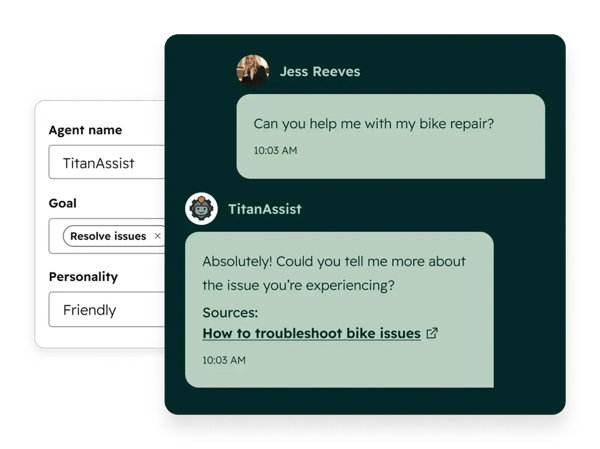 Source: HubSpot Service Hub
As organizations expand their use of HubSpot, pricing can become a larger consideration. Several G2 reviewers mentioned that costs increased when adding users, upgrading plans, or adopting more advanced HubSpot functionality. At the same time, many teams appeared to find value in the broader platform because it can support customer service, CRM, automation, and reporting needs together, especially for organizations already invested in HubSpot.
Customization is another area worth evaluating based on the team’s needs. Some reviewers wanted deeper flexibility in advanced reporting, automation, or specialized service workflows. For teams with highly specific support processes, it may be worth mapping those requirements before implementation. Still, many users viewed Service Hub’s straightforward experience as a benefit because it kept everyday support work easier to manage.
After reviewing Service Hub, I’d position it as a strong fit for teams that want customer support to feel connected, usable, and closely tied to customer data. It may not be the most specialized option for every advanced workflow, but for organizations already using HubSpot or looking for a service platform that balances AI, automation, reporting, and ease of use, it offers a practical and well-rounded approach.
What I like about HubSpot Service Hub:
- The CRM integration provides support teams with immediate access to customer history, conversations, and account details, enabling more informed, personalized interactions.
- Ticketing, automation, reporting, and communication tools are centralized in one platform, which helps teams streamline day-to-day support operations.
What G2 users like about HubSpot Service Hub:
“I really like how easy it is to understand and use HubSpot Service Hub. It’s very smooth and quick to operate and set up, which makes getting things done much easier. I appreciate that it’s user-friendly right from the start without needing a lot of customization. The availability of guides on platforms like YouTube and the HubSpot Academy makes it quick for us to get started with our clients. I also enjoy the centralized system where everything, like tickets, conversations, and customer history, is in one place; it keeps things organized and increases our productivity since everything is automated now.”
– HubSpot Service Hub review, Nofil M.
What I dislike about HubSpot Service Hub:
- Costs can grow as organizations expand their use of HubSpot products and premium functionality, though many teams find value in consolidating multiple tools into one.
- Teams that need advanced custom reporting or highly customized workflows may outgrow HubSpot’s built-in customization options. Although, organizations that prioritize ease of use often see its simplicity as a strength.
What G2 users dislike about HubSpot Service Hub:
“I find the cost scaling and hidden fees challenging. The pricing seems excessive as quickly as you scale. The professional and enterprise tiers have mandatory fees ranging from $1,500, plus additional costs. The limited customization of lower-tier features like customer reporting and advanced automation is frustrating, with advanced features locked behind a more expensive plan.”
– HubSpot Service Hub review, Pratiyush S.
4. Jotform AI Agents: Best for building AI customer support agents without technical complexity
Some AI customer support platforms require significant technical expertise and lengthy implementation. Jotform AI Agents takes a different approach. Built as a no-code platform, it helps businesses create AI-powered agents without relying on developers or IT teams. G2 reviewers frequently described building and launching agents quickly using existing FAQs, forms, and business information, making it an accessible option for organizations adopting AI-powered support for the first time.
That simplicity extends beyond setup. Jotform AI Agents earned 90% for ease of use and 90% for ease of administration on G2, while ease of setup scored 89%. Reviewers consistently praised how easy it was to build, manage, and update AI agents without extensive technical knowledge, allowing teams to focus on supporting customers rather than maintaining complex systems.
Customers also use the platform for far more than support. Lead qualification, appointment scheduling, onboarding assistance, and information gathering were recurring use cases across reviews. Because the platform is closely connected to the broader Jotform ecosystem, conversations can naturally feed into forms, data collection processes, and follow-up actions.
Automation is another area where the product performs particularly well. Autonomous task execution earned a 95% satisfaction score, making it Jotform AI Agents’ highest-rated feature. G2 users frequently highlighted how the platform can guide customers through processes, collect information automatically, and reduce the amount of manual follow-up required from teams.
The conversational experience is another strength. Natural language interaction received a 92% satisfaction score on G2, with reviewers often describing conversations as intuitive and easy to navigate. Many users appreciated that the platform could answer common questions while keeping interactions conversational rather than overly rigid.
Jotform AI Agents fit easily into existing business workflows. Cross-system integration earned an 89% satisfaction score on G2, allowing businesses to connect customer conversations with the tools and processes they already use. For teams looking to automate customer interactions without replacing existing processes, that flexibility can make adoption much easier.
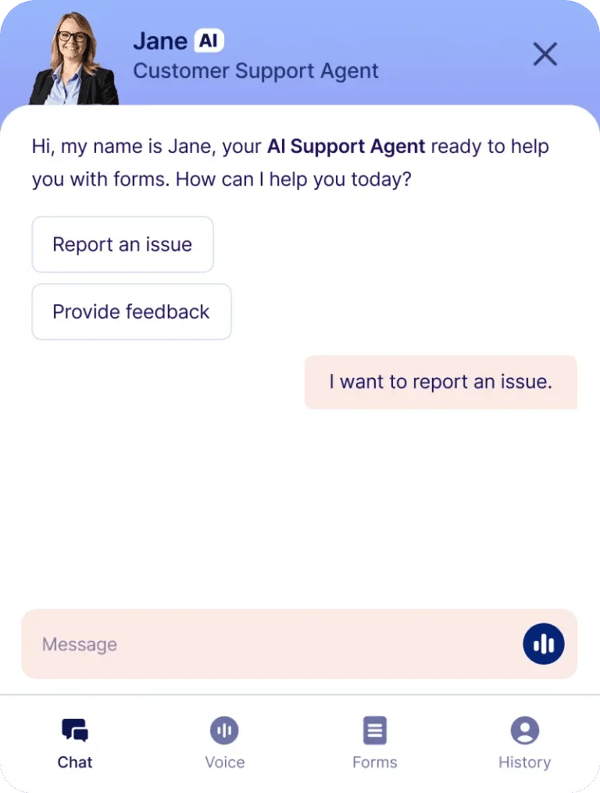 Source: Jotform AI Agents
The platform’s simplicity does create an interesting tradeoff. Several G2 reviewers mentioned that as use cases become more sophisticated, they would like deeper customization options and greater control over conversation logic. Organizations building highly specialized AI experiences may want to evaluate how much customization they require. At the same time, many G2 users seem to view Jotform’s ease of use as a worthwhile exchange because it allows them to move from setup to deployment much faster.
Some reviewers also noted that the AI performs best when handling structured business workflows rather than complex or ambiguous customer conversations. They mentioned that the agent occasionally misunderstood nuanced questions or required additional business context and training to deliver consistently accurate responses. Teams expecting the AI to handle highly complex interactions with minimal setup may need to invest more time refining its knowledge base. Even so, reviewers generally found it effective for answering common customer questions and automating repetitive support tasks.
What stayed with me after evaluating Jotform AI Agents is how quickly teams can put AI to work. Rather than overwhelming users with complexity, it focuses on helping businesses automate conversations, collect information, and support customers with minimal setup. For organizations prioritizing speed, usability, and accessibility, that approach is likely to be its biggest strength.
What I like about Jotform AI Agents:
- In my opinion, the no-code setup makes it easy for teams to create and deploy AI agents without relying heavily on technical resources or developers.
- Strong ratings for autonomous task execution and natural language interaction reflect its ability to automate customer interactions while maintaining a conversational experience.
What G2 users like about Jotform AI Agents:
“What I like best about Jotform AI Agents is how easy and fast it is to create AI chatbots without coding. It helps automate customer support, lead generation, bookings, and FAQs within minutes. The platform is user-friendly, saves time, and works well for businesses, creators, and teams looking for simple and practical AI automation tools.”
– Jotform AI Agents review, Mohamed S.
What I dislike about Jotform AI Agents:
- Organizations building highly customized AI assistants may find Jotform AI Agents limiting, as G2 reviewers noted wanting greater control over conversation logic and customization for more complex workflows. However, many users also appreciated that simpler approach because it made the platform easier to build, deploy, and manage without extensive technical expertise.
- Some reviewers found that the AI performs best with structured workflows and common customer inquiries, though more complex or nuanced conversations may require additional training or business context. At the same time, many users found it highly effective for everyday customer support scenarios where consistency and ease of deployment were the priority.
What G2 users dislike about Jotform AI Agents:
“While the AI Agents are very effective for common queries and guided interactions, more complex or highly nuanced conversations can still require refinement. As with most AI tools, results improve with proper setup and training, so there is some upfront time needed to fine-tune responses. More advanced customization options and deeper control over conversation logic would be a welcome addition as the product continues to evolve.”
– Jotform AI Agents review, Harrison T.
5. Zendesk for Customer Service: Best for scaling omnichannel customer support operations
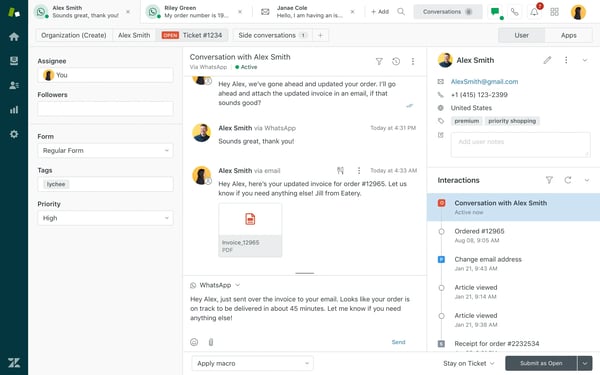
What impressed me most about Zendesk for Customer Service wasn’t a single AI capability. It was how effectively the platform helps support teams stay organized as customer conversations grow across channels. Zendesk combines ticket management, automation, self-service, and AI-powered support into a single system, making it easier to manage customer service at scale.
That centralized approach came up repeatedly in reviewer feedback. Many G2 users described Zendesk as the place where customer conversations, tickets, and support workflows come together. Rather than managing separate tools for different channels, teams can work from a single environment that keeps interactions organized and accessible.
Ticket management is another area where Zendesk seems to earn strong support from customers. G2 reviewers frequently highlighted the ability to track requests, assign work, collaborate across teams, and monitor progress without losing visibility. For growing support organizations, that level of structure can help maintain consistency as inquiry volumes increase.
Automation also plays a significant role in the platform’s appeal. Customer interaction automation scored 89% on G2, while workflow optimization earned 87%. Users often referenced triggers, macros, routing rules, and automated workflows as practical ways to reduce repetitive tasks and improve response times.
Self-service capabilities surfaced repeatedly in reviews as well. Many customers appreciated the ability to create help centers and knowledge bases that allow users to find answers independently. Combined with AI-powered support experiences, those resources can help reduce ticket volume while still providing customers with access to relevant information.
Another strength I noticed was Zendesk’s flexibility. G2 reviewers frequently highlighted the platform’s ability to adapt to different support workflows through configurable forms, triggers, automations, views, and business rules. Many appreciated being able to tailor Zendesk to their team’s processes rather than changing existing workflows to fit the software. For organizations with evolving support operations, that level of customization makes the platform easier to scale over time.
Operational usability also received positive feedback. Zendesk scores 91% for meeting requirements, 91% for ease of doing business with, and 90% for ease of administration on G2. Many reviewers felt the platform delivered the tools they needed to support growing teams while maintaining visibility across service operations.
The platform’s extensive functionality can also make it more complex to configure and manage. As teams expand their use of Zendesk’s features, integrations, workflows, and customization options, several G2 reviewers noted that setup and ongoing administration become more involved. However, many reviewers felt that additional complexity was a reasonable tradeoff for the platform’s flexibility and ability to support larger, more sophisticated customer service operations.
According to some G2 reviewers, Zendesk’s AI is better suited to assisting agents and automating routine support interactions than independently handling highly specialized customer scenarios. Even so, many reviewers viewed Zendesk’s AI as a valuable extension of its broader customer service platform, helping teams improve efficiency without changing the way they already work.
After researching Zendesk, I came away seeing it as an operational backbone for customer support teams. Its combination of ticket management, automation, self-service, and omnichannel support makes it particularly well-suited for organizations looking to scale customer service without losing visibility or control.
What I like about Zendesk for Customer Service:
- Strong ticket management and workflow automation capabilities help support teams stay organized and handle growing volumes of customer inquiries efficiently.
- The combination of omnichannel support, self-service resources, and automation creates a well-rounded customer service experience.
What G2 users like about Zendesk for Customer Service:
“I like Zendesk’s intuitive ticketing system and centralized customer communication. It makes it easy to manage support requests across multiple channels (email, chat, and web forms) in one place, which improves response time and team collaboration. The automation features, triggers, and macros significantly reduce manual effort and help maintain consistent responses. I also appreciate the reporting and analytics capabilities, which provide clear visibility into support performance and help drive data-based improvements.”
– Zendesk for Customer Service review, Balkishan N.
What I dislike about Zendesk for Customer Service:
- As organizations expand their use of Zendesk, configuration and administration may require additional planning, though many teams view that flexibility as an advantage.
- Organizations with highly specialized AI requirements may need additional customization or complementary tools to support more advanced use cases. That said, many G2 reviewers found Zendesk’s AI capabilities well-suited for automating routine customer service tasks, making them a practical addition to everyday support workflows.
What G2 users dislike about Zendesk for Customer Service:
“One thing I dislike about Zendesk is that it can become expensive as the team grows. Adding agents and advanced features increases costs quickly, which can be hard for startups or smaller teams. Another downside is that the configuration can get complex. Triggers, automations, views, and workflows are powerful, but over time, they become difficult to manage if not documented well.”
– Zendesk for Customer Service review, Sanket P.
6. Genesys Cloud CX: Best for managing complex customer experiences across channels
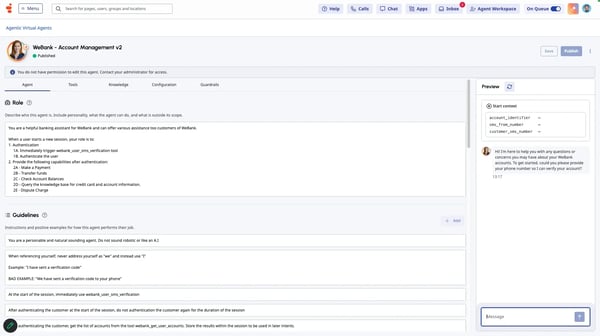
As I researched Genesys Cloud CX, I quickly realized it approaches customer support from a broader perspective than many of the tools on this list. While some platforms focus primarily on customer conversations, Genesys is designed to coordinate the people, processes, channels, and workflows that surround those interactions.
Genesys positions Cloud CX as an AI-powered experience orchestration platform, and that positioning showed up consistently in customer feedback. G2 reviewers frequently discussed routing, workforce management, analytics, customer journey visibility, and omnichannel engagement rather than focusing solely on chatbots or AI agents. For many organizations, the appeal seems to come from bringing multiple aspects of customer service together in one environment.
Integration is one area where the platform clearly stands out. Genesys Cloud CX earned a perfect 100% satisfaction score for cross-system integration on G2, making it its highest-rated feature. G2 users often described connecting voice, chat, email, messaging applications, and business systems into a more unified customer service operation.
I also came across frequent praise for the platform’s routing and workflow capabilities. Customer interaction automation scored 88% on G2, while workflow optimization earned 85%. Reviewers regularly highlighted intelligent routing, queue management, and automation as valuable tools for maintaining consistency across large support environments.
Another strength is visibility across the customer journey. Many users appreciated being able to see interactions across channels rather than treating each customer touchpoint separately. For organizations supporting customers across multiple communication channels, that broader view can make coordination much easier.
Workforce management surfaced as another recurring theme in reviews. G2 users frequently referenced scheduling, forecasting, performance monitoring, and operational planning alongside customer support functionality. This makes Genesys feel as much like an operational platform as it does a customer service tool.
The platform also appears well-suited for organizations planning for long-term growth. Ease of doing business scored 95% on G2, while meeting requirements earned 93%. Reviewers often described Genesys Cloud CX as a solution capable of supporting both current needs and future expansion without requiring significant changes to underlying processes.
The same breadth of functionality that makes Genesys Cloud CX appealing to larger organizations can be time-consuming to learn and adapt for smaller teams. They may find themselves using only a portion of its capabilities at first if they have relatively straightforward customer service operations. Even so, many G2 reviewers appreciated having those additional features available as their support operations expanded, allowing the platform to grow alongside their business.
Several G2 reviewers also noted that Genesys Cloud CX is strongest as an experience orchestration platform rather than a standalone AI solution. While they valued its routing, workforce management, and workflow automation capabilities, some found that more advanced AI use cases required additional configuration or integrations to meet specialized requirements. Even so, reviewers generally viewed that as a reasonable tradeoff given Genesys Cloud CX’s strength in managing complex customer service operations at scale.
What ultimately differentiates Genesys Cloud CX is its ability to connect customer conversations with the systems and processes surrounding them. For organizations operating contact centers, managing multiple communication channels, or coordinating large customer service teams, that operational perspective may be its greatest advantage.
What I like about Genesys Cloud CX:
- The platform connects customer interactions across channels, helping teams manage complete customer journeys rather than isolated conversations.
- Strong scores for integration, automation, and workflow optimization support large-scale customer service operations.
What G2 users like about Genesys Cloud CX:
“I like that Genesys Cloud CX is quick, efficient, and easy to use. Handling multiple chats simultaneously is a big plus for me. I also appreciate its integration with Calabrio for results and metrics, which is great for tracking performance. The ability to link to SAP and access the full profile of each contact while on chat, mail, or call makes customer interactions smoother. It’s straightforward and offers great connection, and I’m really happy with its speed and the good colors. The initial setup was very easy too.”
– Genesys Cloud CX review, Martino B.
What I dislike about Genesys Cloud CX:
- Organizations implementing Genesys Cloud CX across complex customer service operations may benefit from allocating additional time for planning, though many G2 users view that investment as worthwhile for the platform’s flexibility and long-term scalability.
- Genesys Cloud CX excels at orchestrating customer service operations, but organizations looking for highly autonomous AI experiences may need additional configuration or integrations to support more advanced AI use cases.
What G2 users dislike about Genesys Cloud CX:
“The initial setup can be quite difficult and requires a lot of technical help. Sometimes, finding specific settings in the admin menu feels like a ‘treasure hunt’ because there are so many options. Also, the standard reports are a bit basic; if you want very detailed data, you often have to spend a lot of time customizing them.”
– Genesys Cloud CX review, Jerin C.
Frequently asked questions about AI customer support agent software
Have more questions? Find more answers below.
Q1. Which AI customer support platform has the best self-service options?
Zendesk for Customer Service and Fin offer some of the strongest self-service capabilities among the tools I evaluated. Zendesk combines AI-powered support with knowledge bases and help centers that allow customers to find answers independently, while Fin is designed to resolve questions using existing support content and documentation. Both platforms can help reduce the number of tickets that require human intervention.
Q2. Which AI customer support tool integrates with live chat systems?
Fin, Zendesk for Customer Service, HubSpot Service Hub, and Genesys Cloud CX all integrate well with live chat environments. These platforms allow AI agents to engage with customers directly through chat while providing escalation paths when human assistance is needed.
Q3. How to build an AI agent that automates customer support?
You build an AI customer support agent by training it on support content and connecting it to your customer service workflows. Most platforms allow you to upload FAQs, knowledge base articles, product documentation, and other resources before deploying the agent across support channels. Tools like Jotform AI Agents, Salesforce Agentforce, and Fin make this process relatively straightforward.
Q4. What are the top-rated AI agents for multi-channel customer support?
Zendesk for Customer Service, Genesys Cloud CX, and HubSpot Service Hub are among the strongest options for multi-channel customer support. These platforms help teams manage customer interactions across chat, email, messaging apps, self-service portals, and other channels while maintaining customer context throughout the journey.
Q5. What are the best AI assistants for reducing support ticket volumes?
Fin, Salesforce Agentforce, and Jotform AI Agents are particularly effective at reducing support ticket volumes. They help automate repetitive customer inquiries, surface relevant information quickly, and resolve routine requests before they reach human agents.
Q6. What are the best AI tools for 24/7 customer inquiry handling?
Fin, Jotform AI Agents, Salesforce Agentforce, and Zendesk for Customer Service are all well-suited for 24/7 customer support. These platforms can answer common questions, guide customers to relevant resources, and automate routine support interactions outside normal business hours.
Q7. Which AI support agent software delivers the highest CSAT scores?
Jotform AI Agents achieved the highest customer satisfaction score among the products I evaluated. It holds a 4.5 out of 5 rating on G2, with 96% of users rating it four or five stars. Fin also performs strongly in this area, maintaining a 4.5 out of 5 rating across thousands of reviews.
Q8. Which are the best AI-powered agents for handling common customer queries?
Fin, Jotform AI Agents, and Salesforce Agentforce are among the strongest options for handling common customer queries. Fin stood out for its conversational capabilities and natural language interaction, while Jotform AI Agents impressed me with its ease of deployment and automation. Salesforce Agentforce is also well-suited for answering routine questions, particularly for organizations already using Salesforce and looking to combine customer support with CRM context and workflow automation.
Q9. Which are the top AI helpdesk automation tools for fast response times?
Salesforce Agentforce, Zendesk for Customer Service, and HubSpot Service Hub are some of the strongest AI helpdesk automation tools for improving response times. These platforms combine automation, ticket management, workflow routing, and customer support capabilities that help reduce manual work and move customer requests to the right destination more quickly. Zendesk and HubSpot also provide strong operational visibility, making them good options for growing support teams.
Q10. Which are the top AI-powered helpdesk solutions for e-commerce?
Zendesk for Customer Service, HubSpot Service Hub, and Salesforce Agentforce are among the most suitable AI-powered helpdesk solutions for e-commerce businesses. Zendesk’s omnichannel support capabilities help manage customer conversations across multiple channels, while HubSpot Service Hub provides a unified view of customer interactions and history. Salesforce Agentforce is particularly useful for businesses that want AI agents to work directly with customer records, cases, and workflows.
Q11. Which is the best AI customer support agent software?
There isn’t a single best AI customer support agent software for every business. The right choice depends on your priorities. Fin stood out for conversational support, Salesforce Agentforce for Salesforce-centric service operations, HubSpot Service Hub for unified customer context, Jotform AI Agents for ease of deployment, Zendesk for omnichannel support management, and Genesys Cloud CX for complex customer experience orchestration. If I had to choose one overall winner for customer conversation quality, Fin would be the tool I’d look at first.
Support smarter, not just faster
After researching these platforms and analyzing hundreds of G2 reviews, one thing became clear to me: the best AI customer support agent isn’t necessarily the one with the most AI features. It’s the one that solves the specific challenges your support team faces every day.
Some tools on this list excel at conversational AI, while others focus on workflow automation, CRM connectivity, omnichannel support, or customer experience management. The right choice depends on whether you’re trying to reduce ticket volume, improve response consistency, support customers across channels, or help agents work more efficiently.
My advice is to start with your biggest support bottleneck and work backward. The most successful implementations aren’t driven by AI capabilities alone, they’re driven by how well the platform fits into existing support workflows and customer service goals.
If you’re also exploring other ways to improve customer service operations, take a look at the best customer service software on G2.













Post Comment