Top 6 Recruiting Automation Tools I Reviewed for 2026
Hiring today happens faster than most teams are equipped to handle. When your inbox floods with hundreds of resumes, candidates may drop out before screening, interview scheduling can take days, and even seasoned recruiters struggle to keep up.
As teams assess some of the top recruiting automation software, adoption remains in its early stages. Recent studies reveal that 41.7% of recruiters spend 6–12 months implementing AI recruiting tools, while 28.33% save 5–10 hours weekly once automation is active, signaling a shift from experimentation to necessity.
This evolution has made recruiting automation indispensable. Modern solutions extend beyond traditional applicant tracking systems (ATS) by automating sourcing, pre-screening, assessments, scheduling, and candidate communications.
To help you find effective recruiting automation software, I analyzed G2 data, feature sets, and genuine recruiter feedback from over 20 platforms. Some excel in high-volume screening and automated scheduling, others specialize in AI-powered sourcing or structured workflows tailored for fast-growing teams.
If your goal is to remove manual bottlenecks, enhance candidate quality, and outpace competitors, consider these recruiting automation tools.
6 Best Recruiting Automation Software for 2026
LinkedIn Recruiter: Best for sourcing and engaging top talent
Utilizes LinkedIn’s extensive professional network, advanced search filters, and candidate insights, enabling teams to quickly find and connect with qualified candidates.Ceipal ATS: Best for staffing agencies needing AI-driven automation
Offers end-to-end applicant tracking, AI-based candidate matching, job distribution, and workflow automation designed specifically for staffing and recruiting firms.Zoho Recruit: Best for SMBs seeking customizable, affordable hiring automation
Provides robust process automation, customizable pipelines, and CRM integrations suitable for small to midsize businesses that require flexibility without high costs.Indeed Hiring Platform: Best for high-volume hiring and automated screening
Facilitates large-scale hiring with automated screening, assessments, and interview scheduling integrated into Indeed’s broad job seeker network.JobDiva: Best for complex staffing operations and VMS management
Combines integrated CRM, analytics, VMS synchronization, and workflow tools optimized for agencies handling high-volume, multi-client staffing.100Hires: Best for startups and SMBs needing simple, collaborative hiring workflows
Delivers easy job posting, candidate tracking, and collaboration features at an affordable price, ideal for teams desiring automation without complexity.
*This selection is based on G2’s Fall 2025 Grid
Hiring today moves at a pace most teams aren’t built for. When hundreds of resumes hit your inbox, candidates drop off before they’re screened, interview slots take days to coordinate, and even experienced recruiters start to fall behind.
As teams evaluate some of the best recruiting automation software, adoption data shows many are still early in the journey. Recent research indicates that 41.7% of recruiters take 6–12 months to implement AI recruiting tools, while 28.33% report saving 5–10 hours per week once automation is in place, clear signs that automation is moving from experimentation to necessity.
That shift has made recruiting automation essential. Modern platforms go beyond basic ATS functionality to automate sourcing, pre-screening, assessments, scheduling, and candidate communication.
To help you identify the best recruiting automation software that actually delivers, I analyzed G2 Data, feature sets, and real recruiter feedback across 20+ platforms. Some excel at high-volume screening and automated scheduling, while others focus on AI-powered sourcing or structured workflows for fast-scaling teams.
If you’re ready to eliminate manual bottlenecks, improve candidate quality, and move faster than competing employers, these are the recruiting automation tools worth considering.
6 best recruiting automation software for 2026
- LinkedIn Recruiter: Best for sourcing and engaging top talent
Leverages LinkedIn’s vast professional network, advanced search filters, and candidate insights to help teams identify and connect with qualified talent quickly. - Ceipal ATS: Best for staffing agencies needing AI-driven automation
Supports end-to-end applicant tracking, AI-based candidate matching, job distribution, and workflow automation built specifically for staffing and recruiting firms. - Zoho Recruit: Best for SMBs wanting customizable, affordable hiring automation
Offers strong process automation, customizable pipelines, and CRM integrations for small-to-midsize businesses that need flexibility without high costs. - Indeed Hiring Platform: Best for high-volume hiring and automated screening
Streamlines large-scale hiring with automated screening, assessments, and interview scheduling directly integrated into Indeed’s massive job seeker ecosystem. - JobDiva: Best for complex staffing operations and VMS management
Provides integrated CRM, analytics, VMS sync, and workflow tools optimized for agencies managing high-volume, multi-client staffing workflows. - 100Hires: Best for startups and SMBs wanting simple, collaborative hiring workflows
Delivers easy job posting, candidate tracking, and collaborative hiring features at a budget-friendly price, ideal for teams that want automation without complexity.
*These best recruiting automation software are picked based on G2’s Fall 2025 Grid Report. I’ve added their standout features for easier comparison.
6 best recruiting automation software I recommend
Recruiters are managing sourcing, resume screening, assessments, scheduling, and follow-ups — often all at once, across multiple tools and overflowing inboxes. When applicant volume rises or hiring ramps up, doing all of this manually becomes nearly impossible to keep up with.
And the demand for efficient hiring isn’t slowing down. The recruiting automation market is expected to grow significantly, with an estimated value of USD 549.2 million in 2025 and a projected rise to USD 716.8 million by 2035, reflecting a consistent 2.7% CAGR across the forecast period. This growth underscores how quickly organizations are adopting automation to keep pace with modern hiring demands.
That’s where the best recruiting automation software makes a measurable difference. These platforms automate repetitive steps like resume screening, candidate filtering, outreach, scheduling, and assessment distribution, freeing recruiters to focus on high-value conversations instead of administrative tasks. Automating these workflows not only reduces errors but also shortens time-to-hire and creates a smoother, more consistent experience for every candidate.
How did I find and evaluate the best recruiting automation software?
To build this list, I started with G2’s Grid® Report for recruiting automation software to create a shortlist, using a mix of user satisfaction scores and market presence to guide the initial selection. This ensured I focused on platforms that are both widely adopted and consistently rated well by real recruiters and talent teams.
From there, I evaluated each tool based on how effectively it supports modern hiring needs, including automated sourcing, AI-assisted screening, scheduling workflows, candidate engagement features, reporting, and overall usability.
I also used AI to analyze hundreds of verified G2 reviews, paying close attention to what recruiters praised most, where they encountered friction, and which platforms consistently delivered measurable improvements in speed, quality, and candidate experience.
The screenshots featured in this article come from G2 vendor listings and publicly available product documentation.
What makes the best recruiting automation software: My criteria
After digging into G2 Data and reviewing how modern talent teams operate, several priorities came up consistently. Here’s what I focused on when evaluating the best recruiting automation software:
- Automation across the hiring lifecycle: The strongest platforms automate repetitive steps that slow recruiters down — resume screening, candidate filtering, email sequences, assessments, and scheduling. I prioritized tools that reduce manual work without sacrificing accuracy or candidate experience.
- Sourcing and pipeline quality: Great automation isn’t just about speed; it’s about finding the right people faster. I looked for tools with advanced sourcing, AI-driven matching, talent rediscovery, and filters that help recruiters surface qualified candidates early in the process.
- Scheduling and communication workflows: Interview coordination is one of the biggest bottlenecks for fast-growing teams. I evaluated how well each platform supports automated scheduling, reminders, messaging templates, and multi-channel communication to keep candidates engaged.
- Candidate experience and engagement: The best software maintains consistent, timely communication with applicants. I prioritized platforms that offer branded workflows, smooth application processes, and automated touchpoints that prevent drop-offs.
- Integrations with ATS, HRIS, job boards, and calendars: Recruiting breaks quickly when data is scattered across tools. I looked for solutions that integrate natively with ATS systems, HRIS platforms, email and calendar tools, and major job boards to ensure recruiters aren’t jumping between disconnected systems.
- Analytics and visibility: Data-driven hiring requires visibility into pipeline health, stage-level conversions, time-to-fill, and sourcing effectiveness. I focused on platforms that provide clear reporting dashboards and actionable insights rather than just raw data dumps.
Not every platform excels in all of these areas, but the tools that stand out offer a strong balance of automation, usability, and measurable impact on time-to-hire.
The list below contains genuine user reviews from the Recruiting Automation Software category page. To be included in this category, a solution must:
- Streamline and simplify the recruiting process
- Provide automated AI sourcing to identify passive qualified talent
- Build up-to-date talent pools for open and future roles
- Create and track candidate engagement
*This data was pulled from G2 in 2026. Some reviews may have been edited for clarity.
1. LinkedIn Recruiter: Best for sourcing and engaging top talent
LinkedIn Recruiter has become one of the most relied-on platforms for hiring teams that need consistent access to qualified, engaged candidates. 94% of users rate LinkedIn Recruiter 4 or 5 stars, reinforcing its position as one of the most trusted tools in the recruiting automation space.
Users describe it as a powerful sourcing environment that combines LinkedIn’s massive professional network with an intuitive workflow for building pipelines, managing outreach, and connecting with talent more efficiently. For many teams, LinkedIn Recruiter is where the bulk of high-intent candidate discovery actually happens, especially when hiring for roles that require specialized backgrounds or deep industry experience.
A recurring theme across reviews is how effective LinkedIn Recruiter is at finding the right match. Recruiters frequently highlight the platform’s advanced filtering, keyword refinement, and search depth, noting that it helps them surface profiles they “wouldn’t find anywhere else.” Many reviewers emphasize how easy it is to adjust criteria, save searches, and revisit evolving talent pools — a workflow that feels especially helpful when sourcing passive candidates or hiring for highly specific skill sets.
Access to an active, engaged talent ecosystem further strengthens LinkedIn Recruiter’s value. Recruiters appreciate being able to reach out through InMail, view candidate engagement, and track outreach performance directly from the tool. For teams running high-volume searches or maintaining long-term pipelines, this visibility into candidate interest becomes a meaningful advantage, allowing them to prioritize responses and nurture leads more strategically.
From ATS integrations to project organization, LinkedIn Recruiter fits smoothly into broader hiring workflows. Many highlight the ease of integrating with ATS systems, organizing projects, and keeping conversations in one place. Users mention that the interface makes it simple to manage multiple roles simultaneously, tag candidates for later review, and collaborate with colleagues — especially helpful for recruiting teams that operate across functions or handle multiple hiring managers.
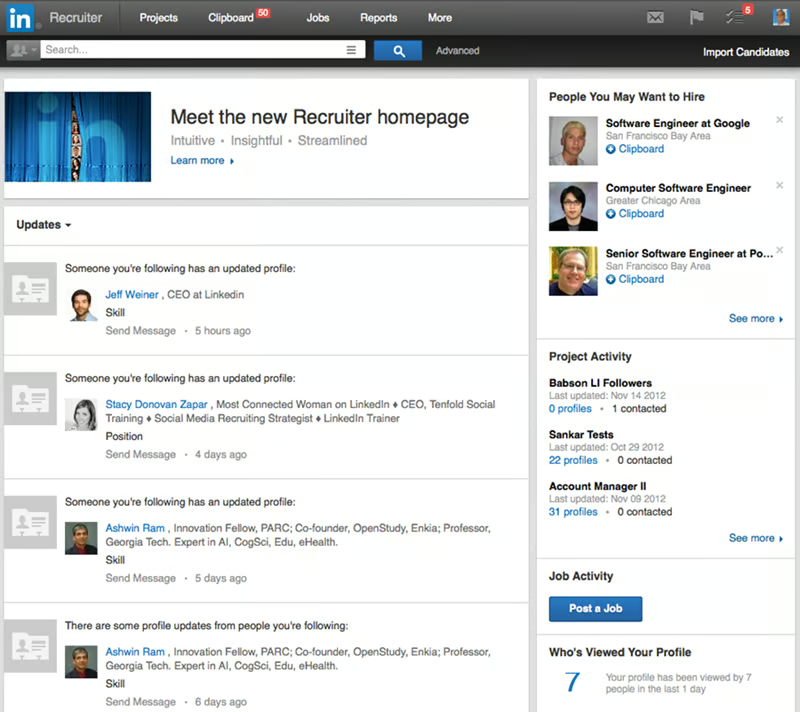
Consistency and reliability also play an important role in why teams continue to use LinkedIn Recruiter as a primary sourcing tool. Search suggestions, profile completeness, and data accuracy are regularly cited as reasons why teams return to LinkedIn Recruiter day after day. Even when refining niche searches, recruiters note that the platform delivers dependable results, often surfacing qualified professionals who meet both skill and industry requirements.
As with any platform designed for breadth and depth, reviewers call out considerations tied to how LinkedIn Recruiter is structured. Some note that the interface can feel busy when they are first getting acquainted with the system’s full capabilities. This is often framed less as a drawback and more as a reflection of how much the platform offers — making it especially well-suited for teams that rely heavily on sourcing as a core part of their recruiting strategy. A smaller portion of reviewers mention that subscription costs can feel higher, particularly for small teams, though many acknowledge that the value grows significantly with usage and volume.
A number of users also point out that search results occasionally surface profiles that don’t fully match the criteria or contain outdated information. These reviewers tend to attribute this to the nature of a large, user-updated professional network rather than a platform limitation. For organizations that depend on fresh, accurate candidate data at scale, LinkedIn Recruiter’s reach and filtering still make it one of the most effective sourcing tools available.
Overall, LinkedIn Recruiter shines as a platform for teams that want consistent access to qualified talent, reliable search performance, and a workflow designed to support ongoing pipeline development. 84% of users say the product is headed in the right direction, reflecting confidence in LinkedIn’s continued investment in recruiter-focused capabilities. Its combination of network depth, outreach tools, and organizational features makes it a trusted choice for recruiters who want to move faster without sacrificing quality.
What I like about LinkedIn Recruiter:
- It is a powerful sourcing engine backed by LinkedIn’s massive professional network, giving recruiters deep search capabilities, refined filtering, and access to high-intent candidates they often can’t find elsewhere.
- LinkedIn Recruiter’s workflow supports ongoing pipeline development and multi-role management, with seamless ATS integrations, organized projects, and tools that make outreach, collaboration, and long-term nurturing effortless for busy hiring teams.
What G2 users like about LinkedIn Recruiter:
“I find LinkedIn Recruiter incredibly valuable for candidate sourcing and filling the pipeline for future roles. The platform provides clear and real-time data on candidates, including their skills, background, and likelihood of joining, which is immensely helpful. The InMails feature is a standout aspect, as it allows me to connect with candidates beyond my immediate network effortlessly. I appreciate the user interface and user experience, which are both well-designed, making it easy to access candidate details clearly. The filters are another major advantage, as they enable me to narrow down to the relevant set of candidates effortlessly by using specific requirements like ‘must have’ attributes and examining past or current company industries. Additionally, the ‘Open to Work’ feature is an intuitive addition that simplifies the recruitment process. Overall, the combination of these features enhances my efficiency and effectiveness in recruiting.”
– LinkedIn Recruiter review, Ganapathi K.
What I dislike about LinkedIn Recruiter:
- Some G2 reviewers mention that the interface can feel busy when they first start using it, something new users may notice more than teams that rely heavily on sourcing depth and advanced search tools.
- A number of users note that subscription pricing can feel high, particularly for smaller teams, though many acknowledge that the value becomes clearer as search volume and hiring activity scale.
What G2 users dislike about LinkedIn Recruiter:
“Although it is an excellent tool, a subscription to LinkedIn Recruiter is not cheap and out of reach for smaller teams. The search results can sometimes pull up profiles that may not meet all of the filters, calling for further refinement in searches. Also, some candidate do not check their LinkedIn messages daily, leading to slower communication.”
– LinkedIn Recruiter review, Mukund J.
2. Ceipal ATS: Best for staffing agencies needing AI-driven automation
Ceipal ATS has become a staple for staffing agencies looking to streamline high-volume hiring with structure, speed, and intelligent automation. 98% of users rate Ceipal ATS 4 or 5 stars, one of the highest satisfaction levels in the recruiting automation category. Teams consistently highlight how well Ceipal supports end-to-end recruiting operations — from sourcing and parsing resumes to evaluating candidates, coordinating interviews, and maintaining clean, navigable pipelines. For agencies juggling multiple clients and a steady flow of job orders, Ceipal stands out as an engine that brings order and efficiency to demanding recruiting cycles.
A recurring theme in the reviews is how much time Ceipal saves in day-to-day candidate management. Users frequently mention how quickly the system parses resumes, identifies relevant talent, and organizes applicant movement through each stage. Recruiters appreciate that the platform reduces manual work and allows them to move faster, especially when handling large applicant pools. Ceipal’s AI-driven matching tools come up often as well, with reviewers noting that recommendations are accurate, relevant, and useful for speeding up shortlisting.
Reviewers also emphasize how intuitive Ceipal feels once their workflows are in place. The interface is described as clear, structured, and easy to navigate, making it practical for staffing teams that need to jump between roles, candidates, and client updates throughout the day. Many users call out how the system keeps everything neatly organized — from communication history to documents — which helps recruiters work more confidently and reduces the risk of missing details during busy hiring periods.
Another strength highlighted across reviews is Ceipal’s robust interview scheduling and coordination capabilities. Agencies managing volume across different clients and roles note that scheduling inside Ceipal is smooth, with automated reminders and straightforward workflows that help keep processes on track. This is especially appreciated by teams that handle multi-step interview loops or need to align availability between recruiters, hiring managers, and candidates quickly.
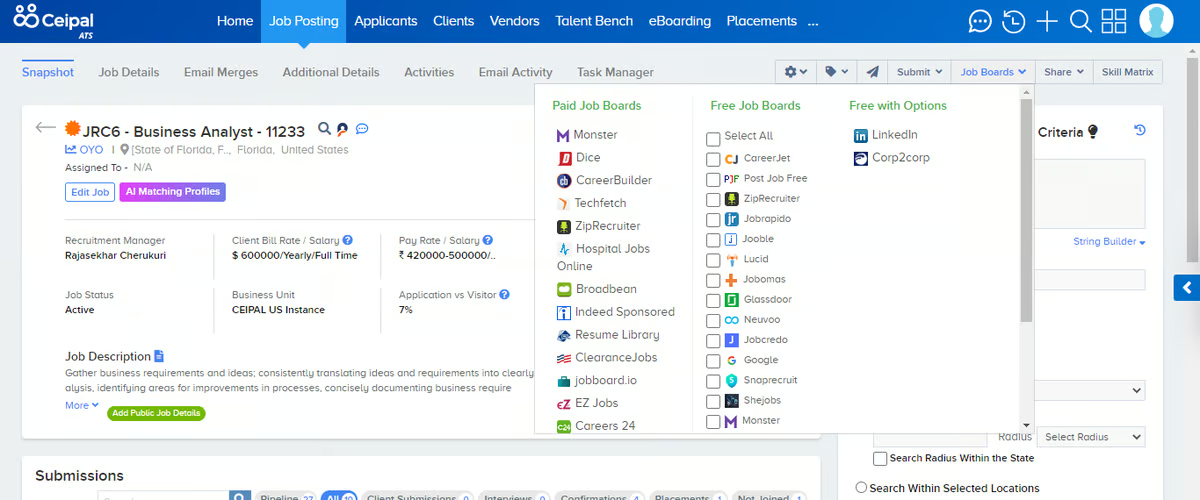
Support quality is a standout advantage as well. Many reviewers mention that Ceipal’s support team is responsive, proactive, and willing to guide them through setup, troubleshooting, or optimizing specific workflows. This level of partnership is especially valuable for staffing firms that depend on stable operations and timely assistance when introducing new recruiters or integrating new capabilities.
Reviewers also appreciate how easily Ceipal adapts to their recruiting processes. The platform allows teams to tailor workflows, create custom fields, or refine steps based on the client or role type. For agencies operating across industries, this flexibility helps maintain consistency without forcing a one-size-fits-all approach. New users can quickly learn the system, which helps teams maintain productivity as they grow or onboard new team members.
As with any platform built for operational depth, some considerations reflect Ceipal’s configurability. A number of G2 users mention that advanced or highly customized workflows can require additional setup or admin support during implementation. This is most noticeable when teams are tailoring the system to niche recruiting processes, where the flexibility comes with a higher upfront configuration effort.
Some reviewers point to usability and performance considerations at scale. When managing large candidate volumes or running complex searches, search results can feel broader and the interface more dense, which tends to matter most for teams handling high-volume recruiting workflows. In these scenarios, users also note occasional slower load times during peak usage, a trade-off more commonly seen in platforms designed to support large databases and detailed search capabilities.
Overall, Ceipal ATS earns strong praise from agencies that want a reliable, structured, and AI-assisted recruiting platform that can keep up with the speed and complexity of staffing operations. Its balance of automation, workflow clarity, customization, and support makes it a dependable partner for teams that need to manage high-volume hiring without losing precision or control.
What I like about Ceipal ATS:
- Ceipal ATS is a fast, structured recruiting environment that handles resume parsing, shortlisting, interview coordination, and pipeline tracking with ease, giving staffing teams the speed they need to manage high-volume searches without losing organization.
- The platform’s accurate AI-driven matching paired with a clean, intuitive interface, makes it easier for recruiters to move candidates through stages, keep communication and documents organized, and stay productive across multiple clients and job orders.
What G2 users like about Ceipal ATS:
“Ceipal ATS greatly streamlines the recruitment process, making it much more manageable. The platform features a clean and intuitive interface, which makes navigation straightforward and saves valuable time, especially when handling a high volume of candidates. One of its standout features is resume parsing and candidate matching, which allows for the quick identification of the most suitable profiles from the database.”
– Ceipal ATS review, Dev S.
What I dislike about Ceipal ATS:
- Some G2 reviewers note that highly customized or niche recruiting workflows can require additional setup and admin involvement during implementation, which may feel heavier for smaller teams compared to agencies that regularly manage configurable, multi-client environments.
- A few users also mention usability and performance considerations when operating at scale. When handling large candidate databases or running complex searches, the interface can feel dense and search results may require further refinement, with occasional slower load times during peak usage for high-volume recruiting teams.
What G2 users dislike about Ceipal ATS:
“What I dislike about CEIPAL ATS is that the user interface can feel cluttered and a bit overwhelming, especially for new users. Some features take a while to get used to, and the system can occasionally lag during searches or when switching between modules. More customization in reporting would also be helpful.”
– Ceipal ATS review, Akash G.
3. Zoho Recruit: Best for SMBs wanting customizable, affordable hiring automation
Zoho Recruit has become a favorite among small and midsize businesses that need a flexible, cost-effective ATS without sacrificing automation or workflow structure. 92% of users say the platform is headed in the right direction, signaling confidence in Zoho’s roadmap and product evolution. Across hundreds of G2 reviews, users consistently highlight how well Zoho Recruit balances simplicity with customization, giving growing teams the tools they need to manage sourcing, screening, and hiring from a centralized, easy-to-navigate workspace.
The platform feels highly approachable from day one. Users frequently mention that Zoho Recruit is simple to learn, with clean navigation, intuitive page layouts, and straightforward workflows that help new recruiters get up to speed quickly. For SMBs that don’t have the luxury of long onboarding cycles, this ease of adoption is a major advantage.
Customization is a strong win with Zoho Recruit. Reviewers repeatedly call out how easily they can tailor forms, fields, stages, and pipelines to fit unique hiring processes. This flexibility helps businesses create a recruiting environment that mirrors their operations rather than forcing them into rigid templates. The adaptability is especially valuable when managing different job types or coordinating hiring across multiple teams.
Zoho Recruit’s automation tools also appear in many positive reviews. Recruiters appreciate being able to automate tasks like candidate updates, workflow transitions, reminders, and email sequences—freeing up time to focus on outreach and evaluation. Reviewers often mention that automations help them maintain consistency and reduce manual work, especially when handling multiple open roles at once.
Integration strength comes up frequently as well. Users highlight how reliably Zoho Recruit connects with job boards, email platforms, background check vendors, and the broader Zoho ecosystem. This helps teams streamline candidate intake and maintain a single source of truth without jumping between systems. Several reviewers also note the convenience of having resumes parsed accurately and organized quickly within candidate profiles.
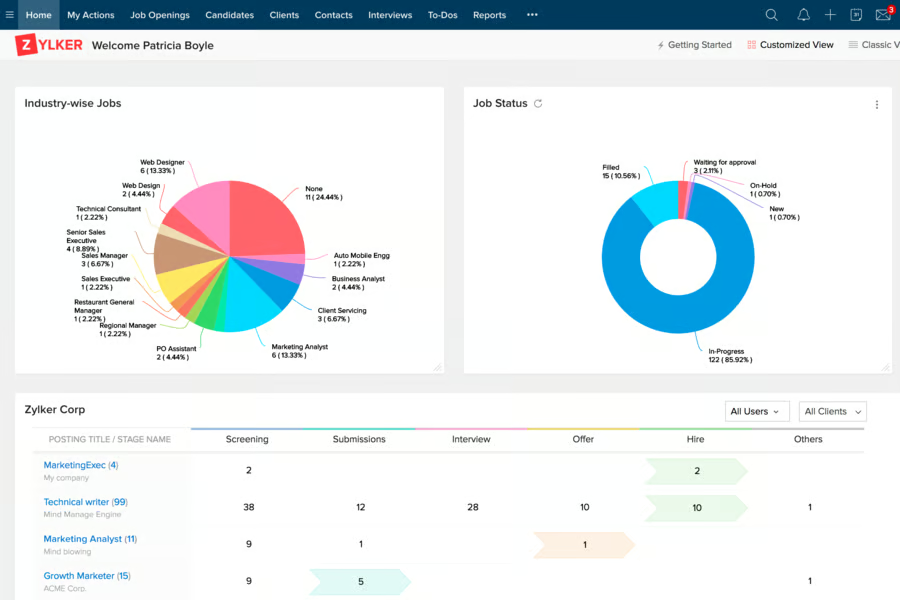
Candidate pipeline visibility earns repeated praise, too. It is easy to track applicants, monitor stages, and maintain clear oversight of where each candidate stands. Teams managing high application flows find this especially helpful for staying organized and moving candidates through the funnel without losing momentum.
Reporting and analytics also surface positively across multiple reviews. Users value being able to generate clear summaries of hiring activity, track recruiter performance, and measure operational health without needing complex BI tools. For SMB teams, this level of insight is often more than enough to refine processes and make data-driven improvements.
As with any system built to balance affordability and flexibility, reviewers do mention a few considerations. Some G2 users note that certain advanced or enterprise-grade features may require additional configuration or feel less extensive compared to higher-priced platforms — a natural trade-off for software designed to meet SMB needs without inflating cost.
Others mention that mobile functionality or responsiveness can occasionally feel limited, reflecting Zoho Recruit’s focus on core desktop workflows where most hiring teams spend their time.
Overall, Zoho Recruit earns strong praise for giving small and midsize companies exactly what they need: customizable hiring automation, clean workflows, and the right level of functionality at a price point that supports growth. For SMB teams that want structure without complexity and automation without enterprise overhead, Zoho Recruit remains one of the most dependable and well-loved ATS options.
What I like about Zoho Recruit:
- Zoho Recruit offers a clean and accessible ATS that’s easy for SMB teams to adopt, with intuitive navigation, fast resume parsing, customizable pipelines, and built-in automation that removes repetitive work from the hiring process.
- It provides strong integrations and a reliable workflow structure, giving growing teams a centralized and well-organized system for sourcing, screening, and tracking candidates without the overhead of enterprise-level tools.
What G2 users like about Zoho Recruit:
“We were able to tailor pipelines, candidate stages, and web-form application fields to reflect our actual hiring process — not fit our process into the software. That flexibility meant fewer “we’ll change how you work” moments and more “this tool adapts to us”. What stands out for me is how Zoho Recruit brings a lot of recruitment workflow under one roof without making things over-complex. For our small to mid-sized hiring team, the ability to post jobs, track candidates, schedule interviews, and manage offers in one place has saved a lot of juggling between tools.”
– Zoho Recruit review, Vishal J.
What I dislike about Zoho Recruit:
- Some G2 reviewers note that more advanced or enterprise-grade features can feel limited or require additional setup, which fast-scaling organizations might notice.
- A number of users mention that mobile functionality can be inconsistent, something on-the-go recruiters may feel more than teams that operate primarily on desktop.
What G2 users dislike about Zoho Recruit:
“Some of the menus and settings can feel a bit cluttered at first, especially when managing multiple pipelines or custom fields. It takes a little time to get familiar with where everything is. However, once you get past the learning curve, it’s smooth and very capable.”
– Zoho Recruit review, Christopher D.
4. Indeed Hiring Platform: Best for high-volume hiring and automated screening
Indeed Hiring Platform is widely appreciated by recruiting teams that need to handle large applicant volumes quickly and consistently. 93% of users rate the platform 4 or 5 stars, reinforcing its strength as a reliable choice for high-volume hiring.
Across hundreds of G2 reviews, users highlight how the platform streamlines screening, simplifies coordination, and helps teams move candidates from application to interview faster than traditional ATS setups. For organizations that rely on steady inbound traffic or seasonal surges, Indeed’s emphasis on automation and workflow efficiency makes it a dependable hub for managing high-throughput hiring.
A theme that appears repeatedly across reviews is how effective the platform is for quick applicant evaluation. Recruiters note that automated screening questions, assessments, and filters help them identify strong candidates early, reducing the amount of manual review needed for high-volume pipelines. Many teams mention that these tools significantly shorten their hiring cycles, especially when they need to fill multiple roles at once.
Reviewers also appreciate how easy it is to manage communication through the platform. Messaging templates, automated follow-ups, and centralized candidate interactions help maintain consistent outreach, even when recruiters are handling dozens of applicants in parallel. Users say this reduces back-and-forth, keeps candidates engaged, and supports a more predictable interview pipeline.
Scheduling capabilities show up as another major strength. Many reviewers mention how seamless it feels to coordinate interviews directly through the platform, with automated invitations, reminders, and calendar syncing. For teams accustomed to juggling spreadsheets or manual coordination, this feature often becomes a meaningful time-saver.
The platform’s ability to attract large applicant pools is another recurring advantage. Across industries and role types, users note that Indeed consistently delivers strong candidate flow, which is especially valuable for businesses hiring hourly workers, frontline staff, or entry-level positions. Recruiters appreciate that the platform makes it easier to keep pipelines full without relying on additional job boards or manual sourcing.
Ease of use is also a strong theme. Many reviewers describe the interface as straightforward, intuitive, and beginner-friendly — ideal for teams that don’t have dedicated talent operations or ATS specialists. The platform’s layout helps recruiters stay organized and track candidate progress clearly from one stage to the next.
Customer support also receives positive mentions. Reviewers note that Indeed’s assistance is responsive and helpful, particularly when teams need guidance on optimizing job posts, improving response rates, or adjusting settings for specific hiring needs. For organizations navigating high-volume cycles, this support adds an extra layer of stability.
On the downside, some G2 users mention that the backend can feel somewhat complex when navigating multiple roles or large applicant pools — a trade-off that tends to suit teams accustomed to managing fast-moving, multi-stage pipelines.
Others note that job promotion and premium visibility may increase costs, which aligns with the platform’s emphasis on delivering stronger applicant flow rather than functioning as a low-budget hiring tool.
Overall, the Indeed Hiring Platform stands out for its ability to bring structure, automation, and speed to high-volume recruiting environments. For teams that need dependable screening tools, strong candidate flow, and simplified interview coordination, it remains one of the most efficient and well-regarded options available.
What I like about Indeed Hiring Platform:
- The Indeed Hiring Platform functions as a high-volume hiring engine built for speed, combining automated screening, strong applicant flow, seamless scheduling, and communication tools that keep candidates moving through the pipeline without manual bottlenecks.
- It offers a simple and accessible interface backed by helpful customer support, making it easy for teams of any size to stay organized, evaluate candidates quickly, and manage large applicant pools without unnecessary complexity.
What G2 users like about Indeed Hiring Platform:
“I love that I can post a job, screen candidates, schedule interviews, and even host virtual interviews — all in one place. It saves a ton of time and keeps the process organized. It makes hiring fast and effortless. Indeed’s reach is massive, so we get a steady flow of applicants. The platform also helps surface the most relevant candidates, which makes shortlisting easier.”
– Indeed Hiring Platform review, Ruwais (Roy) K.
What I dislike about Indeed Hiring Platform:
- Some G2 reviewers note that the backend can feel complex when managing many roles at once, something smaller teams may feel more than organizations already used to fast-moving, multi-stage pipelines.
- A number of users mention that job promotion or premium visibility can raise costs, which may matter for budget-tight teams, while others view it as part of securing stronger applicant flow.
What G2 users dislike about Indeed Hiring Platform:
“One thing that does get a bit frustrating is the quality control — sometimes you end up with a flood of applicants who haven’t even read the job description properly. It takes time to filter through them, and the built-in filters don’t always catch mismatches.
Also, once a job gets older than a few days, the visibility drops sharply unless you boost it, which feels a little pushy. And sometimes candidates just don’t respond after applying, so the engagement side could definitely be improved.”
– Indeed Hiring Platform review, Verified User Review.
5. JobDiva: Best for complex staffing operations and VMS management
JobDiva is built for staffing teams that manage high-volume recruiting, VMS-driven workflows, and multi-client operations, and the review data backs that up. JobDiva holds a strong 4.7 out of 5 rating across 1,625+ G2 reviews, reflecting its reputation as one of the most trusted platforms in recruiting automation.
Across hundreds of G2 reviews, recruiters consistently highlight how JobDiva brings ATS, CRM, sourcing, resume harvesting, and VMS sync into one ecosystem, making it a strong operational hub for agencies that need speed and structure.
Reviewers frequently praise its powerful resume harvesting, noting that JobDiva automatically pulls resumes from major job boards like Dice, Monster, CareerBuilder, and Indeed. This automation is one of the most widely mentioned advantages, helping recruiters fill pipelines faster without jumping between tools. Users also call out the AI-assisted matching, Boolean search strength, saved searches, and hotlists, which make it easier to source niche candidates across large databases.
Another recurring theme is JobDiva’s deep integrations. Recruiters appreciate that VMS portals sync cleanly, job postings distribute across multiple boards, and communication logs — including emails and notes — centralize under each candidate profile. Many reviewers also highlight how JobDiva handles submittals, interview tracking, RTR collection, and e-signature workflows, significantly reducing manual steps in contract staffing cycles.
The platform’s reporting and dashboards come up often as well. Users like being able to track recruiter activity, performance metrics, interviews, placements, and client trends without relying on external spreadsheets. Several note that the reporting system saves hours of manual work and improves visibility into pipeline health.
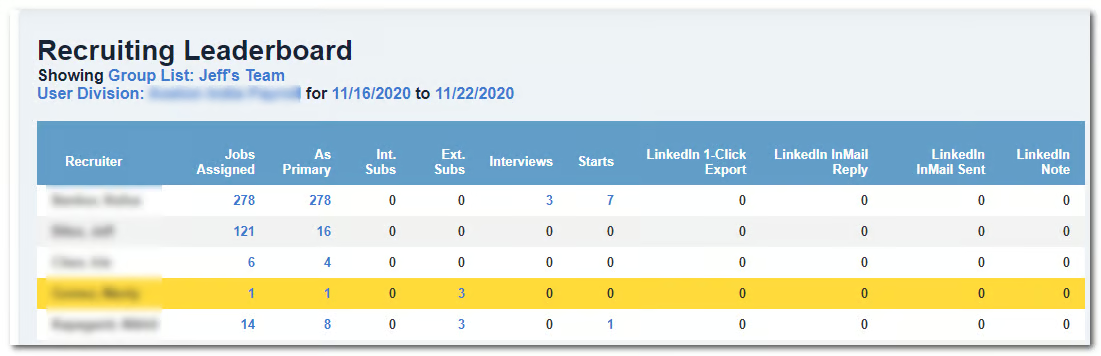
JobDiva’s daily usability also receives strong praise. Many reviewers say they use it “all day, every day”—calling out its reliability, quick implementation, and strong customer support. Despite the feature depth, teams mention that once they complete onboarding, JobDiva becomes an essential part of their workflow, especially for agencies running multiple roles, clients, and requisition volumes simultaneously.
On the flip side, reviewers point out two trade-offs that reflect JobDiva’s scope rather than shortcomings. First, new users often find the interface dense or dated, and several mention needing structured onboarding to become fully productive. This typically comes up among recruiters transitioning from lightweight ATS tools.
Performance can slow down during heavy usage or large database searches, which users recognize as a natural side effect of running intensive search and parsing operations across millions of candidate records.
These considerations tend to soften once teams get used to the system — many reviewers emphasize that the depth and automation JobDiva provides ultimately outweigh the learning curve.
JobDiva stands out as a platform designed for speed, scale, and staffing-specific automation. For agencies managing VMS programs, contract hiring, or high-volume sourcing, the combination of harvesting, matching, reporting, and workflow automation makes JobDiva one of the most capable and consistently praised tools in the category.
What I like about JobDiva:
- It delivers deep sourcing capabilities built for staffing speed, combining resume harvesting, AI-powered matching, Boolean search, VMS synchronization, and streamlined submittal workflows into one system teams can rely on every day.
- JobDiva provides robust reporting and operational visibility, giving staffing agencies clear insight into activity levels, placements, pipeline health, and client trends without needing to rely on external reporting tools.
What G2 users like about JobDiva:
“I find JobDiva to be incredibly smooth to use, especially appreciating the time-saving feature of sending mass emails through its email mailer. This is particularly valuable given my vast database, as it allows me to efficiently reach out to potential candidates, ensuring I get responses from only those who are interested. Additionally, the job posting features are a highlight for me, as they offer free services that allow job postings to be automatically disseminated to other free posting websites, expanding my reach without incurring extra costs. The initial setup of JobDiva was very easy for my team, which facilitated a smooth transition from our previous software, Ceipal. Overall, these features contribute significantly to the ease and effectiveness of my work in US IT staffing.”
– JobDiva review, Amit J.
What I dislike about JobDiva:
- Some G2 reviewers say the interface can feel dense or dated when they first start, something users coming from lightweight ATS tools notice more than teams used to enterprise-level depth.
- A number of users mention that performance can slow during large-scale searches, which tends to impact heavy database users more than smaller teams with lighter search loads.
What G2 users dislike about JobDiva:
“The interface can feel dated and a bit cluttered, especially for new users. It takes some time before everything feels intuitive. Some features feel buried under too many clicks, so simple tasks can take longer than they should. The system is powerful, but because of that, the learning curve is steeper compared to newer ATS platforms. And occasionally, certain modules feel less flexible; you can do the task, but not always in the smoothest or most customizable way.”
– JobDiva review, Aashish S.
6. 100Hires: Best for startups and SMBs wanting simple, collaborative hiring workflows
100Hires has become a go-to choice for startups and small teams that want a clean, simple ATS without the steep learning curve or heavy configuration of larger recruiting platforms. The platform meets requirements at a 98% rating, demonstrating strong alignment with SMB recruiting needs. Users consistently highlight how approachable the system feels from day one. For teams with limited bandwidth or lean recruiting operations, the platform’s clarity, speed, and ease of setup make it especially appealing.
A recurring theme in the reviews is how intuitive 100Hires is to navigate. Recruiters frequently mention that pipelines are easy to configure, candidates are simple to move between stages, and essential information is always right where they expect it. Many users note that this simplicity allows founders, hiring managers, and non-technical team members to participate in recruiting without needing extensive onboarding, which is a major advantage for small teams hiring collaboratively.
The platform’s workflow flexibility also stands out. Reviewers praise the ability to customize job pipelines, tailor fields, and adapt the system to different role types or team preferences. Users appreciate that 100Hires doesn’t impose rigid templates, allowing them to mirror their own hiring processes while keeping everything organized in one place.
Automation appears as a much-needed feature throughout the dataset. Recruiters highlight features like automated follow-ups, reminders, email templates, job distribution, and streamlined scheduling. These tools help reduce manual tasks and maintain consistency across multiple open roles. For SMB teams that juggle hiring alongside other responsibilities, this built-in automation helps them stay on track without needing complex workflows.
For global or cross-functional teams, 100Hires makes collaboration part of the hiring workflow rather than an add-on. Many reviewers emphasize how easy it is to leave notes, tag colleagues, share candidate evaluations, and maintain conversation visibility across the team. This transparency helps small organizations stay aligned, especially when multiple stakeholders participate in interviews or assessments. Users say the platform “keeps everyone on the same page” without additional communication tools.
Recruiters also frequently mention 100Hires’ sourcing support. The Chrome extension, resume import tools, and integrations with LinkedIn and job boards help teams build pipelines quickly and manage incoming applicants with minimal friction. Resume parsing and centralized communication further support this flow, enabling users to respond faster and maintain clean, searchable candidate profiles.
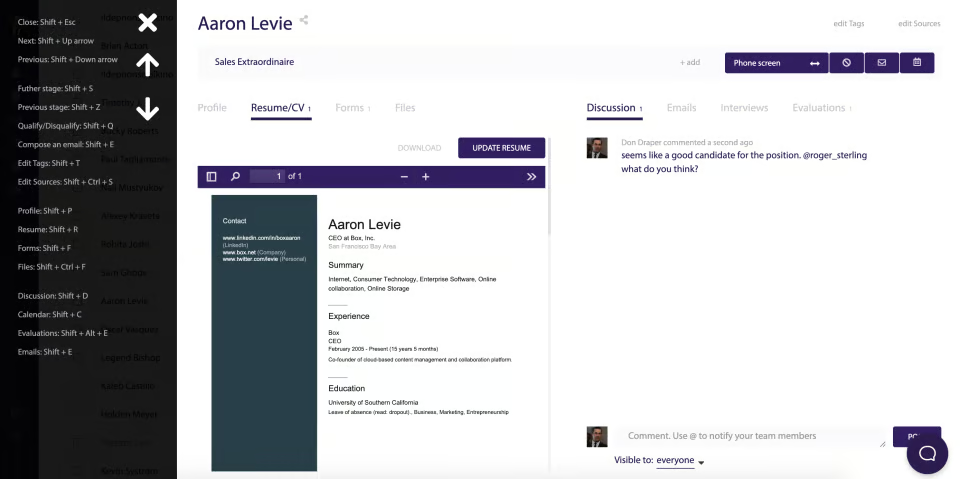
Support quality is another area where 100Hires receives strong feedback. Many reviewers note that the team is responsive, hands-on, and willing to guide customers through setup or troubleshooting. For SMBs that lack internal HR operations support, this level of partnership can make a noticeable difference in day-to-day hiring efficiency.
As with many SMB-focused platforms, reviewers mention a few considerations that reflect 100Hires’ streamlined approach. Some users note that analytics are more basic than what larger enterprise ATS platforms offer — a trade-off that aligns with its focus on simplicity and ease rather than deep reporting. Others mention that certain integrations or more advanced automation options are still evolving, which makes the platform best suited for teams that prioritize clarity and straightforward workflows over highly complex hiring architecture.
Overall, 100Hires stands out as an accessible, thoughtfully designed ATS that helps smaller teams recruit efficiently without unnecessary complexity. Its blend of usability, customization, automation, and collaborative features makes it a strong, scalable fit for growing organizations that need structure they can rely on.
What I like about 100Hires:
- 100Hires offers an intuitive and flexible ATS designed for small teams, with customizable pipelines, built-in automation, and collaboration tools that help founders and hiring managers move candidates quickly without unnecessary complexity.
- With strong sourcing and resume management capabilities, including a Chrome extension, job board integrations, and parsing features, 100Hires help lean teams build and maintain candidate pipelines with minimal friction.
What G2 users like about 100Hires:
“It has AI integration for different use (writing job ads, candidate scoring, etc), which helps a lot to speed up recruitment processes. I also liked that there are automations on the pipeline and thus making pipeline management easier and efficient. Lastly, I liked that I can have different options when it comes to sourcing candidates (which is very important). I can use my website, different job boards, and LinkedIn as well.”
– 100Hires review, Johanna A.
What I dislike about 100Hires:
- Some G2 reviewers note that analytics are more basic than what larger ATS platforms provide, which may matter for teams that rely heavily on deep reporting rather than straightforward visibility.
- A number of users mention that certain integrations and advanced automations are still developing, something fast-scaling teams may feel more than smaller groups focused on simple, clear workflows.
What G2 users dislike about 100Hires:
“One thing I found a bit limiting was the initial learning curve. It took a little time to figure out where everything was and how to set up the hiring flow just right. A few parts of the dashboard could be more intuitive, especially for first-time users. That said, once I got used to the layout, it became much easier to navigate and use efficiently.”
– 100Hires review, Vasudeva Rao K.
Frequently asked questions (FAQs) about the best recruiting automation software
Have more questions? Find more answers below.
Q1. What is the best recruiting automation software for small businesses?
Small teams typically look for ease of use, affordable pricing, and tools that simplify early-stage hiring. Platforms like Zoho Recruit and 100Hires are strong fits because they offer intuitive workflows, automated follow-ups, and customizable pipelines without requiring complex setup or technical expertise.
Q2. Which recruiting automation tool is best for staffing agencies?
Staffing firms usually need high-volume processing, candidate matching, and deep workflow automation. Ceipal ATS and JobDiva are top choices because they support resume harvesting, VMS integrations, AI-driven matching, and multi-client management — capabilities that agencies rely on daily.
Q3. What software is best for high-volume hiring?
Companies hiring large applicant volumes benefit from screening automation and streamlined scheduling. The Indeed Hiring Platform is well-suited for this scenario, offering automated assessments, filtering, and interview coordination to reduce manual workload during peak hiring cycles.
Q4. What’s the best recruiting automation platform for sourcing passive talent?
For organizations focused on outbound sourcing, LinkedIn Recruiter stands out. Its extensive professional network, advanced filters, and candidate insights help teams identify, engage, and nurture passive candidates more effectively than traditional job boards.
Q5. Which recruiting automation tools work best for SMBs scaling their hiring?
Growing SMBs want flexibility, collaboration, and automated workflows that keep teams aligned. Zoho Recruit and 100Hires both offer scalable pipelines, automated alerts, and collaborative features without overwhelming smaller teams with enterprise-level complexity.
Q6. What is the most popular recruiting automation solution for enterprise companies?
Enterprises often require integrations, compliance controls, and end-to-end hiring automation. LinkedIn Recruiter, Ceipal ATS, and JobDiva are frequently adopted at scale because they support large datasets, multi-region workflows, and deep HRIS or CRM integrations.
Q7. Which platforms are best for screening and shortlisting candidates automatically?
For automated screening, assessments, and qualification workflows, the Indeed Hiring Platform offers built-in evaluations and filtering tools. Ceipal ATS also performs well here with AI-powered scoring, resume parsing, and candidate matching.
Q8. What is the best recruiting automation tool for collaborative hiring?
Teams that rely heavily on shared evaluations, notes, and feedback cycles often choose 100Hires thanks to its collaborative pipeline tracking and centralized communication. Zoho Recruit is another solid option for collaborative workflows within SMB hiring teams.
Q9. What recruiting automation platforms work best with existing HR or CRM systems?
Organizations that need connected workflows benefit from tools with broad integration ecosystems. Ceipal ATS and Zoho Recruit integrate well with HRIS, payroll, CRM, and productivity tools, making them strong choices for companies wanting a unified data environment.
Q10. Where can I compare the best recruiting automation software?
You can explore leading recruiting automation platforms, including LinkedIn Recruiter, Ceipal ATS, Zoho Recruit, Indeed Hiring Platform, JobDiva, and 100Hires on G2, where real users share verified insights on performance, automation depth, and ease of use.
Your hiring process, upgraded
Recruiting automation isn’t just about saving time, it’s about building a hiring engine that consistently brings in the right talent without stretching your team thin. The platforms in this list help you move from reactive hiring to a proactive, structured process where sourcing, screening, and collaboration all work in sync.
Whether you’re streamlining high-volume hiring, scaling a growing team, or bringing order to agency workflows, the right automation tool becomes the backbone of predictable, efficient recruiting. Each solution on this list brings something different to the table, from AI-driven matching to collaborative pipelines and end-to-end orchestration, so you can build a hiring process that actually supports your team’s goals.
Now it’s your turn to test, refine, and choose the software that aligns with the way your organization hires. Better candidates, better workflows, and better hiring outcomes start with the right foundation.
Looking to go further? Explore the best applicant tracking systems (ATS) to create a fully connected talent acquisition stack.



Post Comment